marbaque

Forum Replies Created
-
Thank you, it is solved. Our technology guys fixed it on the server. So, not a plugin issue. That said, the plugin was showing misleading error messages and instead of saying that it’s missing the curl dependency, it wrongly said that the feed that we’re trying to use is malformed.
Thank you @hendcorp. I tried deactivating the plugin. I deactivated other plugins as well and I still get the same error.
I used different RSS sources, with the same result. Also, used the importing too import an OPML file, it seems to work, but when I enter one of the sources, I get the same error.
Im using Twenty Twenty-Three (twentytwentythree) theme
Active Plugins:
- Breadcrumb NavXTVersion 7.4.1 by John Havlik | Auto-updates enabled
- Enable Media ReplaceVersion 4.1.5 by ShortPixel | Auto-updates disabled
- Font AwesomeVersion 5.0.1 by Font Awesome | Auto-updates disabled
- Pressidium Cookie – ConsentVersion 1.7.1 by Pressidium | Auto-updates enabled
- Simple CSSVersion 1.1.1 by Tom Usborne | Auto-updates disabled
- Site Kit by GoogleVersion 1.148.0 by Google | Auto-updates enabled
Website with the problem: https://www.networkofopenorgs.org
Forum: Fixing WordPress
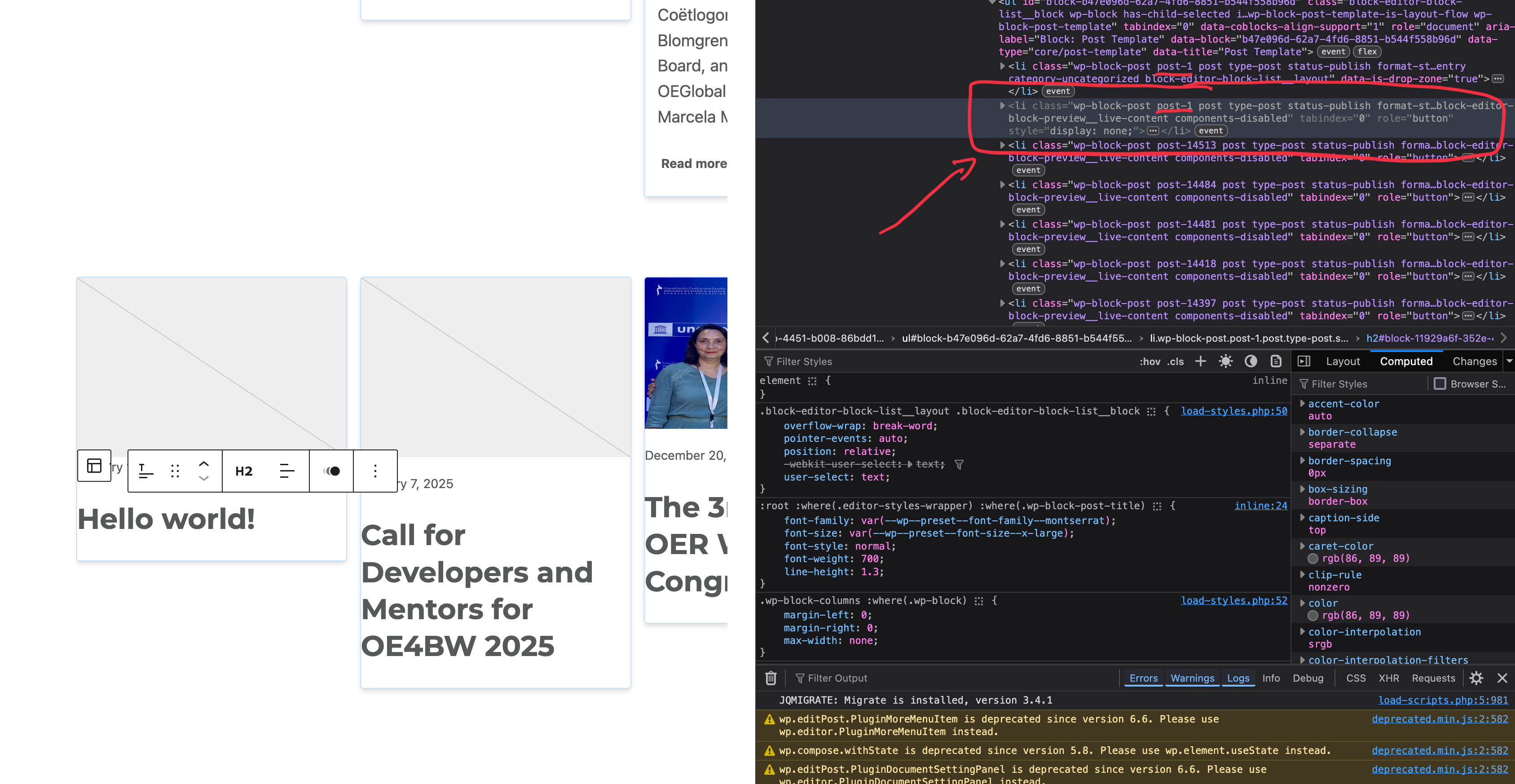
In reply to: Hidden copy of post in Query Loop blockCorrect, well in my variation I see only 3, but there is a hidden item in the code that breaks the layout.
It happens with the default Query Loop block as well, so it is not due to the variation. I can’t show you the link cause it happens in the editor, but here’s a screenshot where there is a hidden copy of the first post in the loop, and this is the default Query block.
https://www.imagebot.net/sites/default/files/Screenshot%202025-02-23%20at%208.38.06%E2%80%AFPM.png
Hello, I don’t have any cache plugin running on that website
Forum: Plugins
In reply to: [Font Awesome] Not working in Site EditorCorrection. It is loading on the page editor now, it was due to a misconfiguration con my site kit.
Still not loading on the site editor side
- This reply was modified 2 years, 7 months ago by marbaque.
Forum: Plugins
In reply to: [Font Awesome] Not working in Site EditorFor me, it is not working even in page editor, when using the theme that supports site editor (twenty-twenty-tree)
I can use Loco translate, but my language says it is 100% translated. However, I still find strings unstranslated when using the site
I haven’t found a solution. I f I try some functionality such as multistep or conditional logic, there is an error in the page and the form does not show at all.
- This reply was modified 2 years, 10 months ago by marbaque.
Forum: Plugins
In reply to: [Font Awesome] Fatal Error – multisite multi-network creationThere is a new thread explaining what to do
https://wordpress.org/support/topic/wordpress-multisite-troubleshooting/Forum: Plugins
In reply to: [Font Awesome] WordPress Multisite TroubleshootingThank you, @mlwilkerson
The cleanup tool worked for meForum: Plugins
In reply to: [Font Awesome] Fatal Error – multisite multi-network creationI am getting a similar error on a multisite network.
Eek! We're missing the information we need to load the version of Font Awesome you have selected. Go to your Font Awesome plugin settings page, re-select a version, and save. If that doesn't work, try deactivating and then re-activating the plugin. If that doesn't work either, you might need to delete and re-install the plug-in.I tried deleting and reinstalling the plugin, but it didn’t work.
- This reply was modified 3 years, 7 months ago by marbaque.
is there a known fix for this? I am having the same issue using the latest version
- This reply was modified 3 years, 8 months ago by marbaque.
HI @briantp it seems we had some outdated template files into the custom theme.
I replaced these with the original ones, and it is working now. Not really sure what it was, though.
Forum: Plugins
In reply to: [Page Builder Gutenberg Blocks – CoBlocks] SVG images problemThank you, @olivierlafleur
I confirm the fix works.
I had to clean the cache a couple of times, though. If somebody finds it not updating, that might be the case.- This reply was modified 4 years, 3 months ago by marbaque.
Forum: Plugins
In reply to: [Page Builder Gutenberg Blocks – CoBlocks] SVG images problemI found a possible solution, adding a
mask-image:noneto the.iconclass. But of course, this is just a provisional fix.