lots0meat

Forum Replies Created
-
Forum: Themes and Templates
In reply to: [Hum] Getting image to span the whole content area#content { width: 100%; margin-left: 0%; }I entered this code below the “Standardize One-Column” section near the top of my CSS sheet for the child theme. Worked nicely.
I also edited these % values
.hentry header {
	padding: 1.625em 4% 0;
}

#content .hentry .entry-content {
	padding: 0.6em 4% 0;
	border-style: solid;
	border-color: #eee;
	border-width: 0 0 1px;
}
Thanks for giving me some ideas. Cheers.
Forum: Themes and Templates
In reply to: [Hum] Menu response to window edgesHello Jon.
I like the look and feel of your sites. Can you tell me how you got the image of the dog’s face on mrsallee.com to span the whole width of the content area?
Forum: Themes and Templates
In reply to: [Hum] Getting image to span the whole content areaTwenty Eleven, Child Theme: Hum
Forum: Themes and Templates
In reply to: [Hum] Getting image to span the whole content areaThanks for the reply. Unfortunately, it didn’t work. As I understand, it doesn’t matter where in the CSS I place it, is that correct?
I found this in the CSS code
.full-width,
#content article.format-image .entry-content > :first-child {
	margin: 0 -8.96226415%;
	max-width: 117.924528%;
	width: 117.924528% !important;
	padding: 0;
	overflow: hidden;
}
It seems like this can be of some use to me. Any thought?
Forum: Themes and Templates
In reply to: [Hum] Getting image to span the whole content areaunfortunately my site is on a local server right now so there is no link. Is there another way to show you y site?
Forum: Themes and Templates
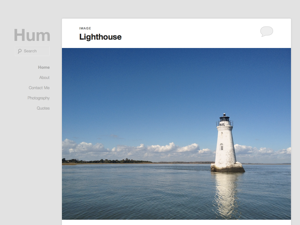
In reply to: [Hum] Getting image to span the whole content areaThis is a screen shot from the Hum Theme description. The picture of the light house spans the entire content area. This is the effect I want to achieve.