kilbot

Forum Replies Created
-
Forum: Plugins
In reply to: [WCPOS - Point of Sale (POS) plugin for WooCommerce] Support?Hi, I am just about to release an update which fixes a few outstanding issues. There is a bit of a backlog on support tickets while I focus on development. Please resend your support enquiry and I will get back to you today.
Forum: Plugins
In reply to: [WCPOS - Point of Sale (POS) plugin for WooCommerce] Fatal ErrorHi, it sounds like you have another point of sale plugin activated which uses some of the same class names. The plugin available on codecanyon copied some code from WooCommerce POS a couple of years ago and this is known to cause problems. You will need to deactivate any other point of sale plugins before activating WooCommerce POS.
Forum: Plugins
In reply to: [WCPOS - Point of Sale (POS) plugin for WooCommerce] error to pay productsTo fix this issue you must upgrade to WooCommerce 3.2.5 or higher.
Forum: Reviews
In reply to: [WCPOS - Point of Sale (POS) plugin for WooCommerce] errorThe plugin is not abandoned, I am currently working on an update to fix some urgent issues which will be released this week. Unfortunately there is a backlog of support requests but I will do my best to clear them once the update is out.
If you are seeing the rest_invalid_param error you need to update to WooCommerce 3.2.5 or higher and WooCommerce POS 0.4.17.
Hi @manish3m, updating to WooCommerce 3.2.5+ will fix this issue. WordPress core made some changes to the REST API which caused errors in both WooCommerce and WooCommerce POS.
Forum: Plugins
In reply to: [WCPOS - Point of Sale (POS) plugin for WooCommerce] Error Invalid parameterHi @ripebr, updating WooCommerce to 3.2.5+ should fix the tax_class type setting.
Hi Woernib, the default prefix character is capital ‘B’, but you can change this in WP Admin > POS > Settings > Hotkeys.
This issue was resolved via WooCommerce POS Support. It was due to an outdated Pro plugin.
- This reply was modified 8 years, 5 months ago by kilbot.
Forum: Plugins
In reply to: [WCPOS - Point of Sale (POS) plugin for WooCommerce] Barcode ScannerHi,
WooCommerce POS Pro has a setting for custom barcode fields. For YiTH WooCommerce Barcodes you need to set this to _ywbc_barcode_display_value.
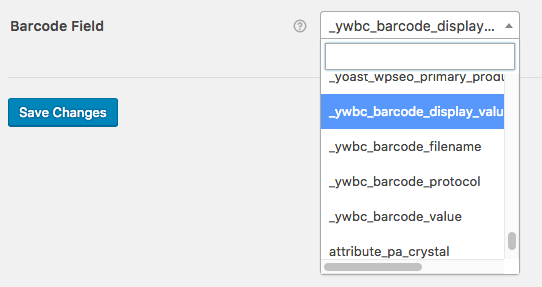
If you don’t have the Pro features you can use the woocommerce_pos_barcode_meta_key filter. Please see https://docs.wcpos.com/en/products/barcode-scanning/custom-barcode-field.html for more information.
- This reply was modified 8 years, 5 months ago by kilbot.
@rizzofernando – I have just released 0.4.17 which fixes the error for decimal quantities.
WooCommerce have also released a compatibility update today. You will need to update to WooCommerce 3.2.5 otherwise you will continue to see errors on checkout.
Forum: Plugins
In reply to: [WCPOS - Point of Sale (POS) plugin for WooCommerce] Error Invalid parameterI have just released 0.4.16 of WooCommerce POS which fixes the ‘rest_invalid_param’ error. Thank you all for your patience.
I have just released 0.4.16 which fixes the ‘rest_invalid_param’ error. Thank you all for your patience.
I am currently travelling in Germany which means I can’t just borrow a laptop. I have ordered one, I am assured it will arrive tomorrow and I will have a release in about 24 hours.
If you need a fix for this problem immediately you should rollback to WordPress 4.8.
I understand everyone’s frustration and I certainly never expected it to take this long to receive my laptop. There is nothing I can do at the moment working from my phone.
If you rely on plugins for your business you should always wait a little while before doing a major update to WordPress or WooCommerce, there are always going unforeseen issues with a major update.
@murphylodder – please find another plugin
Forum: Plugins
In reply to: [WCPOS - Point of Sale (POS) plugin for WooCommerce] Error Invalid parameterHi all, apologies for the delay while I wait for my new laptop to be delivered.
I have had a look at the changes in WordPress 4.9 and have identified the line of code which is causing the compatibility issue. If you cannot rollback to WordPress 4.8 and you need a fix immediately please do the following:1.
FTP to your server
2.Find /wp-includes/rest-api/endpoints/class-wp-rest-controller.php
3.Go to line 548
4.RemovepropertiesandadditionalPropertiesfrom the arrayThis will be a temporary fix to get you through until an update to WooCommerce POS can be released.The above does not entirely fix the compatibility issue. The only solution at the moment is to rollback to WordPress 4.8.
- This reply was modified 8 years, 5 months ago by kilbot.