Igor Benic

Forum Replies Created
-
Hi @master-of-web, for now the actual WordPress (standard) featured-image is the Background Image since that was the initial plan for giveaways.
This is a good point and I will see to change the background image to be something else and the featured image a different thing that can be used for archives.
For now, you can use the facebook image if you want by using this code:
// Inside of a single post loop: if ( function_exists( 'sg_get_giveaway' ) ) { $giveaway = sg_get_giveaway( get_post() ); $display = $giveaway->get_display_settings(); $facebookImage = false; if( isset( $display['facebook_image'] ) && $display['facebook_image'] ) { $facebookImage = giveasap_get_image_url( $display['facebook_image'] ); } if ( $facebookImage ) { echo '<img src="' . esc_url( $facebookImage ) . '" class="attachment-thumbnail size-thumbnail"/>'; } }- This reply was modified 6 years, 2 months ago by Igor Benic.
Hi @rspiv, Zapier integration is something I have on my list of features I want to build. I’ll look into that for 2.31.0 or 2.32.0.
Hi @bmcconach, thank you for such kind words! I want to make Simple Giveaways better with each upgrade so I am always taking into account any suggestions 🙂
This one was a pretty big one since email is an important part of running giveaways and I guess, with this, others might also want to use the plain option.
Hope you have some great giveaways! 🙂
Hi @spark36, the 2.29.0 and 2.30.0 included some Giveaway elements as Elementor widgets (in the premium version).
Hope that could also help you customize it as you need!
Hi @bmcconach, in 2.30.0 you can now choose to use the Plain email type under Giveaways > Settings > Emails.
This will still use all the text entered but strip any HTML tags.
- This reply was modified 6 years, 3 months ago by Igor Benic.
Thanks @spark36 for such kind words! I do try my best to answer and solve support requests 🙂
Hopefully, the GravityForms integration should come with 2.31.0 version 🙂
Forum: Plugins
In reply to: [Sponsors] Mobile layout – logos to smallHi @mouwb, I have finally made it available in 3.3.0.
Check the documentation page in the admin or here on the plugin description more information on it.
The attribute is “breakpoints” and here is a short introduction to it:
[sponsors style=slider arrows=1 image_size=full slidestoscroll=3 slidestoshow=3 breakpoints=480;1;1|640;2;2]
The attribute breakpoints uses format “screen_px;images_to_show;images_to_slide”. Then for multiple breakpoints, we separate them by “|”.
In the above example we have separated 2 breakpoints 480px and 640px.
For 480px, we set 1 for images to show and 1 for images to slide.
For 640px, we set 2 for images to show and 2 for images to slide.Forum: Plugins
In reply to: [Sponsors] width of images in sliderHi @jenny7,
the version 3.3.0 includes variablewidth in the shortcode atts which you can set to be true by adding variablewidth=1 to the shortcode.
Forum: Reviews
In reply to: [Raise Prices with Sales for WooCommerce] The only pluginThanks @rezhart92! Just updated it to 1.2.0 🙂
Forum: Plugins
In reply to: [Raise Prices with Sales for WooCommerce] PHP errorHi @artyus, this should be fixed in 1.2.0
Hi @rclux, since this is an extension for SportsPress, it works for the matches that you manage through SportsPress.
If you use SportsPress for your Rugby matches, you can then provide a live feature for those matches. That is, when you update the score (the main result) in the admin area, the results will be refreshed on the match or events page where that match is listed.
Forum: Plugins
In reply to: [Raise Prices with Sales for WooCommerce] PHP errorHi @artyus, sorry for such a late response!
I’ll fix it as soon as possible.
Forum: Plugins
In reply to: [Live Scores for SportsPress] Live Scores for SportsPress mobile applicationHi @ozgurgedikli, sorry for such a late response.
There is no mobile app for this since SportsPress on its own does not also provide such.
To make a mobile app, it would require a lot of time, resources and money to make it, and unfortunately, we are not there yet 🙁
But it is a nice idea.
Forum: Plugins
In reply to: [Live Scores for SportsPress] Main score and leg scoreHi @nottinghambilliards, does SportsPress allow the display of such results? I am not aware of such option.
If it does, could you point me out on the settings to achieve it so I can reproduce it locally and then develop on top of it. I am using their main_results function to get them, so if they do allow it to display it like this, I could maybe have a way to display the live scores as well.
Forum: Plugins
In reply to: [Sponsors] Mobile layout – logos to smallHi @mouwb,
you will need to go into the wp-sponsors plugin and find the file under
wp-sponsors/includes/class-wp-sponsors-shortcodes.phpThen, you need to scroll down and find
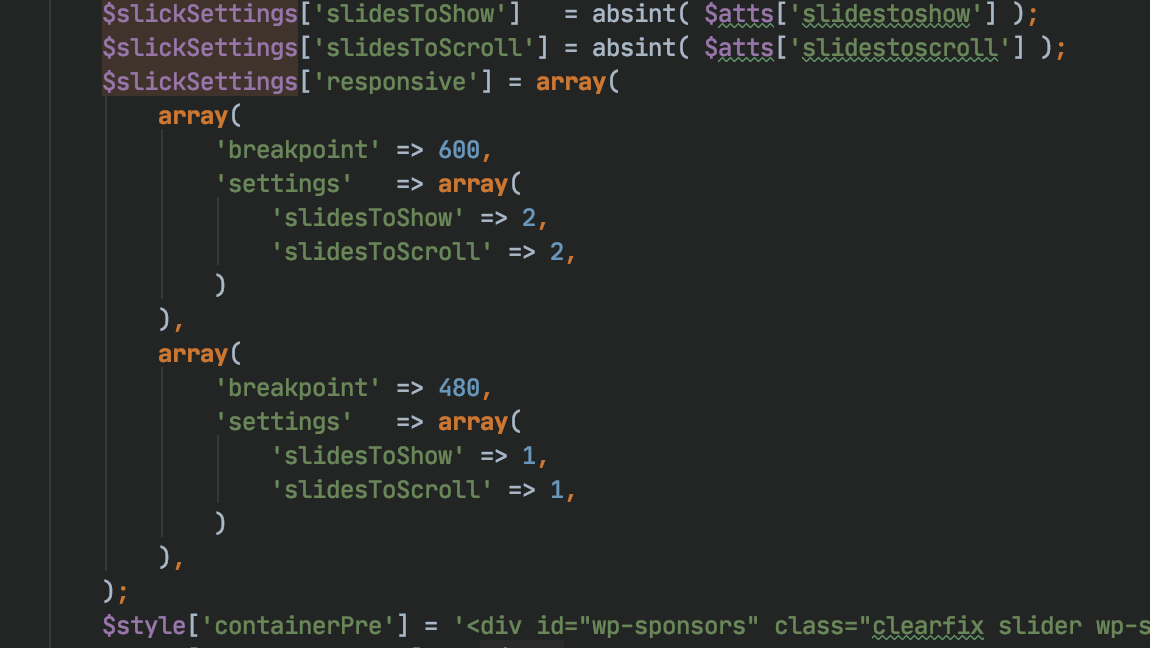
$slickSettings['slidesToScroll'] = absint( $atts['slidestoscroll'] );Once you have found that, under that code, add this one:
$slickSettings['responsive'] = array(
 array(
  'breakpoint' => 600,
  'settings'   => array(
    'slidesToShow' => 2,
    'slidesToScroll' => 2,
   )
 ),
 array(
  'breakpoint' => 480,
  'settings'   => array(
    'slidesToShow' => 1,
    'slidesToScroll' => 1,
  )
 ),
);
Here is a screenshot of the code as well (just tried it out). Just be sure there are not errors in the code which you typed because you could end up into a fatal error on your site. I would recommend you to test it locally of in a staging site if possible.
http://www.wpsimplesponsorships.com/wp-content/uploads/2020/02/Screenshot-2020-02-18-at-01.34.37.png
The biggest “issue” here for me will be to find a way to include that setting into attributes of shortcode 🙂
- This reply was modified 6 years, 4 months ago by Igor Benic.
- This reply was modified 6 years, 4 months ago by Igor Benic.