Holmey

Forum Replies Created
-
Forum: Fixing WordPress
In reply to: Can't do anything with my widgets :(It’s the same with other browsers Andrew and when I do a manual install yet another WordPress site on the same server I installed a week ago is fine with it just being all installs, (manual or via fantastico), since then that won’t let me do anything at all with the Widgets.
Thanks for the reply.
Holmey
Forum: Fixing WordPress
In reply to: Can't do anything with my widgets :(I’ve just tried doing another install on a different domain on my server and I’ve got the same problem on the new site I’ve installed too – HHHHHHEEEEEELLLLLLLPPPPPPPP.
Forum: Fixing WordPress
In reply to: Can't do anything with my widgets :(Anybody about that can help me with this, it’s driving me mad with me having tried several reinstalls and it still not working 🙁
Forum: Plugins
In reply to: WP e-CommerceMmmmm, so you must have the sidebar on the left.
I’ve set my checkout page, the one with the Make Purchase button as a full page without any sidebars, (Template – One Column, No Sidebars), if your theme will allow that, (I think it’s a standard option, I use the weaver theme, I find it really flexible with an excellent and friendly support forum), try that and see if it sorts your problem.
Forum: Plugins
In reply to: WP e-CommercePurchase or Add to cart ? If it’s the add to cart button it’s under settings/presentation, if it’s make purchace, sorry I can’t help you there.
I had to get my hosting company to disable Suhosin to get the target markets working and it connecting to the PayPal portal OK but it’s working fine now, http://www.socialwarriors.co.uk.
If I can be of any help Atorlars either give me a shout here of through the contact page on my web site.
Holmey
Forum: Plugins
In reply to: [Visitor Maps and Who's Online] Map viewer not working with WP e-CommerceAlso, on the page where I have the map viewer it makes the top admin menu bar vanish and the page appear as if I am not logged in if that helps.
Forum: Fixing WordPress
In reply to: Adding 1 category as a main menu itemYep, I’m using Weaver.
Forum: Fixing WordPress
In reply to: Just lost the whole site :(Nope, it was the Subscribe To Comments Reloaded which should have been OK.
I ended up backing up the SQL database from the server & rebuilding the site,(3 hours work), then restoring the database and as soon as I did that I had the same problem again, a white screen of death 🙁 Apears that the plugin has somehow corrupted the SQL database.
Anyway, I’m going to have to build the site from scratch again, thankfully it had only been online for 5 days, although in 5 days it had 18 subscriber and over 50 posts in the forum, looks like my Easter Holidays are going to be busy 🙁
Thanks for the reply, back to the grindstone for me.
Holmey
Forum: Fixing WordPress
In reply to: Limit to child menu's ?Just bumping this in the hope that somebody that can help will spot this post, thanks in anticipation.
Holmey
Forum: Fixing WordPress
In reply to: Limit to child menu's ?Just to add, it will allow additional menu items on my top menu OK, got a massive bald patch now with all the head scratching going on 🙁
Forum: Fixing WordPress
In reply to: Limit to child menu's ?Well that is strange, never seen that before.
Me neither and it’s got me really confused, the page is fine when viewed via Preview Page, it’s just the link that does not work, (although it shows).
Thanks for having a look.
Anybody else got any ideas before I go bonkers trying to work it out.
Holmey
Forum: Fixing WordPress
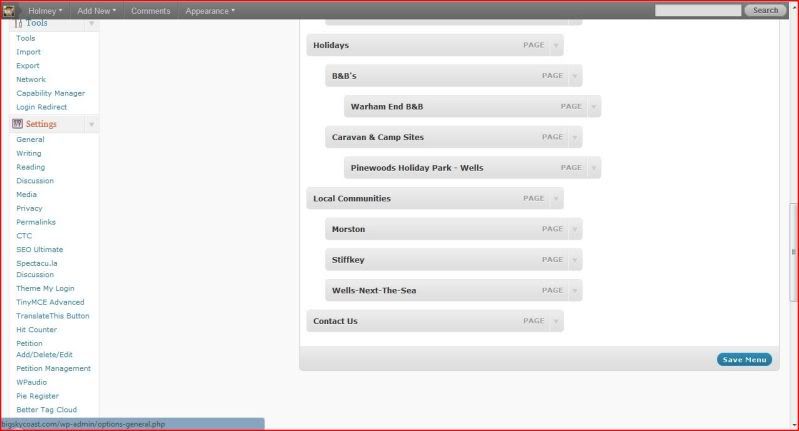
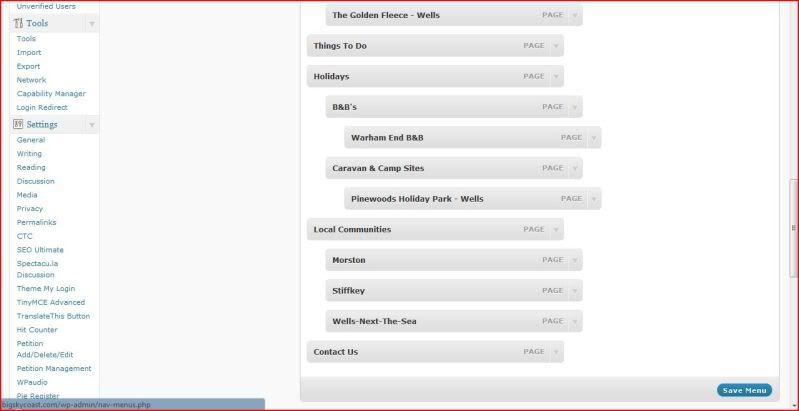
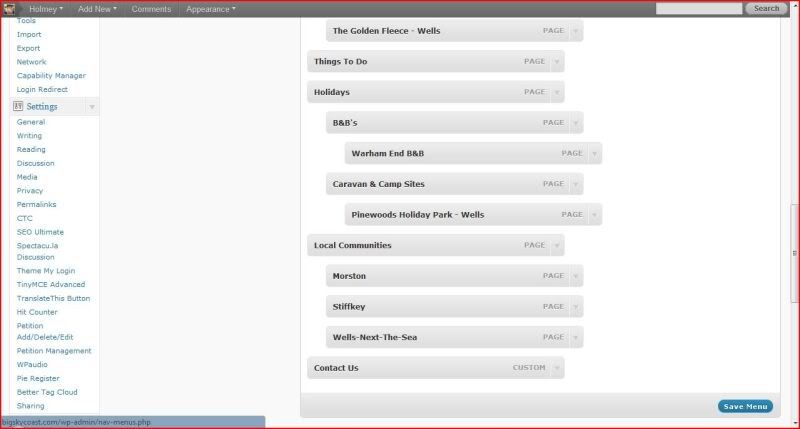
In reply to: Limit to child menu's ?Screen shots to show what is happening –
Before anything is done –
http://i62.photobucket.com/albums/h82/holmstack/Big%20Sky%20Coast/Screen1.jpg
New menu added –
http://s62.photobucket.com/albums/h82/holmstack/Big%20Sky%20Coast/?action=view¤t=MenuAdded.jpg
New menu put in place –
http://i62.photobucket.com/albums/h82/holmstack/Big%20Sky%20Coast/MenuInPlace.jpg
After being saved –
http://i62.photobucket.com/albums/h82/holmstack/Big%20Sky%20Coast/Saved.jpg
You will not that after being saved the last menu item is titled Custom not Page. If the last item had been a child menu it would have been forced down and become the last parent menu and would have been changed to Custom too.
The “Custom” menu item shows on the site but does not work.
Got me scratching my head this one, help appreciated.
Holmey
Forum: Fixing WordPress
In reply to: Limit to child menu's ?Hi Dan,
I will try and explain it better, if this does not work I’ll upload some screenshot pictures that I can post a link to.
All the links currently showing on my site work, I deleted the ones that didn’t till I could sort it out.
Basically, if I add another page then the link to it to my bottom custom menu it is OK till I save the menu. When I save the menu, if I leave the added menu item at the bottom of the list it changes that from a menu that says page at the right and side of the menu item to one that says custom on the right hand side of the menu item and it appears on the site but doesn’t work. If I place the new link higher on the list, it changes the last item on the menu from one that shows as page into one that shows as custom on the right hand side and again shows but does not work. If the last item on the menu is a child menu that child menu is pushed out of the nest and becomes a parent menu in it’s own right at the bottom but again is changed to one labeled custom that shows but doesn’t work.
It’s really got me scratching my head this and to “finish” the site of I need to add another family of menus.
Any help, ideas appreciated.
Holmey
Forum: Fixing WordPress
In reply to: Limit to child menu's ?Just to add, the child menu that is pushed into being custom menu on save shows but does not work.
I Deleted & reinstalled it, saved my new size settings and started again and it worked 🙂
I’d taken the slide show down as it didn’t look good but I’ve replaced it now as it’s sorted.
Thanks for the help guys.
Holmey