hkicenet

Forum Replies Created
-
Forum: Plugins
In reply to: [Inline Related Posts] Cross Site Scripting (XSSForum: Plugins
In reply to: [Advanced Ads – Ad Manager & AdSense] Cannot rename/relocate advertisement.js@henningaa Could you take a look for this issue? Thank you very much..
I confirmed that this issue appears in new privacy tab, in using other browsers(Chrome/Firefox) and in another IP. Note that I disabled all cahces during my testing.
Forum: Plugins
In reply to: [Advanced Ads – Ad Manager & AdSense] Cannot rename/relocate advertisement.jsHi Henning, Thanks for your reply.
I confirmed that this issue appears in new privacy tab, in using other browsers(Chrome/Firefox) and in another IP. Note that I disabled all cahces during my testing.
Could you help look into this issue? Thank you very much.
@deliciousbrains I would also love R2 support!
Will grab the Pro license for adding the support. Thanks.
Thanks for your info.
Just want to ensure the Pro version fits my needs before upgrading.
Please advise if the Pro version could achieve them?
Hi Support,
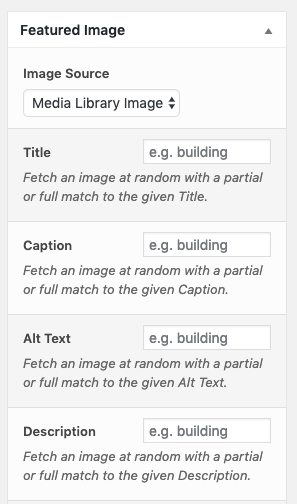
1. From the screen capture below, seems can only grab media image by Alt text, but cannot assign Alt text to the media image? Please advise, thanks.
2. Also, is it possible to enforce Full match for grabbing media image by title/alt text? Now seems can only do partial match.
Thanks.
got it. Thanks for your reply.
Forum: Plugins
In reply to: [NextGEN Facebook] Warning: DOMDocument::loadHTML(): Empty string suppliedThanks for your reply.
Just updated and the message changed to below, please advise. Thanks.
warning: DOMDocument::loadHTML(): Empty string supplied as input in /wp-content/plugins/nextgen-facebook/lib/util.php on line 605
FYI. It showed in my Testing site with WP_Debug & WP_Display enabled.
NGFB Free
Installed: 8.34.3-1
Stable: 8.34.3-1
Latest: 8.34.3-1Forum: Plugins
In reply to: [Extended Coupon Features for WooCommerce FREE] Suggestions for this pluginThanks for your info.
1. Could you give me more hint on how to override it? Need to do in direct edit class-wc-cart.php?
Thanks.
Got it. Thanks for your reply.
Forum: Plugins
In reply to: [Extended Coupon Features for WooCommerce FREE] Suggestions for this pluginHi Soft79,
It works, and thanks for your great help!
1.
Could you please also give me hints on which file/function I should look into to make the below sentence shown in notice form (green), instead of error form (red)?
http://screencast.com/t/3uzIZPolbhMh2.
For notification, I saw a room for improvement that we could customize the notice for each coupon applied via URL to specify how it work: % Off, Free Shipping or $ OFF. I suggest to add text fields in coupon edit page for them.
You could consider to add it to PRO version and I am happy to purchase the PRO version with it. Thanks.
Example:
“Congratulations, you’ll be receiving 5% off your purchase. Discount reflected at checkout!”
https://www.teezily.com/test1213213123?pr=fr5eForum: Plugins
In reply to: [Extended Coupon Features for WooCommerce FREE] Suggestions for this pluginThanks for your quick reply.
1. Actually, I want to allow use to apply code with below format. Any suggestion? Thanks.
http://www.abc.com/product/abc?pr=coupon_code2/3. Added the below code to functions.php of my child theme, but not change for the notice message, tried clear cache. Please advise. Thanks.
/* Override URL to Coupon Notice */ $qrvm_2015_catch_translations = array(); add_action( 'after_setup_theme', 'qrvm_2015_setup' ); function qrvm_2015_setup() { load_child_theme_textdomain( 'qrvm_2015', get_stylesheet_directory() . '/languages' ); global $qrvm_2015_catch_translations; $qrvm_2015_catch_translations = array ( 'woocommerce-jos-autocoupon' => array( 'Coupon code already applied!' => __( 'Coupon code already applied. Discount reflected at cart checkout!', 'qrvm_2015'), 'Coupon code applied successfully.' => __( 'Congratulations, Coupon code applied successfully. Discount reflected at checkout!', 'qrvm_2015'), ), ); } //Override translations add_filter('gettext', 'qrvm_2015_filter_gettext', 10, 3); function qrvm_2015_filter_gettext($translation, $text, $domain) { global $qrvm_2015_catch_translations; $my_domain = 'qrvm_2015'; if (isset($qrvm_2015_catch_translations[$domain])) { if ( isset( $qrvm_2015_catch_translations[$domain][$text] ) ) { return $qrvm_2015_catch_translations[$domain][$text]; } } return $translation; }Hi davidteamsms,
I asked almost all tracking number plugin and all of them don’t allow WC-API for pushing the tracking code to WC.
Feel free to discuss and advise. Thanks.
Forum: Reviews
In reply to: [Braintree for WooCommerce Payment Gateway] Lack Essential Features!Hi Mike,
Please take a look for the docs of previous paid plugin in Woothemes.
Search “Merchant Account IDs”:
https://docs.woocommerce.com/document/braintree/====
Merchant Account IDsThis section is only needed if you have different merchant accounts for multicurrency support. Please note that you must use a currency switcher plugin to change currencies — we recommend the Aelia Currency Switcher (requires purchase), which works seamlessly with this Braintree plugin.
WooCommerce Braintree Credit Card Settings 3
The different merchant IDs you’ve entered here will then be used to charge the appropriate currency. To add more merchant IDs:
Select the currency for this merchant ID in the dropdown.
Click the “Add merchant account ID for (currency)” button.
Enter the merchant account ID for this currency in the newly created field.
Repeat as needed for each merchant ID / currency.
Remember, you need a new merchant account for each currency.
====Is it clear enough?