hikarimoro

Forum Replies Created
-
Forum: Fixing WordPress
In reply to: <p></p> and <br /> in posts not working?^hmm…well i wasn’t having that problem.
for me. in the WYSIWYG visual editor it will do the breaks ( <br */> and <p*>):
see here
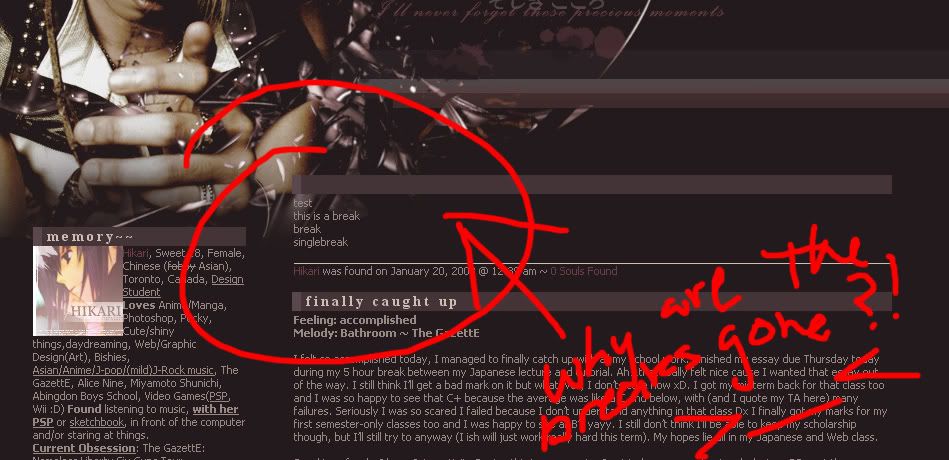
but then for some reason when i post it’ll completely ignore the paragraph breaks and turn them into single line breaks:
click
and oddly enough if you view the source for my blog you’ll see that the paragraph breaks are there:
click
but according to the WordPress HTML editor they’re not >__<:
clicknow, on my last WordPress update for 2.3.1/2 oddly enough i managed to get the breaks using the
&*nbsp;<br /*>
method that was mentioned before (last time i tried before those updates. they wouldn’t work >>;; )
that’s great that i can get them now. but heck i don’t want to have to go and paste that everytime i want a paragraph break >__< (now that is just incredibly tedious)
2 notes on this issue (at least for me):
1. this problem isn’t just on Firefox, it’s on every browser i go on (IE, Firefox, Safari, Opera) on both pc and mac
(2)ONLY WordPress is doing this. as in, if i were to put paragraph breaks on any other page on my blog it will do the paragraph break. (general this tells me that the problem is, at least after trying to fix this problem for the longest time, is not in my css)the back of my head kinda thinks that it might be a compatibility problem between my theme and the current version of WordPress (because i never changed any of the theme files to match how they’re coded for 2.3) but then that doesn’t make sense to me because i never had that problem with past WP updates >>
so all in all very confusingForum: Fixing WordPress
In reply to: <p></p> and <br /> in posts not working?coming back to this again.
I’m still having this problem. and honestly it bothers me D:So what I know right now is that it’s not a browser problem. I’ve tried it on IE, Firefox, Opera, Safari, been on a mac been on a pc. and nothing has changed. Whenever I put
or <p> where the line breaks are supposed to be in my post. they automatically disappear after I save the post.Oddly enough, when I switched to the WP default(or classic) theme, the <p> and
were all automatically put in. This is incredibly odd because I’ve always been able to use my old themes on the new WP upgrades. Anyway, when i tried editing the default 2.3 theme to how it i wanted it to be with my original theme (and this took hours) it still didn’t work. (the <p> and
ended up being deleted again).
And just in case it’s still not clear what’s wrong here’s some screenshots:
post formatting should look like this:
http://img527.imageshack.us/img527/2152/defaultthemets5.png
but instead it ends up like this:
http://img527.imageshack.us/img527/6628/mythemesw3.png
—
and as others have stated. this also (i don’t think) isn’t a css problem.Forum: Fixing WordPress
In reply to: Can No Longer Edit a Older Post in HTMLi have the same problem (i think)
yes the Code tab is for editing html. but then the problem is that after saving it. WordPress doesn’t seem to pick up the change you made.
Example, I wanted to stick paragraph and breaks into one of my post. but when I edited the code and saved it, nothing changed in the actual post.
I believe actually, WP used to stick them in automatically but for some reason it doesn’t do that now(which i find weird because now I can’t even put them in)