hakuna4matata

Forum Replies Created
-
Forum: Plugins
In reply to: [Quick Featured Images] Image defined for default blog categoryThanks. Solved for me.
Hi, thanks for the clarification and the video link.
However, that’s exactly the issue I’m having: the widget shown in your YouTube video – the one with the headline “Lessons” inside the sidebar – doesn’t appear in my installation at all.
In my setup (Kadence Theme + Kadence Blocks + LifterLMS), I can add these two widgets:
- Course Outline
- Course Syllabus
The Course Outline widget disappears completely when set to “Full”, and the Course Syllabus widget is visually much larger (shows the “free” badge and “X of X,” is not collapsible, etc.), which doesn’t fit a sidebar.
Could you please explain how to add the same sidebar widget as in the video (labeled “Lessons”), so that it dynamically displays the correct lessons for each course (i.e., not the same outline for every course)?
Thanks in advance for clarifying – I’d really like to achieve the same dynamic sidebar navigation as shown in your video.
Thank you for your answer.
Is there any way to view the log of transactional emails sent by MailPoet? For example, via a database table, a debug mode, or any internal MailPoet report? Do you store the logs somewhere?
Thank you for your response!
We want to emphasize that we really love LifterLMS – after testing many LMS solutions, it was the only one that met (and even exceeded) our expectations in terms of technology, structure, and design. The recent updates show that the project is actively maintained, and we truly appreciate that.
Our only challenge is the legal framework within the EU:
For free courses or memberships, we are legally required to use Double Opt-In (DOI) during enrollment to ensure GDPR-compliant data processing. Without DOI, we have to rely on additional plugins for forms, memberships, and automation – just to handle this single compliance issue. Ideally, LifterLMS would offer an optional DOI feature for enrollments, similar to how newsletter tools manage it.Right now, we’re debating whether to continue with LifterLMS and this extra (and technically unnecessary) plugin stack or switch to another system that already includes DOI support to keep the installation lean and low-maintenance.
It’s not an easy decision. We’d really prefer to stay with LifterLMS.
Thanks, this helped. Here’s what I found.
These six fields in the Events Manager (default!) settings consistently trigger a 403:
dbem_calendar_preview_modal_event_format dbem_calendar_preview_modal_date_format dbem_calendar_preview_tooltip_event_format dbem_event_list_item_format dbem_event_grid_item_format dbem_single_event_formatWhat exactly triggers the WAF
1. Inline style attribute with CSS variable
<div class="em-event em-item" style="--default-border:#_CATEGORYCOLOR;">The WAF sees
style=plus a colon and a hash (#) and assumes it’s a potential XSS (cross-site scripting) attempt. This is the main cause of the 403.2. Icon spans using two classes with “icon”
<span class="em-icon-clock em-icon"></span>When both class names contain the word “icon”, some WAF rule sets flag it as “possible HTML/JS injection” (it’s a false positive, but reproducible). Using only one class like
em-icon-clockworks fine.It’s a false-positive WAF block caused mainly by the inline
styleattribute and, in some cases, by<span>elements with multiple “icon” classes.Following this, I can save my adjusted template without issues – but if I click “Reset to Default”, the default content (which includes those patterns) immediately triggers the WAF again.
Maybe the default template could be updated to use a safer version that avoids inline styles and duplicate “icon” classes.
Hope, it helps.
Additional suggestion:
These template fields are only visible and editable when Advanced Mode is enabled.
It might be safer if those fields were simply excluded from the POST payload when Advanced Mode is disabled – and if the description included a short warning that certain hosts’ WAF systems may block saving because of inline styles or icon markup.- This reply was modified 6 months, 1 week ago by hakuna4matata.
I have asked.
For security reasons, Hostinger does not expose the exact mod_security or WAF rule being triggered to end users. This means they cannot provide the specific rule ID, pattern, or condition that caused the block.This is all I get from them:
- POST request returns 403 Forbidden error. The POST request to /wp-admin/edit.php?post_type=event&page=events-manager-options is blocked by the server before PHP or WordPress code is executed.
- Issue persists with CDN disabled and no security plugins active. Disabling CDN does not resolve the issue. Other plugins and WordPress core settings save correctly.
- Only Events Manager plugin is affected. All other plugins and WordPress core settings function normally; the problem is isolated to Events Manager.
- Server environment details: Hostinger’s shared hosting environment uses mod_security and other WAF protections. The block likely relates to the structure or payload of the POST request made by the plugin when saving settings.
Any idea?
There are at least 3 other requests describing the same issue:
- https://wordpress.org/support/topic/forbidden-67/
- https://wordpress.org/support/topic/forbidden-66/
- https://wordpress.org/support/topic/error-forbidden-you-dont-have-permission-to-access-this-resource-2/
- This reply was modified 6 months, 1 week ago by hakuna4matata.
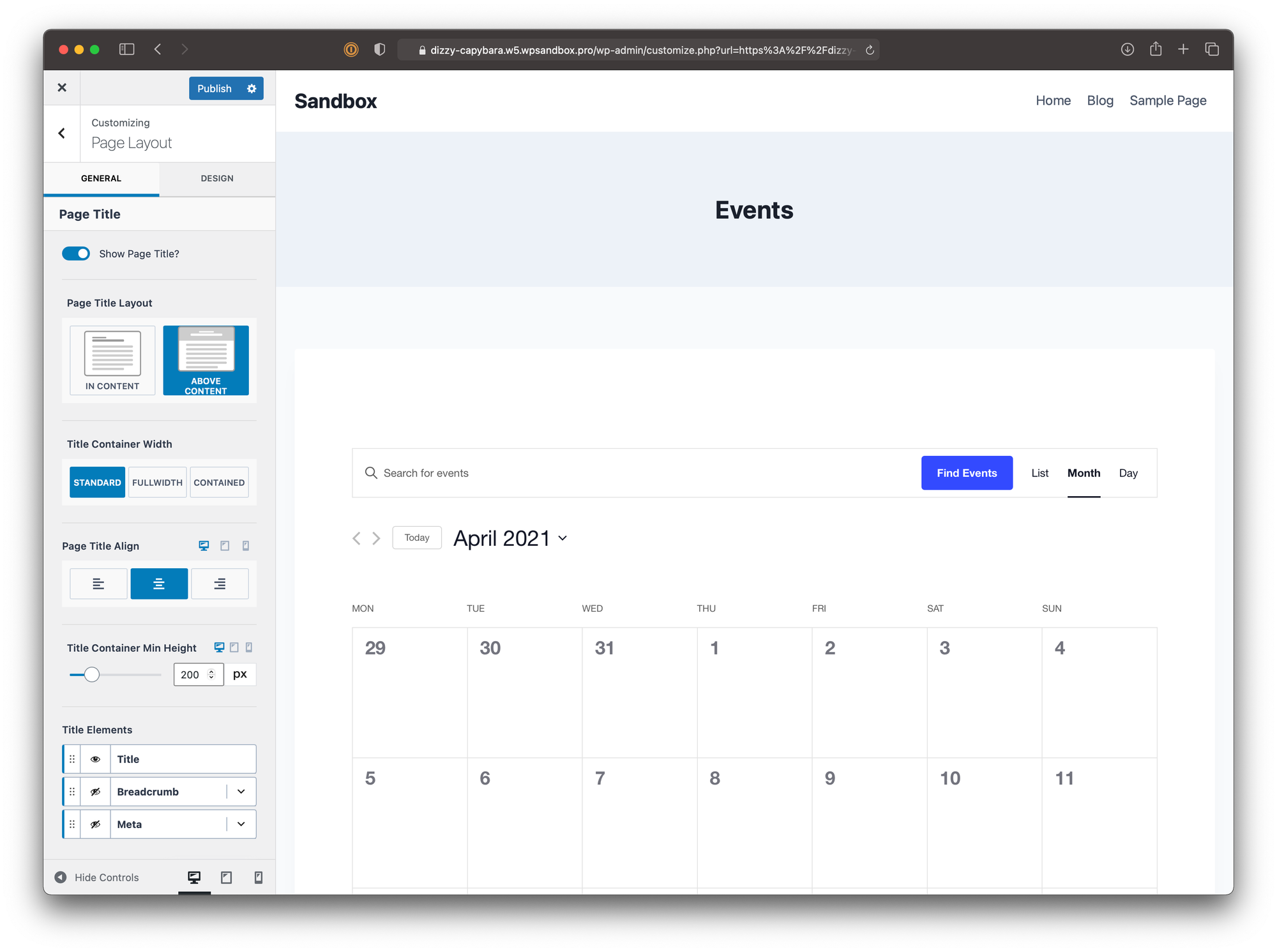
What I mean is shown on this screen https://images.theeventscalendar.com/uploads/2021/04/wp-admin-customizer-kadence-page-layout.png at the left side.
You can see the settings there, e. g. for the Page Title Layout, Breadcrumb, Design, and so on. Those settings are available for Pages, Archive Pages, and Blog Posts. In the article linked, is stated: “These settings don’t work automatically with the default event page. That’s because the calendar is not actually a page, but an archive. To work around this, let’s open up the “Blog Posts” settings, where there’s an option to customize the archive appearance.“
However, nothing changes on the calendar main page if I change archive settings. E. g.: display page title, display featured image, display breadcrumbs, change the font of the entry title, any design settings, and so on. None of those settings are applied.
Further, we can set different fonts in Kadence for heading and title. There is a setting for Event Calendar to use theme fonts that is ignored. I have checked it, but Events Calendar sets all h1-h6 headings to body font instead of heading font. The font size in The Event Calendar setting can be 14px, 16px, or 18px. Nothing else.
You say that article is outdated and you have removed the compatibility with Kadence since then. Probably, this is the answer. You can put at the beginning of the article, “Most settings have been removed from Kadence Customizer.” Just to avoid those questions. 😉
This worked like a charm. Thanks! No issues anymore.
One more question: will this fix be integrated in the future version, or should I keep the snippet? Thank you!
Hi Darian,
thanks a lot for your efforts. I can confirm that the Google Calendar subscription now works perfectly as expected.
However, there is still an issue when adding a single event to Google Calendar. You can check it yourself here: https://tsvgelb.evseite.de/event/geburtstag-3/
Just click “Add to calendar” below the event and select the first option Google Calendar. You’ll see that it is still not created as an “All-Day Event” but instead shown from 00:00 to 23:59.
Could you explain why this happens, and if there is a way to fix it?
Thanks again for your support!
Best regards,
The snippet was indeed automatically disabled. I have not noticed it.:
Line 18: DateTime::format(): Passing null to parameter #1 ($format) of type string is deprecated.
Can you check it?Hi Darian,
I can confirm this is not a cache issue.
I tested again by creating a brand new event marked as “All Day”. When adding it to Google Calendar via the Google Calendar button, it is still imported as running from 00:00 to 23:59 instead of being recognized as all-day.
You can see this directly on the test site:
- Go to the event, click “Add to Calendar → Google Calendar” → Google opens the event dialog, but the “All-day” option is not set.
- The same happens when clicking “Google Calendar” on the main calendar page. The event is not imported as all-day, but with times 00:00–23:59.
So the issue is reproducible and clearly not related to caching. The .ics file export is correct, but the link generated for Google Calendar does not preserve the all-day format.
Could you please recheck the way the Google Calendar link is generated and confirm whether it uses a different endpoint than the .ics file export?
Best regards,
Hi Darian,
thanks for your previous response.
I can confirm that the issue with the .ics file export is fixed: All-day events are now correctly written as
DTSTART;VALUE=DATE:20250920DTEND;VALUE=DATE:20250921When I import this file manually into Google Calendar, the events appear correctly as all-day.
The problem still persists with the Google Calendar subscription link.
When using the link generated by the “Google Calendar” button (https://calendar.google.com/calendar/...cid=webcal://...), Google does not show the events as all-day. Instead, they are displayed with start time 00:00 and end time 23:59.This is not related to caching: for testing, I removed the calendar subscription completely and added it again, and the issue remains.
So my questions are:
- Is the Google button using a different export endpoint than the standard .ics file download?
- If yes, can this endpoint be adjusted so that it outputs the same all-day format (
VALUE=DATEwith exclusive DTEND) as the file export?
Currently, the .ics file is correct, but the Google subscription link still produces incorrect times for all-day events, which is confusing for end users.
Thanks in advance for clarifying!
Best regards
- This reply was modified 7 months, 3 weeks ago by hakuna4matata.
Sure, you can get this from this demo site https://tsvgelb.evseite.de/kalender/
Hi,
thank you for your reply.
I fully understand your reason behind keeping the data during reinstall — it makes sense for troubleshooting.
But this approach creates a serious GDPR problem. The default user usually expects that uninstalling a plugin removes all personal data from the database. Other plugins handle this with a simple checkbox like: “Delete all plugin data on uninstall.” — disabled by default to protect users from accidental data loss.
A real-world GDPR issue may look like this:
- The user has used your plugin.
- They migrate to another email tool.
- They uninstall MailPoet (subscriber data remains in the database).
- A year later, MailPoet gets reinstalled automatically (for example, bundled in a theme or recommended by another plugin).
- All previous subscribers, lists, and automations instantly reappear.
- MailPoet may then start sending emails to users who unsubscribed long ago or explicitly requested data deletion.
- The website owner is now facing a GDPR violation.
Most users have no technical knowledge to clean up the database manually after uninstall. This puts them at legal risk without even realizing it.
Would you consider implementing an optional setting (checkbox) during uninstall to allow full data deletion for those who need GDPR compliance?
Thanks again for listening — this would help a lot of us who operate under strict privacy regulations.
Any progress here, or at least walk-round for Kadence Theme?