gediweb

Forum Replies Created
-
Forum: Plugins
In reply to: [CleanTalk Anti-Spam. Spam Firewall & Bot protection] WP Plugin not workingLooks like that worked! all green checkmarks now.
Forum: Plugins
In reply to: [CleanTalk Anti-Spam. Spam Firewall & Bot protection] WP Plugin not workingdebug info: https://prnt.sc/wighpo
Forum: Plugins
In reply to: [All-in-One Video Gallery] No preview image from VimeoThat’s amazing! Who would have thought. Thank you for all your hard work!
Forum: Plugins
In reply to: [All-in-One Video Gallery] No preview image from VimeoUnfortunately, that url did not produce a thumbnail either and alternative solution is not the best in this case because this is meant for my client to uploade and add these and they are not able to create an image for each video. Not technical enough.
Can I possibly send you the Vimeo and WordPress logins so you can test it? What email would I use for you? and your IP so I can whitelist both.
Forum: Plugins
In reply to: [All-in-One Video Gallery] No preview image from VimeoThanks for getting back to me. I was starting to wonder LOL
I tried both these settings on the Vimeo end and I am still not getting the thumbnail
https://snipboard.io/QIt4Ee.jpg
https://snipboard.io/wHFcNA.jpg
Is there anything else it could be?Hi @sharmadpk03
Thank you for your answer. I have the account page set. Was My-Account. I also tried to rename it to “Account” and re-save the permalinks, just in case and still the same result. I get the password reset email, I click on the link and get to Account page (/account/forgot-password/?show-reset-form=true) with a login form instead of password reset form
Spoke too soon!
– the reset page works now
– I get the email to reset
– the page I’m taken to has a login form on it instead of the reset password form see screenshot: https://prnt.sc/sd8a46
– I also tried to rename the endpoint from “edit-password” to “change-password” thinking its a similar issue as before, but no. the same thing.Sorry, did not see the solution in docs. the page comes up now.
https://docs.wpeverest.com/docs/user-registration/troubleshooting/lost-password-page-not-found/
- This reply was modified 6 years, 1 month ago by gediweb.
@sharmadpk03 any insight on this? How to use functions.php to redirect 2 forms to 2 different pages?
Thanks @medard22 & @sharmadpk03,
I saw that, but I have 2 registration/login forms that need to redirect to different places. One is for patient portals and one is for surgeons/professionals. Not sure how I can adapt it to 2 different redirects.
I wanted to update you. It was that secondary form. When I went to create a new one, all worked fine. Thank you.
@sharmadpk03 Thanks for your answer, Got an image 404 from your plugin see screenshot below:
https://snipboard.io/Rd2kBe.jpgAlso made a little recording of me trying to add fields and save: https://drive.google.com/open?id=1rmyN0ArLNryoK72c5SVp6IL2PZpTejUD
Forum: Plugins
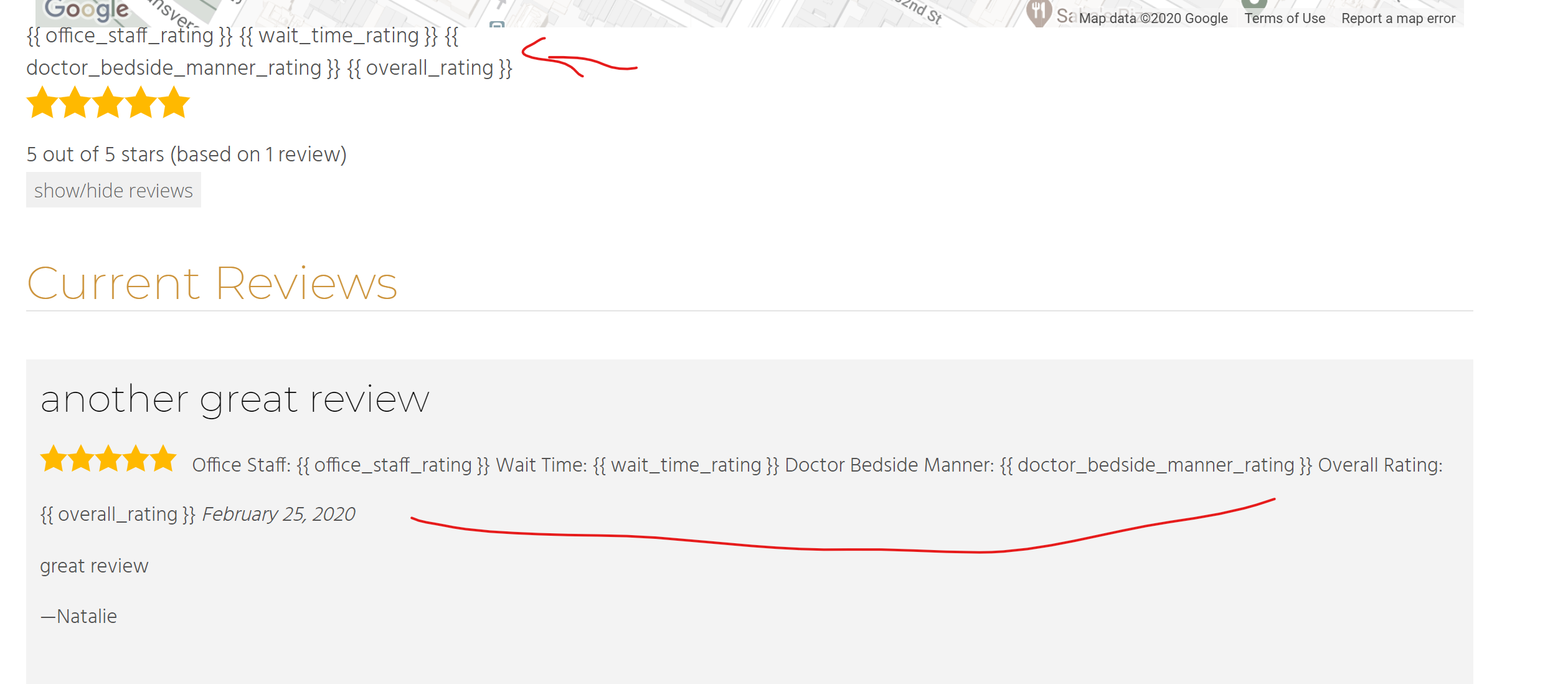
In reply to: [Site Reviews] multiple star reviewsThanks 🙂 That took the error away but I still get the code on top and now no reviews in details see screenshot”
And I’m so sorry to be a pain. I just want to get this right.
Forum: Plugins
In reply to: [Site Reviews] multiple star reviewsThat is definitely not what I had LOL
it’s throwing me an error. Puts the site down:
“There has been a critical error on your website.
Learn more about debugging in WordPress”
and here is what I get in the error log:
[26-Feb-2020 16:39:37 UTC] PHP Parse error: syntax error, unexpected ';' in /home/almostdone/pmd.almostdone.website/wp-content/themes/cesis_child_theme/functions.php on line 231This is line 231:
$value = glsr_star_rating($value); // render the stars from the rating valueForum: Plugins
In reply to: [Site Reviews] Multiple criterionok thanks!