fatbones

Forum Replies Created
-
Hi Julien,
Please let me look into this a bit more. The project where I noticed the shortcode translation issue also has the LOCO Translate plugin installed, and I’m wondering if the combination of this plugin and wpLingua could be causing these translation problems.
Best,
Hi Julien,
I hope you’re doing well. I wanted to follow up with a more detailed technical explanation of an additional issue I’ve identified when using wpLingua in combination with Contact Form 7, specifically regarding how form structures are automatically translated.
Technical Report: Aggressive Auto-Translation Issues Between wpLingua and Contact Form 7
1. General Description of the Problem
wpLingua currently applies overly aggressive translation rules to Contact Form 7 forms. The plugin does not sufficiently distinguish between:
- Human-readable text strings (which should be translated), and
- Technical identifiers (which must never be translated).
As a result, wpLingua attempts to translate field names, identifiers, internal parameters, group names, and shortcode syntax, which leads to broken form logic and unexpected behaviour.
This is not a cosmetic issue; it directly affects form validation, conditional logic, submission handling, and backend processing.
2. Affected Elements That Must Never Be Translated
In Contact Form 7, many English words are not natural language, but part of the form’s internal API. Translating them breaks the form.
Examples of elements that must remain untouched:
- Field names
your-name your-email your-country type-of-enquiry your-message - Field types and syntax
text* email* select* textarea* - Parameters and directives
id: maxlength: minlength: autocomplete: first_as_label akismet: data: - Group and conditional identifiers
[group other-queries-selected] [/group] - Counter and logic shortcodes
[count your-message down]
All of the above are programmatic identifiers, not translatable content.
3. Concrete Example Where the Problem Appears
In a form like the following (simplified excerpt):
[label] Full name * [text* your-name id:wpcf7-data1 placeholder "Your name here"] [/label][label] Country of residence *
[select* your-country data:countries.olympic
id:wpcf7-data4 autocomplete:off
first_as_label “— Select a country —“]
[/label][group other-queries-selected]
[textarea* your-message minlength:5 maxlength:700]
[/group]wpLingua currently risks translating:
your-countryother-queries-selectedfirst_as_labelyour-message
This causes:
- Conditional groups to stop working
- Required fields to fail validation
- Submitted data to be ignored or treated as empty
- Form logic to silently break without visible errors
4. Expected Translation Behaviour
From a technical standpoint, only literal user-facing strings should be translated, such as:
- Label text:
"Full name" "Country of residence" - Placeholder text:
"Your name here" "--- Select a country ---" - Option labels:
"Participate in an interview" "Share a personal story" "Other queries"
In short:
Only text enclosed in quotation marks should be considered translatable.
Everything else must be treated as protected syntax.
5. Recommended Internal Safeguard (Conceptual)
From an implementation perspective, wpLingua should:
- Detect Contact Form 7 shortcodes (
[text],[select],[group], etc.) - Lock all identifiers, parameters, and attribute names
- Apply translation exclusively to quoted strings
- Explicitly ignore:
- Field names
- IDs
- Parameters
- Group identifiers
- Conditional logic blocks
This would make wpLingua fully compatible with CF7’s internal logic while preserving translation quality.
6. Final Notes
I believe this is a critical compatibility issue, not a corner case. Contact Form 7 is widely used, and many advanced forms rely heavily on internal identifiers and conditional logic.
If you agree, I’d be happy to continue analysing this with you once my current project delivery is completed, and we can go through real-world edge cases step by step.
Best regards,
Hi Julien,
I finally discovered that the problem wasn’t caused by the translation plugin, as the team that developed the WordPress theme I work with sent me a tiny snippet of CSS code that affected the page in question and fixed it. Thank you very much for your interest. We can consider that case resolved.Forum: Plugins
In reply to: [teachPress] Show publications ordered by ID in backend officeSolved. The following is the PHP source code that must be saved into /wp-content/mu-plugins folder (create if it doesn’t exist). Any name, p.e. ‘teachpress-force-id-order.php’ :
<?php
/*
Plugin Name: teachpress – Force Publications Order by ID DESC
Description: Overrides teachpress admin publications list so it is always ordered by publication ID in descending order.
Author: fatbones
Version: 1.0
*/// ========================================================================
// This mu-plugin automatically forces TeachPress admin publication list to always use ID DESC ordering.
//
// IMPORTANT: This hook modifies the request BEFORE TeachPress processes its query.
// ========================================================================add_filter(‘request’, function ($query_vars) {
// Check if we are in the TeachPress publications admin page
if (is_admin() && isset($_GET['page']) && $_GET['page'] === 'publications.php') {

    /*
     * TeachPress reads ordering parameters from $_GET['orderby'] and custom SQL fragments.
     * We replace them with ID DESC.
     */

    // Force SQL-like order parameter TeachPress expects.
    $_GET['orderby'] = 'id DESC';

    // Clean potential interfering parameters.
    unset($_GET['order']);
    unset($_GET['orderbydir']);

    // Remove WP's default ordering vars if present.
    unset($query_vars['orderby']);
    unset($query_vars['order']);

    // Apply our forced ordering
    $query_vars['orderby'] = 'id';
    $query_vars['order']   = 'DESC';
}

return $query_vars;
});
Hello Julien,
Sorry for the delay in replying to your email. I would like to ask you to PM to my email address, so I could answer providing a comparison list of all the plugins installed on both sites. Could that be possible?
Best,Hello,
I disabled the Complianz plugin and cleared the cache on both the server and browser sides, but everything remains the same. I have another website that uses the same theme and page structure. However, that website has no issues or conflicts with wpLingua, which is why I can’t understand how the translated version of that page is behaving on this new website.
Best,Hi Julien,
Yes, I found two inconsistencies in class and style calls, as well as a semicolon that shouldn’t have been there. However, despite having corrected it, the translated page still looks the same.
Is there a way to retranslate the entire page, but only that page? The remaining text strings corresponding to other pages have already been reviewed and reworked.
Thanks.@moderator
Ok, thanks for notifying that. May the author share the screenshots thru websites like https://pasteboard.co/ avoiding to capture the website address and then post them here?Hi,
Yes, it worked. Thanks so much!
Now I have another question: I would like to remove some commas in the English translated version of the original text since they are not used after some words or in the context of the whole sentence. Is there any special setting or shortcode as well to indicate wpLingua not to include those commas into the translation?Forum: Plugins
In reply to: [teachPress] Custom tp_pub_link iconsHi Michael,
I’ve finally developed a small and working PHP code snippet to customize the publication file type icons directly from the child theme, so no changes will be made to the original teachpress plugin files. You can see the result at https://observatorio-sobre-interseccionalidad.csic.es/publicaciones/
The only previous step for those who want to achieve these results is to create a custom icon library from fontello.com
If you’d like me to provide you with these lines of code, please let me know, and I’ll be happy to send them to you privately so you can check them and add them in your next update if you deem it appropriate.
Affected child theme files: functions.php ; style.css
Forum: Plugins
In reply to: [teachPress] Custom tp_pub_link iconsHi Michael,
The reason I asked the previous question is because I implemented your plugin within an extremely minimalist website that dispenses with solid elements and icons and uses only thin lines. I reviewed the icons available in FontAwesome 5 and Academicons, focusing primarily on the “Free-Regular” style and specifically the icon for files (e.g., far fa-file-pdf and far fa-file-code).
In this regard, I’ve also received some updates from other plugin developers, and their updated source code for use within functions.php file in the child theme begins with:
[code lang="php"]</p> <!-- /wp:paragraph --> <!-- wp:paragraph --> <p>class Awsm_Team_Override extends AWSM_Shortcode_Team_Masonry {</p> <!-- /wp:paragraph --> <!-- wp:paragraph --> <p> protected function do_shortcode( $atts, $content = '' ) {<br /> $query = $this->get_loop_query();<br /> .<br /> .<br /> .<br /> }<br />}</p> <!-- /wp:paragraph --> <!-- wp:paragraph --> <p>[/code]
Hi, I also got this message “An error prevented this Widget from being displayed properly” and this is the log (using version 1.149.0):
Cannot read properties of undefined (reading 'metricValues')<br><br> in UserDimensionsPieChart<br> in div<br> in Cell<br> in div<br> in Row<br> in div<br> in Grid<br> in div<br> in div<br> in ForwardRef<br> in WithWidgetSlug<br> in DashboardAllTrafficWidgetGA4<br> in WhenAnalytics4Active(DashboardAllTrafficWidgetGA4)<br> in WidgetRenderer<br> in WidgetErrorHandler<br> in div<br> in Cell<br> in WidgetCellWrapper<br> in div<br> in Row<br> in div<br> in div<br> in Grid<br> in WidgetAreaRenderer<br> in div<br> in WidgetContextRenderer<br> in DashboardMainApp<br> in DashboardEntryPoint<br> in RestoreSnapshots<br> in ErrorHandler<br> in ThemeProvider<br> in StrictMode<br> in RootWith version 1.148 all were working fine.
Thank you Julien for your quick response.
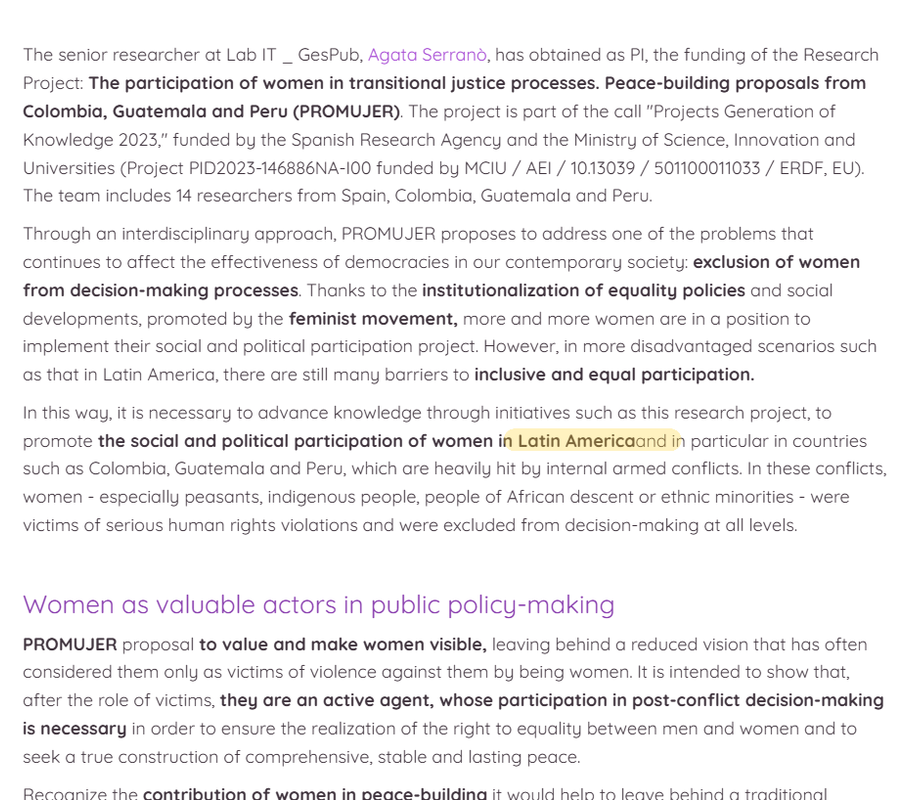
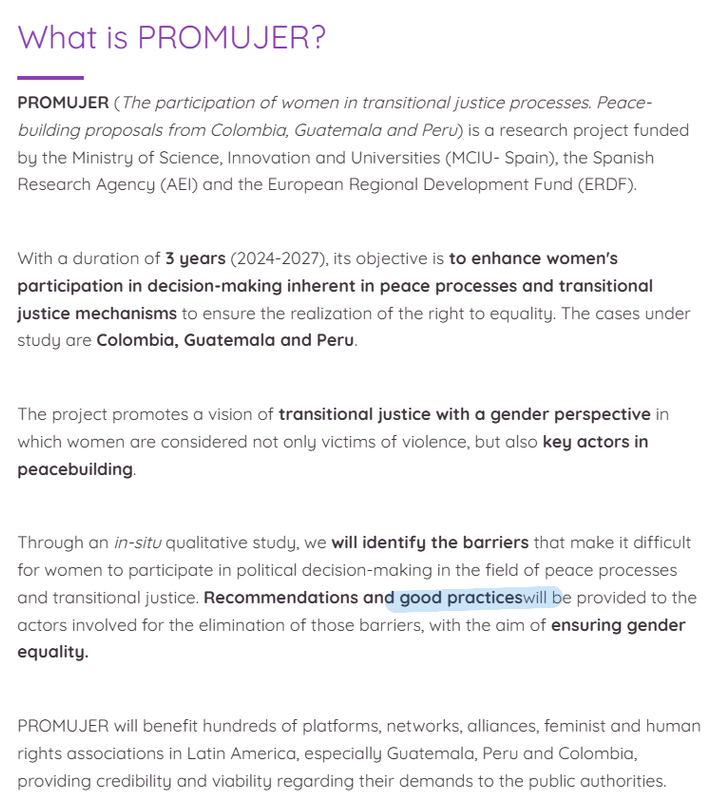
Sure! Here you are the URLs for the pages in original language (ES) so you need only to switch to EN and you will find the texts I highlighted into the screenshots:
https://promujerproject.com/#!/welcome
https://promujerproject.com/mapa/
https://promujerproject.com/medios/la-participacion-de-las-mujeres-en-la-toma-de-decisiones-en-america-latina/
Concerning the shortcodes, I’m wondering where should I exactly insert them.
Best,Hello again,
Regarding my two additional questions, the reason for the first one is that the editor is reconsidering making changes to the original texts, in terms of removing words that are currently in bold, modifying the structure of the texts, partially altering expressions and certain words used in Spanish, etc. so that the English translations are as faithful as possible and match what is really intended to be conveyed in the translated version.Based on previous experience, I think that adding an option to the plugin that allows for a dump of some pages or all previous translations in order to perform a new scan of all pages is a smart solution. This will allow us to analyze the results obtained until we achieve the desired goal.
On the second question, my interest in being able to include <HTML> code in translated texts has to do with a situation in which I was involved with a text that included words in Spanish and also in Latin. These Latin words, being universal, must be respected and not translated into English. A practical example of what my problem was is the following:
URL: https://promujerproject.com/#welcomeOriginal text in Spanish:
“A través de un estudio in situ eficaz y cualitativo… “
Automatic translation into English by wpLingua:
“Through an qualitative study on-site… “
A correct translation would have been:
“Through an in-situ qualitative study… “
Also, in this case, since two text fragments have been generated (one for the normal text and one for the italics), it’s quite difficult to empty the second fragment to transfer the term “in-situ” to the first fragment and thus respect the structure of the original text, since, as the plugin is currently conceived, all fragments must have at least one content and cannot be left empty. This is another reason why IMO the plugin should support <HTML> code, in order to replace the content of the second fragment with an [ASCII] code such as Alt+255, and at the same time apply the italic style to the portion of text that I have transferred from the second fragment to the first.I hope I have been able to explain well the situations I have faced in my first experience with your wonderful plugin. Honestly, and apart from these issues, it’s a real pleasure to observe the intelligent way in which it does this work.
I would like you to take into account the comments about my experiences in order to try to improve the functionality of the plugin as much as possible.
Best regards,Hello Julien,
Indeed, the page that was translated under plugin version 2.3.6 and that had errors is now displayed correctly with the new update. The translations of the rest of the pages and contents on this website had been successfully carried out under version 2.3.5 with no errors.
However, there are some small errors scattered in some texts that I have just reviewed and I see that in all cases there is the same pattern: it is the link between two words whose font style is bold in the first place and normal in the second place.
I took some screeshots that you can check here. These three small errors occurred in the first translation, under version 2.3.5:
https://i.postimg.cc/8P4Sps4z/Screenshot-19-02-2025-18-18-10.png
https://i.postimg.cc/nVY82M6G/Screenshot-19-02-2025-18-18-31.png
https://i.postimg.cc/SNDB03QX/Screenshot-19-02-2025-18-19-55.png
Thanks for your warm support.