eleopard

Forum Replies Created
-
Forum: Plugins
In reply to: [Behance Portfolio Manager] Multiple Category FeatureHello Everyone,
Our Development team is looking into this.
We will try to release this feature in the coming version.Forum: Plugins
In reply to: [Animate It!] Smaller delay and duration increments?Hi George,
Apologies for the delayed reply.
We re still working on adding it seamlessly to Gutenberg editor.
Still, you can add it using the Classic Editor Block.
https://adobe.ly/2MmPv7OPlease let me know in case you face any issues.
Forum: Plugins
In reply to: [Animate It!] Is version 2.3.2 compatible with WP 5.0.3?Dear Velvetpixel,
Thanks for your interest in Animate It!
Animate It! is compatible with WordPress 5.0.3
However, we re still working on adding it seamlessly to Gutenberg editor.Still, you can add it using the Classic Editor Block.
https://adobe.ly/2MmPv7OPlease let me know in case you face any issues.
Forum: Plugins
In reply to: [Animate It!] Smaller delay and duration increments?Dear George,
Thanks for using the Animate It!
You can add custom CSS classes to attain smaller delays as well as duration.
When you select the duration/delay, please select custom from the drop-down.
You should see a custom input box. Here you can any custom value e.g. 0.1, 0.25 etc.Here is the screenshot with Custom Duration option selected:
https://www.downloads.eleopard.in/images/animateit-demo/16/wp3.jpgPlease let me know if this helps.
Forum: Plugins
In reply to: [Behance Portfolio Manager] Basic Info SectionGlad to know it worked. Marking this ticket resolved now.
Please feel free to let me know in case you face any other issues.
Forum: Plugins
In reply to: [Behance Portfolio Manager] Basic Info SectionHello JCornford,
Thanks for using the Portfolio Manager.
the Basic info section is set to take the color of the website, which is your case is white, hence the issue 🙂
You can easily override this by doing the following:
1. Go to Portfolio Manager > Settings > Advanced Tab > Custom CSS Box
2. Paste the following:
#bpm-project-footer-wrapper{
    color: #333333;
}
You can change the color #333333 to any other color that your want.
this would change the colors of all the footer’s text.Let me know if this works for you.
Dear Pdpmail,
Thanks for using the Animate It! and sorry for the delayed reply.
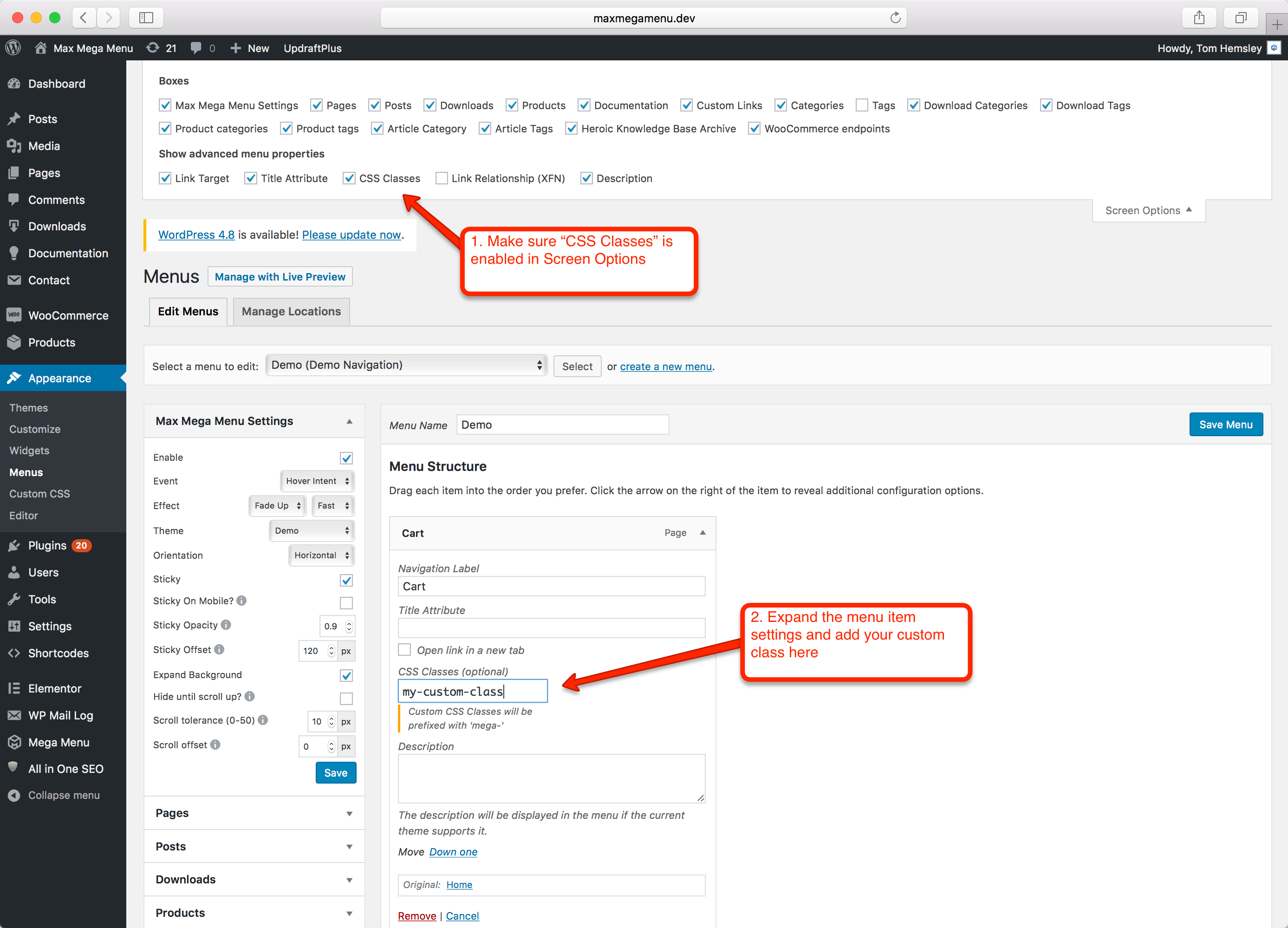
Regarding the animation, you need to add the animate classes to all the menu items.Here’s more info. how to enable the menu item classes:
https://www.megamenu.com/wp-content/uploads/2017/07/wordpress-menu-item-custom-css-class.pngAdd the classes on all items and let me know if it works as expected.
Hi Asif,
After trying in a few hours again, the connection was successful.
Thanks for the great pluginForum: Plugins
In reply to: [Behance Portfolio Manager] Thumbnail hovers: zoom beyond the edgesGlad to know it worked 🙂
Please feel free to let me know if you face any other issues.Forum: Plugins
In reply to: [Animate It!] Scrolling effectDear, Sirlygirlblues,
Thanks for your interest in Animate It!
Regarding the load up effect. You’d have to either add the animations to each grid item manually, or you can write a script that adds the animation classes to the grid items.
Once this is done, the desired loading animation can be obtained.
Forum: Plugins
In reply to: [Behance Portfolio Manager] Thumbnail hovers: zoom beyond the edgesHi Philipp,
Please add the following CSS in Portfolio Manager > Settings > Advanced Tab > Custom CSS box.
.eds-bpm-view {
    overflow: hidden;
}
This should make the images not visible outside the edges.
Let me know if this resolves the issue.Forum: Plugins
In reply to: [Animate It!] conflict when using W3 Total CacheChanged the setting.
The Animations are still loading fine:
http://animateitdemo.wpdevcloud.com/animate-it-demo/Here’s the complete set’s screen
https://adobe.ly/2rdHRmjCould you please share the link to your website, where this issue is?
I believe some other plugin/script conflict may be causing this.Forum: Plugins
In reply to: [Animate It!] conflict when using W3 Total CacheDear Nevoerez1,
The settings are applied as you mentioned.
https://adobe.ly/2E3LAvsThe animations are still working perfectly.
http://animateitdemo.wpdevcloud.com/animate-it-demo/Please let me know in case I am missing anything.
Here’s the full settings screenshot for Minify Setting:
https://adobe.ly/2E6VH2qForum: Plugins
In reply to: [Animate It!] conflict when using W3 Total CacheDear Nevoerez1,
Sorry I somehow missed out on the reply.
Will check and get back to you in a few hours.Forum: Plugins
In reply to: [Animate It!] Animate it on image overlayHi Webdevsc,
I just added the animations using the Inspect element on the browser to the blocks: “Up to 9 passengers”, “Up to 4 hours of range” and “Up to 90lbs of baggage”.
And the animations are working fine for me.
I added the classes: “animated fadeInLeft delay1 duration1 infinite eds-on-scroll”
Try the following:
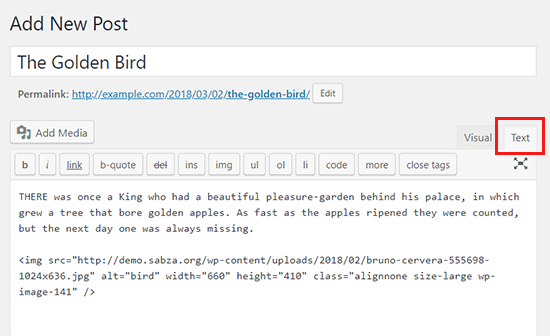
1. In the editor chose Text only: https://cdn2.wpbeginner.com/wp-content/uploads/2013/04/text-editor-wp.png
2. Then the 3 image code would look like this:
<img src="image-path" class="image-overlay img-responsive shadow">Just go to the animation generator (https://www.downloads.eleopard.in/class-generator-wordpress) create your desired animations and paste with the image classes
Note: I used FadeIn animation so my classes looked like this “animated fadeInLeft”
3. Now, add these classes to the
tag so it finally looks like this:
<img src="image-path" class="image-overlay img-responsive shadow animated fadeInLeft">And Save.
This should make the images appear properly in the front-end.Let me know if it works for you.