Dani Llewellyn

Forum Replies Created
-
Forum: Plugins
In reply to: [A-Z Listing] More then one TemplateThis isn’t possible when you’re including both listings on the same page. If you have two separate pages then this is possible in a very limited way based on the top-level page in the hierarchy (it only works on posts of the type
page).I’m assuming this won’t help you because it’s such a limited feature currently, but I’ve included the details of how it works for completeness:
Currently the code will look at the top-level page in the hierarchy chain to determine the
sectionof the listing, and will look for a specific template in your theme calleda-z-listing-$section.phpwhere$sectionis the slug of the top-level page.For example if I have pages like:
home
blog
- a-z-listing
about
Then the a-z-listing at
blog/a-z-listingwill useblogas it’s “section” name. This requires that bothbloganda-z-listingarepagepost-type, and thea-z-listingpage hasblogset as it’s parent.I want to improve this so that it is easier to use different templates, because the “section” method is very restrictive and was built as a dirty hack for a specific client site with the intention to “fix it later”.
Forum: Plugins
In reply to: [A-Z Listing] Sort Posts on a Custom Field’s Value?Hi,
You can override the index letter for each post by hooking the
a_z_listing_item_indicesfilter.function override_the_a_z_index_letter( $indices, $item ) { if ( 'expected_post_type' !== $item->post_type ) { return $indices; } $meta = get_post_meta( $item->ID, 'your_meta_key', true ); $idx = mb_substr( $meta, 0, 1, 'UTF-8' ); // replace the current indices - if you just want to add it as an additional index // add the value to a new item in $indices rather than overwriting $indices entirely $indices = array( $idx => array( array( 'title' => $item->post_title, // or use the value in $meta - this is shown as the post title in the listing 'item' => $item, ), ), ); // I really need to improve this so you don't need to add all that boiler plate // but instead just return the indices. For the future. return $indices; } add_filter( 'a_z_listing_item_indices', 'override_the_a_z_index_letter', 10, 2 );References:
- https://developer.wordpress.org/reference/functions/add_filter/
- https://developer.wordpress.org/reference/functions/get_post_meta/
- https://secure.php.net/manual/en/function.mb-substr.php
- https://a-z-listing.com/reference/hooks/a_z_listing_item_indices/
- This reply was modified 8 years, 5 months ago by Dani Llewellyn. Reason: fix the array
Forum: Plugins
In reply to: [A-Z Listing] Back to topThat functionality isn’t built-in currently, but you can add it easily by copying
wp-content/plugins/a-z-listing/templates/a-z-listing.phpinto your theme/child-theme and adding the required links.Specifically you need to add links which point their
hrefto#letters:<!-- ... snipped ... --> <div class="letter-section" id="<?php $a_z_query->the_letter_id(); ?>"> <h2> <span><?php $a_z_query->the_letter_title(); ?></span> </h2> <div><ul> <!-- ... snipped ... --> </ul></div> <a href="#letters">Back to top</a> </div> <!-- ... snipped ... -->You might want to use the theme customizer’s “custom css” feature to add some styles to make it look nicer.
Forum: Plugins
In reply to: [A-Z Listing] Missing Documentation?`I need to rewrite those. I initially wrote the installation instructions anticipating adding a PHP section to the documentation, but changed my mind and separated the PHP documentation into individual FAQ items so that it is easier to see both methods of achieving a goal together i.e. the shortcode and PHP. These FAQs are at the bottom of the main plugin listing page, or in the readme.txt or readme.md in the plugin folder (both readme files contain the same information but with different formatting to support displaying on the WordPress.org plugin directory and on GitHub).
Forum: Plugins
In reply to: [A-Z Listing] StylesYou change the style in the same way you change the style of anything on your site. You could, for example, edit your theme’s style.css or you could use the Customizer’s “Custom CSS” feature.
The inbuilt styling is not meant as a “works for everyone” solution but is an example of how you could style the page. It is anticipated that it will work for most people out of the box but there is a likelihood that it won’t fit your site’s design in which case you can either add style overrides to the inbuilt style or you can turn off the styling entirely and write your own styles from scratch.
If you require customizing the HTML output of the listing then you need to copy the file from
wp-content/plugins/a-z-listing/templates/a-z-listing.phpinto your theme’s root folder and edit appropriately. This file follows a WordPress-style “the loop” mechanism extended to support the separation of posts into groups by letter.Forum: Plugins
In reply to: [A-Z Listing] Posts from a category onlyCan you describe what happens when it “doesn’t work”? It looks like you’re attempting to use a shortcode called
glossarywhich is not provided by my plugin. The taxonomycategoryis normally assigned toposttype posts which won’t be shown by my plugin unless you also includepost-type="post"in the shortcode:[a-z-listing post-type="post" taxonomy="category" terms="afectiuni-a-z"]Forum: Plugins
In reply to: [A-Z Listing] WooCommerce Categories and SubcategoriesTo display all products in the
specialscategory you would use theterms=attribute:[a-z-listing post-type="product" taxonomy="product_cat" terms="specials"]The difference between this and what you already tried is the omission of the
display=termsattribute which switches the list to displaying terms from the taxonomy indicated intaxonomy=. Without thedisplay=attribute the list usestaxonomy=andterms=to filter thepost-type=posts.Forum: Plugins
In reply to: [A-Z Listing] Not work in two serverHow are you calling the plugin, shortcode or PHP, and what are the symptoms of the failure? e.g. blank screen, half the page cut-off, page completed but no content from the plugin – the footer is intact indicating the page is complete, wrong posts in list, other?
Forum: Plugins
In reply to: [A-Z Listing] Blank page for one type, working for anotherIf you want to dig-in I’m expecting that PHP died due to resource exhaustion or timeout – you can try finding the error log of your server to see whether my guess is correct which might give you ideas to mitigate it for now such as either increasing the memory limit for PHP or finding out whether it timed out due to mysql responding slowly or just a nature of physics. if mysql is responding slowly you could try adding in a memory cache or attempting to tune mysql or both.
Forum: Plugins
In reply to: [A-Z Listing] Blank page for one type, working for anotherI don’t have an exact figure because it depends on the resources available at your web host. Different sites will hit the problem at different sized lists because of variances in cpu, memory allocation, and overall load for the PHP runtime and the database.
Forum: Plugins
In reply to: [A-Z Listing] Blank page for one type, working for anotherI would expect you’re hitting an upper-limit due to the size of the list. I’m working on improving the performance and issues with large lists for the future, but I don’t have a solution for you right now :-(.
Forum: Plugins
In reply to: [A-Z Listing] Output in TabsThe above code was an untested example to show the general process for a possible implementation. That it doesn’t work is somewhat unsurprising given that I didn’t test it :-). The plugin doesn’t do tab-style output itself, so custom coding is required by the site owner or developer to add the functionality.
Forum: Plugins
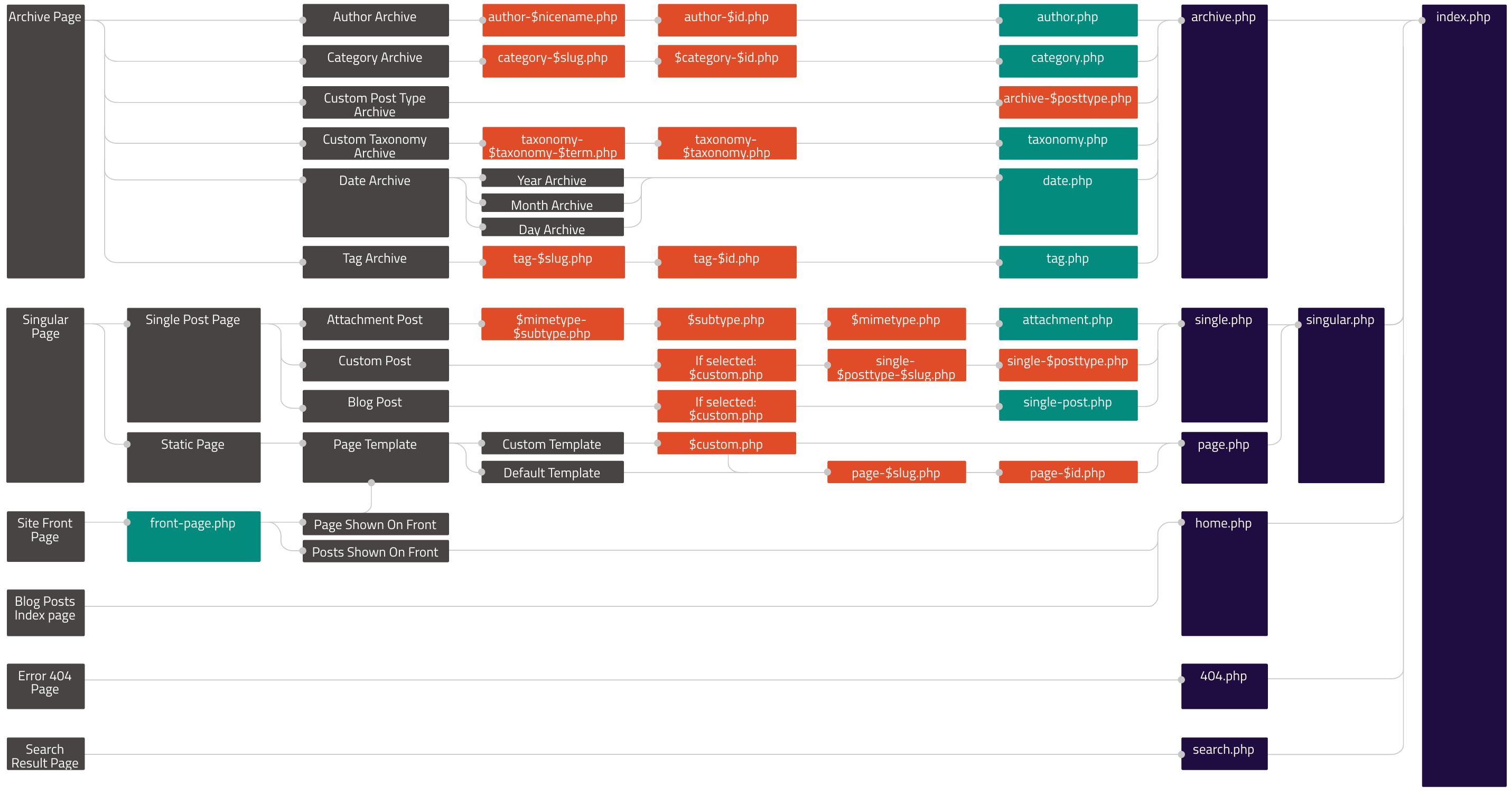
In reply to: [A-Z Listing] Exclude certain categoryThe code needs to be added to an appropriate template in your theme. The template-hierarchy page and image are helpful to determine an appropriate file to add or modify.
Forum: Plugins
In reply to: [A-Z Listing] Show post title end with specific wordThe shortcode cannot do this currently. It might be possible with the WP_Query/PHP method of displaying the listing, but it is not straight-forward/easy if you are not familiar with WP_Query parameters or PHP coding.
The function
the_a_z_listing()supplied by the plugin for calling via PHP to display the listing takes all the same parameters as WP_Query.- This reply was modified 8 years, 7 months ago by Dani Llewellyn. Reason: Link to function docs on a-z-listing.com
Forum: Plugins
In reply to: [A-Z Listing] Display Images?This will require adding a template to your theme and customising accordingly in a manner similar to other theme coding. The template is saved in
wp-content/plugins/a-z-listing/templates/a-z-listing.php; copy it to your theme atwp-content/themes/<yourtheme>/a-z-listing.phpand amend to output the image.Depending on how your image is attached to the post you might want to use
the_post_thumbnail()for the actual output, though that only works with images attached via the “featured image” functionality.