davidblood

Forum Replies Created
-
Forum: Plugins
In reply to: [Knowledge Base] Switch Plugin – Possible?Hi,
Yes, I simply wanted to remove the extra menu item as it was basically Homepage > Homepage as “Knowledgebase” was the Home and looked weird (I have slight OCD). In the end I just commented out the code in
class-breadcrumbs.phpnot recommended as updates will revert but oh well! Maybe we could add a checkbox in the settings “Is Homepage? Y/N” and it disables this item array? Could be a Pro feature.How are you setting the Private? The articles are custom post types so I’m wondering if I am missing something.
From All Articles (/wp-admin/edit.php?post_type=wz_knowledgebase) => Quick Edit => Check “Private” Box. Usually this marks the post/page/article as private and then to non-admins and editors the article will throw a 404 page.
However, after deactivating the plugin and re-enabling it seems it’s behaving like that now so not sure if it was a glitch or something? I’m on Beta2 still.
Forum: Plugins
In reply to: [Knowledge Base] Switch Plugin – Possible?Hi Ajay,
I managed to edit the direct file in the end to get what I wanted. I basically wanted to remove the extra item on the breadcrumb as mentioned here by “reason for modifying”.
Another thing I noticed this plugin doesn’t hide/throw 404-page articles that are marked as “Private” only visible to site admins and editors? Any regular guest can still view the link directly and it shows up in search results. Any ideas on this? Assume it’s a bug.
For a standard WordPress page it will throw a 404 page unless logged in as admin/editor same as my previous KB plugin I came from.
Forum: Plugins
In reply to: [Knowledge Base] Switch Plugin – Possible?Hi Ajay,
Sorry for the 2 week delay, been busy! Returning to my staging site now. Current progress is here.
While on the front page you’re using a block/shortcode which is within the content area and so getting the extra markup around it.
That is indeed the case! I ended up calling it via PHP file instead of a shortcode, perfect! Just working on the Search field now as you will notice from above link it’s not in the same page on homepage as articles.
I’m still wondering If possible to also override other files/folders? As per this comment. I haven’t had any luck so far trying to override
class-breadcrumbs.phpI’m still on 3.0.0-beta2 so will update to 3.0.0-beta3 not sure what’s new in beta 3 as the GitHub notes beta2’s.
Forum: Plugins
In reply to: [Download Manager] update using Version 3.3.46 colors changed@nriddhi I don’t use Pro versions of any Plugin (it’s just the name).
Hey @shahjada, It seems it was caused by
Enable modal login formbeing enabled it loaded reCAPTCHA on every page (as intended here since the modal could be called from any page likely a navbar) so I just disabled that and my issue went away.This must’ve enabled itself when updating? As modal login form has never been enabled or an issue before same as it forced updated my Login Page for where
[wpdm_login_form]is located.I had to add
.w3eden #wpdmlogin, .w3eden #wpdmreg {min-width: 100% !important;max-width: 100% !important;}though as the login page container was tiny!Maybe we can add Cloudflare’s Turnstile too WPDM too? I’m DeGoogle.
All my issues are now resolved.
Forum: Plugins
In reply to: [Download Manager] update using Version 3.3.46 colors changedHey,
Same here! It broke reCAPTCHA on my entire site. I use Cloudflare’s Turnstile with Paid Memberships Pro and this update broke the entire thing.
It’s also modified the entire login page overriding the Paid Memberships Pro login page etc despite it’s a
Paid Memberships Pro Login Block? Now it’s container is so small width wise you can’t even see the inputs.@shahjada said fixed in 3.3.44… but it’s not fixed I’m on 3.3.46?
EDIT: Found the issue it seems it changed the Login Page from “Login (DL)” page to “Login (Core)” via Settings => Frontend Access upon update. Annoying!
However, it’s still breaking Paid Memberships Pro’ Turnstile (Login) – Unless I disable Settings => Basic and uncheck
Enable sign up form CAPTCHA validationandEnable sign in form CAPTCHA validationas it seems your plugin loads reCAPTCHA JavaScript on all pages not just the page set under Frontend Access? Wouldn’t it be better if you only load these files on pages/posts they are required? Not globally? More JS loaded on 99% pages for zero reason.Reverting update…
- This reply was modified 7 months, 3 weeks ago by davidblood.
- This reply was modified 7 months, 3 weeks ago by davidblood. Reason: Added edit (fixed-ish..)
Forum: Plugins
In reply to: [Knowledge Base] Switch Plugin – Possible?Hi,
Perfect! So that updated class-breadcrumbs.php allowed the breadcrumb to appear on the front page now.
However, It seemed to of added some extra height or padding (other pages are fine) above is the home page (“/”) and below is a random article example, peak the height difference.

Here is a pastebin.com of the source code rendered for both. However, this isn’t you It’s the theme’s styles.css which is being weird as it’s not happening on article pages despite it’s reading the same styles.css.
From current research it seems its due to on front page it’s added inside
entry-contentand on articles it’s added outsidetheentry-contentdiv class before theentry-header post-headerclass. Assume it’s cause I’m using a WP > Pages > WP Block I’m injecting it into the content area where the plugin injects outside before this – I’ll dig deeper. Thanks it works!Edit: Can confirm if I remove the Knowledge Base Breadcrumb Block from the page and instead call it from my child’s
header.phpit works as normal. So, not a bug just loaded elsewhere.<?php if (function_exists('wzkb_breadcrumb')) {
wzkb_breadcrumb();
} ?>Edit 2: Whoops! That now shows 1 breadcrumb on the front page, two on articles etc – to avoid this I updated to
use is_front_page()function.<?php if (is_front_page() && function_exists('wzkb_breadcrumb')) {
wzkb_breadcrumb();
} ?>- This reply was modified 7 months, 4 weeks ago by davidblood. Reason: Added edit; work around
- This reply was modified 7 months, 4 weeks ago by davidblood. Reason: Edit 2: is_front_page checks
Forum: Plugins
In reply to: [Knowledge Base] Switch Plugin – Possible?Howdy,
Okay, so working on my plan previously trying to add breadcrumb and Search to the front home page. I have managed to get the Search to appear by simply adding the Knowledge Base Search block to the page set as Front Page. However, for breadcrumbs It doesn’t want to appear via a Block (Knowledge Base Breadcrumb) or Shortcode (
[kbbreadcrumb separator=" » "]).Not sure if this is how you intended it to be or another bug?


Cheers.
Forum: Plugins
In reply to: [Knowledge Base] Switch Plugin – Possible?Hi,
- Glad you was able to locate the issue and get that fixed! For a moment I thought I was doing something silly but then considered maybe it was for Legacy only.. So I’m glad it’s intended to work for both templates.
- Yeah, I feel most sites usually have the breadcrumbs at the highest point just below a navigation bar (if any) like this support thread (WordPress has Nav > Sub-nav > Breadcrumbs > Search)
Regarding my template modifications I can confirm these were done in a child theme not the plugin’s files directly – since as you mentioned updates will overwrite any modifications here.
I’m surprised the twenty-twenty-five didn’t stick with the entry-content since usually WordPress follow and recommend microformat but not to worry, I got it in the end!
entry-content is a common HTML class/ID used in WordPress themes (instead of a generic page-content) to specifically target the main body of a post or page, allowing for theme-specific styling or manipulation via CSS/PHP functions like the_content() for posts, while page-content might be used more broadly for any container or a different CMS.
WordPress / classes required by a particular microformat. https://microformats.org/wiki/hentryFor multi-product for me it was the URL structure changing and would mean I have to update any other pages and breaking links already out in the wild. I’m going to dupe my staging site again (before 3.0.0-beta2) and do a second staging site for multi-product and try to show/explain better.
Maybe I just missed something in a rush (as it was 5am..) or did something wrong but I will definitely revisit here.
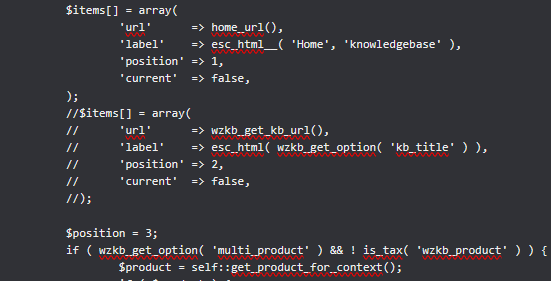
Edit: Is it possible to also override other files/folders? I.e. I need to modify
/wp-content/plugins/knowledgebase/includes/frontend/class-breadcrumbs.phpbut don’t wish to do it here since plugin updates will revert. I tried to copyclass-breadcrumbs.phpinto my Child Theme but didn’t work and also tried to copy it into my Child Theme matching path/wp-content/themes/wp-child/knowledgebase/includes/frontend/class-breadcrumbs.php(which is out I did the previous KB plugin I used) but also didn’t work.
Reason for modifying: my Knowledgebase is hosted on a sub domain so this creates Home (“/”) => Knowledgebase (“/article”) => “Category Here” => “Article Title Here” so need to comment out//the wzkb_get_kb_url section inclass-breadcrumbs.php.When I comment out this part it achieves what I’m aiming for – Home > Announcements > Do Not Track or Sell My Information not Home > Knowledgebase > Announcements > Do Not Track or Sell My Information. As for my setup “Home” is the Knowledgebase here.
- This reply was modified 8 months ago by davidblood. Reason: Added edit regarding breadcrumbs class file
Forum: Plugins
In reply to: [Knowledge Base] Switch Plugin – Possible?Hi,
So, I have updated to 3-beta2. However, the multi product way didn’t work out well for me feel it’s not for my use case so revert database and re-did my steps leaving multiproduct off this time, perfect!
However, a few questions!
- The custom CSS headers are not longer being applied I updated the CSS selectors (example wzkb_section_name → wzkb-section-name) as per the GitHub. However, they aren’t being applied? It seems the CSS in the field (Knowledge Base => Settings => Styles => Custom CSS) isn’t being loaded viewing the website source only related CSS I can find is:
/wp-content/plugins/knowledgebase/includes/frontend/css/styles/classic.min.css?ver=3.0.0-beta2there is no <style> sections – Is this only loaded when using Legacy now?
Edit: Ignore, it seems using the shortcode it didn’t apply this. Switched to Block – Worked. - Is it possible to have the breadcrumb above the search bar and show on every page (inc front)? No breadcrumb then going to an article with a breadcrumb ruins the flow. I would also like search on the homepage / front page. I had this in my
header.phpchild theme but if I add it now it duplicates. On the Topic page the breadcrumb being down below the title ruins the flow too (imo) – By flow I mean it’s not fluid and like no consistency across pages.
Homepage: it isn’t there – Article page: it’s wedged down below searchbar – Topic page: it’s moved again below the topic title.
EDIT: It seems I have managed to do this for category page by modifying thetaxonomy-wzkb_category.phpfile: https://pastebin.com/iispYjqc. Assume this will be the same forsingle-wz_knowledgebase.phpStill not sure how to add search and breadcrumb to front page.
EDIT 2: Okay, so I’m making some good progess. I was able to resolve the issue with spacing it seems my theme (official default WordPress theme) uses entry-content instead of page-content and
entry-headerinstead ofpage-header.Now, I feel I have nearly nailed it 99% just now getting the breadcrumb and search on homepage “/”
- This reply was modified 8 months ago by davidblood.
- This reply was modified 8 months ago by davidblood.
- This reply was modified 8 months ago by davidblood. Reason: Added edit 2, I've resolved most of these issues
Forum: Plugins
In reply to: [Knowledge Base] Switch Plugin – Possible?Hi,
Thanks! This is a the site in question replacing the previous. Just trying to make the match and mimic as much as possible.
I saw on your GitHub about using the Intuitive Custom Post Order and that seems to work perfectly. Slightly annoying needing another Plugin but hey-ho!
Regarding 3.0.0-beta2 is that simply the case of downloading and uploading to the
knowledgebaseplugin folder over writing existing files? Nothing else needs to be done manually? Basically the same as updating a plugin normally I guess.Forum: Plugins
In reply to: [Knowledge Base] Switch Plugin – Possible?Hi,
Yeah, I edited my message I got some of it working! I had to use the Block as the shortcode
[knowledgebase]didn’t work – It’s now just the columns and style.I have tried setting it to “2” or “3” and it doesn’t change anything.
Number of columns > 3
Inbuilt styles: checked (set in the sidebar and settings)Edit: I just noticed when using the Knowledge Base block and on the right hand sidebar setting “max articles per section” or “number of columns” here when you save > reload it doesn’t save the value? It’s empty again. The “show excerpt” seems to save unless it doesn’t display the saved/stored value but it’s stored in db (reading it). Anyhow, setting to “3” here or Settings => Styles still shows 1 column.
For example (look how small and compact text is): https://ibb.co/B2cXdrwx both Twenty Twelve.
I also can’t see a way to “order” and change the default sorting is this purely A-Z? For example the outdated plugin had the order.php page which allowed “Drag and drop items to customise the order of categories in WP Knowledgebase” or is this a Pro feature?
Edit 2: Righto, I understand it more now! It seems the setting I was looking for was
First section levelto1not2 (default)here is a side by side: https://ibb.co/C3PF4yFZSeems to be pretty close to the previous plugin. Just the article UI to work on now and figure out why it ads “Archives March 2022” and “Categories Uncategorised” at the bottom.
- This reply was modified 8 months ago by davidblood.
- This reply was modified 8 months ago by davidblood.
Forum: Plugins
In reply to: [Knowledge Base] Switch Plugin – Possible?Hi,
So with the help of Claude Opus 4.5 I was able to do this via SQL using the “URL” part to see what each plugin used. For example for tags it seems the old plugin used:
/wp-admin/edit-tags.php?taxonomy=kbe_tags&post_type=kbe_knowledgebase
Yours:
/wp-admin/edit-tags.php?taxonomy=wzkb_tag&post_type=wz_knowledgebaseUPDATE wp_term_taxonomy SET taxonomy = 'wzkb_category' WHERE taxonomy = 'kbe_taxonomy';
UPDATE wp_posts SET post_type = 'wz_knowledgebase' WHERE post_type = 'kbe_knowledgebase'
UPDATE wp_term_taxonomy SET taxonomy = 'wzkb_tag' WHERE taxonomy = 'kbe_tags';No clue if I missed anything, think article, tags and category is pretty much it.
Total time: 615 rows affected. (Query took 0.0120 seconds.)
So far, so good! This was all done on a staging sub-domain, of course.
My only issue currently is I don’t like the categories using the full width makes the index home page very log. I preferred the side by side (2 wide) guess I could tweak the code and modify it – secondly, all the article text is small, compact close together so guess I need custom CSS here.
- This reply was modified 8 months ago by davidblood.
- This reply was modified 8 months ago by davidblood.
Forum: Plugins
In reply to: [Knowledge Base] Switch Plugin – Possible?Hi, sorry for the late reply never got around to switch due to time. However, I got some free time now so looking into getting this updated.
It seems its using a custom
post_typeofkbe_knowledgebasefrom the_poststable.https://plugins.trac.wordpress.org/browser/wp-knowledgebase/tags/1.3.0
- This reply was modified 8 months ago by davidblood.
@leosantis that looks like the action scheduler that WooCommerce and those plugins using background tasks. For me it was PMPro.
Async: Locks in
wp_optionstable related to Action Scheduleraction_scheduler_lock_async-request-runnermaybe same as me? I had some of these issues before and used thedefine('WP_ALLOW_REPAIR', true);with/wp-admin/maint/repair.phpresolved it for me.Hi @jbgupdraft
Absolutely I updated to v4.3.1 for the error to appear (I was on 4.3.0 error free)