dafsade

Forum Replies Created
-
Forum: Plugins
In reply to: [Payment Plugins for Stripe WooCommerce] Required fields validationHi and thanks so much for your answer!
I tried with the checkout shortcode. Now I see Goole Pay as inline payment. I’m trying this user flow:
- Fill the form but leave unchecked Terms/Privacy checkbox
- Click Google Pay inline option and proceed
- It bring back to checkout with validation message “Terms/Privacy required”. Notice at this point there isn’t anymore the Pay with Google Pay submit button but the default Submit order button.
- Check the Privacy checkbox and click Submit order button -> it appears the browser popup (Chrome on macOS) saying:
Do you want to leave the site?
Any changes you have made may not be saved.
Cancel or Exit
It’s the popup the browsers show when the user is leaving a page without saving some data. - Click Exit and the order is correctly placed.
However this UX in my opinion is not good for the standard users. The displaying of that browser popup is risky. Why it appears? Is this the normal flow of this plugin, or is there an issue in my project?
Thanks
Thanks @dannycooper , you saved me from wasting a lot more time! So I write here what’s the problem hoping it could help the community.
The Mulish font was added by this damn Chrome extension “Pop up blocker for Chrome™ – Poper Blocker”. Just disable it to see. Moral of the story: remember that your damn browser extension modify the DOM of your websites, for example adding Google Fonts! 🙁
Thanks again, Dan.
- This reply was modified 3 years, 2 months ago by dafsade.
I’m working in local to have it working, before send it online. Maybe if you can leave me your email we can find a way
- This reply was modified 3 years, 2 months ago by dafsade.
I activated Twenty twenty one theme and disabled all plugins except yours and Mulish font is stil there…
Forum: Plugins
In reply to: [MC4WP: Mailchimp for WordPress] Get subscriber dataHi,
the filter mc4wp_integration_contact-form-7_subscriber_data isn’t a mc4wp filter? I thought it was in the scope of your plugin.Also the object MC4WP_MailChimp_Subscriber $subscriber seems yours.
Just to understand how it works, thanks
Thanks, do you have in plan to add this feature in the plugin UI?
Forum: Plugins
In reply to: [Media Library Assistant] IPTC/EXIF: Execute all rules –> parsererrorDone, Davide. Sent the email.
Let me know, thanksForum: Plugins
In reply to: [Media Library Assistant] ACF Image: Button and Search box wrongly hiddenSolved! Many thanks David.
For when is planned the “official” update?
Forum: Plugins
In reply to: [Media Library Assistant] IPTC/EXIF: Execute all rules –> parsererrorHi David
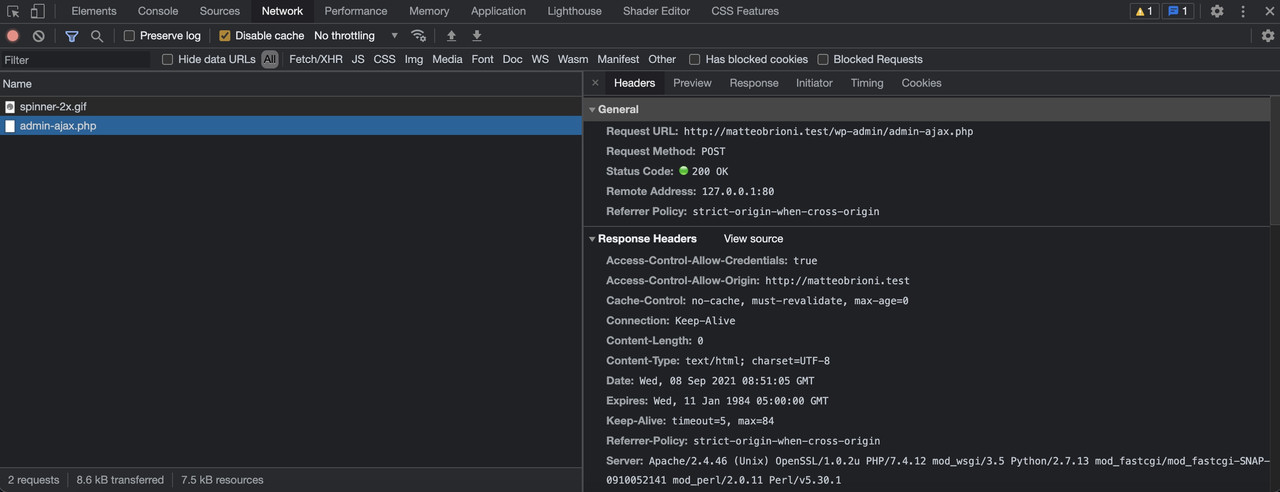
in Debug > Error Log I have no errors, nothing at all.After launching “Execute All Rules”, from Inspector > Network tab there are only these:
https://i.postimg.cc/Zq2xxFLw/net2.jpgHere the admin-ajax.php fully Headers (Preview and Response are void):
Request URL: http://my-project.test/wp-admin/admin-ajax.php
Request Method: POST
Status Code: 200 OK
Remote Address: 127.0.0.1:80
Referrer Policy: strict-origin-when-cross-origin
Access-Control-Allow-Credentials: true
Access-Control-Allow-Origin: http://my-project.test
Cache-Control: no-cache, must-revalidate, max-age=0
Connection: Keep-Alive
Content-Length: 0
Content-Type: text/html; charset=UTF-8
Date: Wed, 08 Sep 2021 08:45:50 GMT
Expires: Wed, 11 Jan 1984 05:00:00 GMT
Keep-Alive: timeout=5, max=99
Referrer-Policy: strict-origin-when-cross-origin
Server: Apache/2.4.46 (Unix) OpenSSL/1.0.2u PHP/7.4.12 mod_wsgi/3.5 Python/2.7.13 mod_fastcgi/mod_fastcgi-SNAP-0910052141 mod_perl/2.0.11 Perl/v5.30.1
X-Content-Type-Options: nosniff
X-Frame-Options: SAMEORIGIN
X-Powered-By: PHP/7.4.12
X-Robots-Tag: noindex
Accept: application/json, text/javascript, */*; q=0.01
Accept-Encoding: gzip, deflate
Accept-Language: it-IT,it;q=0.9,en-US;q=0.8,en;q=0.7
Cache-Control: no-cache
Connection: keep-alive
Content-Length: 577
Content-Type: application/x-www-form-urlencoded; charset=UTF-8
Cookie: wordpress_12f9ae0c112d4acedf44eb2668f3b5fb=admin%7C1631262962%7C9iKfs90MWwUc4Q3oYSJo6JLRqsvqnqOOn6oKgmfwbXc%7C49809e2665a0090d4bb63a13f5fe5313a4aace6f3c31d197c08177b63a83afc8; wordpress_test_cookie=WP%20Cookie%20check; wp-settings-3=libraryContent%3Dbrowse; wp-settings-time-3=1630588341; cookie_consent=true; wpml_browser_redirect_test=0; wp-wpml_current_language=it; wordpress_logged_in_12f9ae0c112d4acedf44eb2668f3b5fb=admin%7C1631262962%7C9iKfs90MWwUc4Q3oYSJo6JLRqsvqnqOOn6oKgmfwbXc%7C210282e02d3b35666b02fa77aa90d7e169b21c31825313062bb9b3f51295426f; wp-wpml_current_admin_language_d41d8cd98f00b204e9800998ecf8427e=en
Host: my-project.test
Origin: http://my-project.test
Pragma: no-cache
Referer: http://my-project.test/wp-admin/options-general.php?page=mla-settings-menu-iptc_exif&mla_tab=iptc_exif
User-Agent: Mozilla/5.0 (Macintosh; Intel Mac OS X 10_15_7) AppleWebKit/537.36 (KHTML, like Gecko) Chrome/92.0.4515.159 Safari/537.36
X-Requested-With: XMLHttpRequest
page: mla-settings-menu-iptc_exif
mla_tab: iptc_exif
screen: settings_page_mla-settings-menu-iptc_exif
action: mla-inline-mapping-iptc-exif-scripts
mla_admin_nonce: 89f9dfd599
bulk_action: iptc-exif-options-map
offset: 0
length: 25
mla_allow_iptc_exif_mapping: Enable IPTC/EXIF Mapping
mla_enable_iptc_exif_mapping: Enable IPTC/EXIF Mapping when adding new media
mla_enable_iptc_exif_update: Enable IPTC/EXIF Mapping when updating media metadata
mla_admin_nonce: 89f9dfd599
_wp_http_referer: /wp-admin/options-general.php?page=mla-settings-menu-iptc_exif&mla_tab=iptc_exif
Forum: Plugins
In reply to: [Media Library Assistant] ACF Image: Button and Search box wrongly hiddenGet it, it’s “Disable Gutenberg” plugin:
https://wordpress.org/plugins/disable-gutenberg/Disabling it the problem definitely goes away. Could you try it to reproduce the problem?
Forum: Plugins
In reply to: [Media Library Assistant] ACF Image: Button and Search box wrongly hiddenSorry, issue is here again. 🙁
It seems it re-appears after sometime from disabling/re-enabling plugins (?)Forum: Plugins
In reply to: [Media Library Assistant] ACF Image: Button and Search box wrongly hiddenHi David, thanks for answer.
There’s a misunderstanding. The flex styles you see in my screenshot are applied by me, “live” in the browser inspector, just for testing purpose.
Below you see the code as it is (no flex styles):
https://postimg.cc/gallery/ntpsymBPlugins versions:
– Advanced Custom Fields PRO 5.10.2
– MLA 2.97Anyway, now it happens a strange thing: I tried to disable all plugins except ACF and MLA and the issue gone away. Now I enabled all plugins one by one to get what was the “bad” one. Well, after enabling all the problem never come back!
I keep monitoring the situation
Thanks