csarti

Forum Replies Created
-
Forum: Installing WordPress
In reply to: Need help to transfer site to new serverThank you for this last bit of information! It worked! The sites are back online! Thanks for all your help guys! You are great!
Forum: Installing WordPress
In reply to: Need help to transfer site to new serverI imported the old database into a new one I just created.
Forum: Installing WordPress
In reply to: Need help to transfer site to new serverI’m learning a lot here, thanks! I’ve done all these things, and the home page of the site finally appeared. Unfortunately it was a limited success, as all the different pages, which are actually present when I access wp.admin are inaccessible on the web. I get this message: Not Found The requested URL /about-me/ was not found on this server. Additionally, a 404 Not Found error was encountered while trying to use an ErrorDocument to handle the request.
Maybe there’s a last little tweak to do, but I cant’t figure it out.
Thanks for your help!Forum: Installing WordPress
In reply to: Need help to transfer site to new serverThank you! I could have thought of it myself, but usually when it’s something unknown I have no experience with, insecurity kicks in and the simplest things don’t come to mind!
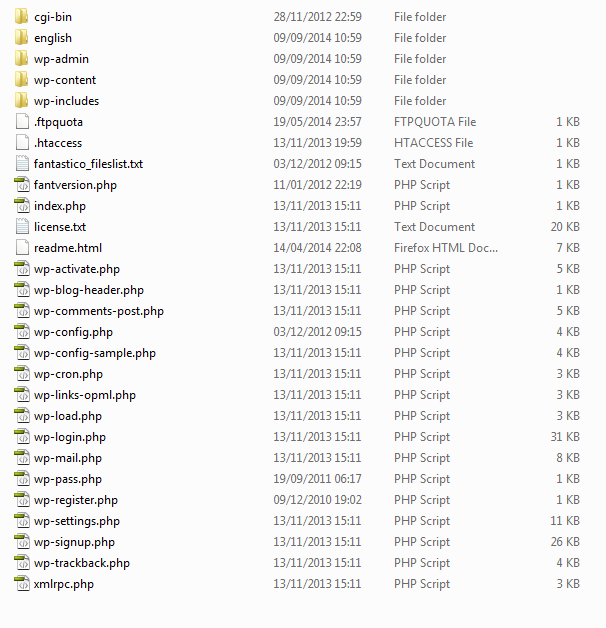
Now the last steps: How do I connect the site files which I have in two of these folders: http://christiansarti.com/wp-content/uploads/2014/09/Screenshot_1.png to the database.
I understand that I have to change the database name in the wp-config file. (where do I find the database password, as I did not create one, only created one for the user) But here are a few more questions from an insecure mind:
One site freedomtrainings.com is the main hosted site. The other is an add-on domain to.bridge.eu .
What is the best way to go about to get my WP site running again?
Thank you!!!Forum: Installing WordPress
In reply to: Need help to transfer site to new serverHi!
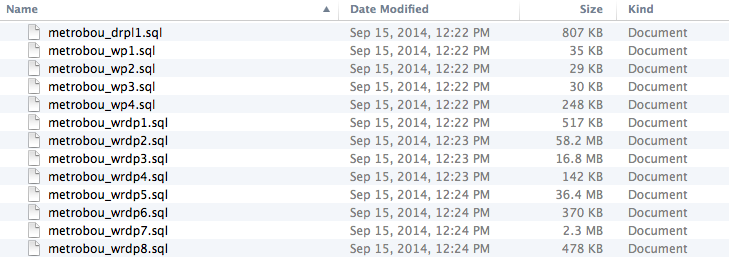
Just another question: I have created the new database and imported a sql file which all worked fine. As I have many of these sql files, probably each of them being the database of one of the many sites I had during the last years, my question is: how can I identify the site it belongs to, as I have to urgently find out which ones belong to the two sites I need to put back online as soon as possible.
Thank you!Forum: Installing WordPress
In reply to: Need help to transfer site to new serverThanks abletec !! I hope I’ll manage. I’ll try it tomorrow, as it’s bed time now for me. I’ll tell you if I succeeded!!
Forum: Installing WordPress
In reply to: Need help to transfer site to new serverThank you! I’ll try these things tomorrow and hopefully post my success story! Thank you also abletec for your response!
Forum: Installing WordPress
In reply to: Need help to transfer site to new serverThanks a lot for your help! My hosting company had a backup from which they could extract the database. Here is a screenshot of the files I downloaded:
http://christiansarti.com/wp-content/uploads/2014/09/Screen-Shot-2014-09-18-at-8.21.44-AM.png
and here is a screenshot of the files of one of the three sites I want to restore on the new server.
http://christiansarti.com/wp-content/uploads/2014/09/Screenshot_1.png
Could you please tell me how to do that or point me to a page where I have the needed info.
Maybe there is a way to restore the sites locally on my computer before uploading to the server?
Thanks for any help!Forum: Installing WordPress
In reply to: Need help to transfer site to new serverThanks for your answer! I guess and hope the database file is in the folder I backed up. What is that file’s name?
Forum: Fixing WordPress
In reply to: How to put a picture next to a column of textThanks! That was the right thing to do!
Forum: Fixing WordPress
In reply to: Twentyeleven child theme does not load properlyIt works now… I guess something weird happened, or I did a thinking mistake which I cant figure out in retrospect. Anyway THANK YOU for this great help! I love the responsiveness of this forum!
Forum: Fixing WordPress
In reply to: Twentyeleven child theme does not load properlyYes, it works! I’m learning, slowly, but steadily. I uploaded the new header picture and reactivated the custom menu…
But I still don’t get why the child theme I made from the file I downloaded from http://quirm.net/themes/twenty-eleven-child/ does not work when I modify it. I removed all the unnecessary info, put my theme name, my name etc in it and removed all their info:
/*
Theme Name:Telstar
Version: 1.0
Theme URI:
Description: Twenty Eleven childtheme for BBC Telstar
Author: Christian Sarti
Author URI:
Template: twentyeleven
License:
License URI:
*//* Import layout */
@import url(../twentyeleven/style.css);
Why does that one not work, as it contains all the necessary code?
Sorry to keep at it, I really don’t like when I don’t understand….
Thank you for any enlightening ))))o(((((
Forum: Fixing WordPress
In reply to: Twentyeleven child theme does not load properlyYes, this is the parent theme, which I had to modify a little bit, as the child theme did not work. I’m activating the child theme now, for you to see the difference.
Forum: Fixing WordPress
In reply to: Twentyeleven child theme does not load properlyHere’s the test site: http://asknreceive.com/test/
Forum: Fixing WordPress
In reply to: Twentyeleven child theme does not load properlyNO!!! IT DOES NOT WORK YET!
When I use the “Twenty Eleven Child 1.0 by Mel Pedley” everything looks fine in the Theme preview, but when I activate it, it has another Header picture and the custom menu I had made comes out completely wrong, with all the sub-entries in my menu being listed in rows….
Why is the Theme fine in the preview and not working properly when activated???