Yann

Forum Replies Created
-
Sorry, our quickstart guide isn’t up to date. The fonts are now managed in Twentig > Settings, as shown in your screenshot:
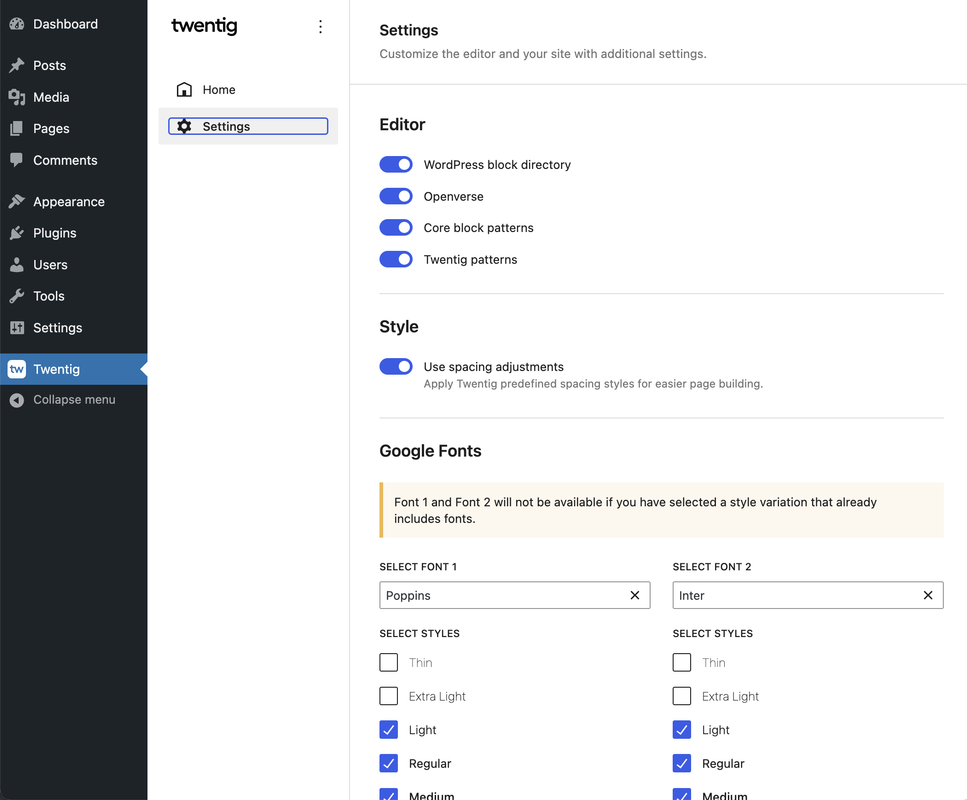
I’m not sure where the issue comes from. If possible, could you please try using the Twenty Twenty-Four theme and see if Font 1 and Font 2 appear in the dropdown?
Thank you for your response. In our latest release, we’ve moved the Twentig fonts settings from the Styles sidebar to the Twentig > Settings section, so it’s normal that you no longer see them in the Site Editor.
It’s possible that a WordPress core issue exists when adding fonts in certain environments, as other themes and plugins have encountered the same issue.
In the fonts dropdown, do you see only “Default, System Font, Source Serif Pro”? Normally, for the Twenty Twenty-Two theme, Twentig automatically adds a curated list of Google Fonts (Alegreya, Cabin, Crimson Pro, Inter, etc.).
Hi @lurchpop, @annetteschwindt,
A previous forum thread discussing the issue with Google Fonts not appearing in the fonts dropdown was unfortunately closed, so we can’t continue the conversation there. Are you still experiencing issues with Twentig Font 1 and Font 2 not appearing in the fonts dropdown?
Thank you
Glad it’s working now. Would you mind leaving us a quick review on our plugin page? This allows us to continue providing great features and support.
Have a nice day,
YannIt seems you’ve clicked on a style variation. Make sure to select the default one, as Twentig Fonts and the fonts added by the Create Block Theme plugin won’t show up if a custom style variation is selected.

Once you’ve selected the default style variation:
- Check if you can see the Inter and Cardo fonts in the dropdown.
- In Twentig > Settings, add Roboto as Font 1, save the settings, and then check if Font 1 appears in the dropdown.
- If you don’t see Font 1, deactivate the Twentig plugin, activate Create Block Theme, and add Roboto. Then see if Roboto appears in the fonts dropdown.
It seems it is a WordPress core issue in certain environments. In the fonts dropdown, do you see the “Cardo” font that Twenty Twenty-Four includes by default?
Thanks for your reply.
With only the Create Block Theme plugin active, could you please try adding the “Roboto” font (no space, no number) and see if it appears in the font dropdown?Are you using the latest version of Create Block Theme, v1.13.4, that was released 5 days ago? They’ve just fixed an issue for fonts with special characters, white spaces, or numbers. It could be the same issue in Twentig as we’re using numbers in our fonts naming (Font 1 and Font 2).
Thank you for your response. When you tried using the Create Block Theme plugin, was Twentig inactive? If not, could you please try adding fonts with the Create Block Theme plugin while Twentig is inactive and see if you still have the issue?
Additionally, could you please specify which browser you are using? If possible, could you also test with other browsers?
Hi,
The Twenty Twenty-One theme adds specific fonts for non-latin languages, “Helvetica Neue” for Greek in your case. To override it, you can add the following CSS code in the Customizer > Additional CSS panel:
body, input, textarea, button, .button, .faux-button, .wp-block-button__link, .wp-block-file__button, .has-drop-cap:not(:focus)::first-letter, .entry-content .wp-block-archives, .entry-content .wp-block-categories, .entry-content .wp-block-cover-image, .entry-content .wp-block-latest-comments, .entry-content .wp-block-latest-posts, .entry-content .wp-block-pullquote, .entry-content .wp-block-quote.is-large, .entry-content .wp-block-quote.is-style-large, .entry-content .wp-block-archives *, .entry-content .wp-block-categories *, .entry-content .wp-block-latest-posts *, .entry-content .wp-block-latest-comments *, .entry-content p, .entry-content ol, .entry-content ul, .entry-content dl, .entry-content dt, .entry-content cite, .entry-content figcaption, .entry-content .wp-caption-text, .comment-content p, .comment-content ol, .comment-content ul, .comment-content dl, .comment-content dt, .comment-content cite, .comment-content figcaption, .comment-content .wp-caption-text, .widget_text p, .widget_text ol, .widget_text ul, .widget_text dl, .widget_text dt, .widget-content .rssSummary, .widget-content cite, .widget-content figcaption, .widget-content .wp-caption-text {
    font-family: var(--font-base);
}
Hope that helps,
Yann
Hi,
Thank you for your feedback. Some users of Twentig have reported this issue. We’ve conducted tests on Kinsta, Ionos, Wamp, Local Flywheel, InstaWp, TasteWP, and others, but we haven’t been able to reproduce this issue on our end.
To help us investigate this further, could you please provide the following information:
- Which host you’re using.
- Whether you have tried it on multiple environments and which ones.
- Confirmation that you have no other plugins installed.
Thank you,
YannHi,
Thank you for your feedback. Some users of Twentig have reported this issue. We’ve conducted tests on Kinsta, Ionos, Wamp, Local Flywheel, InstaWp, TasteWP, and others, but we haven’t been able to reproduce this issue on our end.
To help us investigate this further, could you please provide the following information:
- Which host you’re using.
- Whether you have tried it on multiple environments and which ones.
- Confirmation that you have no other plugins installed.
Please note that style variations can be selected within the Styles panel (see https://wordpress.org/documentation/article/twenty-twenty-four/#style-variations). Ensure that the default style variation is selected.
Thank you,
YannHi there,
Sorry for the slow response.
The WordPress Font Library will not be included in the next WordPress 6.4 release. We have tried Twentig on different installs, but we still cannot replicate the issues with the Twenty Twenty Three theme. The only issue we have found is if the Gutenberg plugin is or was active. If possible, can someone share their Site Health Info (WordPress dashboard > Tools > Site Health) where the issue is happening?
Thanks,
YannIn your case you’re using multiple Columns blocks. You can add the
tw-height-100CSS class to your 3 outer Columns blocks to make them equal height. See our guide for adding CSS classes.Hope that helps,
YannHi Vicent,
Thanks for the kind words.
It seems you managed to change the padding on the desktop. To override the padding on mobile, you can replace the code you’ve added:
@media only screen and (max-width: 1024px) {
	.site-header {
		padding-bottom: 10px;
	}
}
by the following code:
@media only screen and (max-width: 1024px) {
	.site-header {
		padding-bottom: 10px !important;
	}
}
Would you mind leaving us a quick review on our plugin page? This allows us to continue providing great support 🙂
Yann