centicon

Forum Replies Created
-
Forum: Plugins
In reply to: [=== Plugin Name] Cannot browse – blank page, no notebooks appearingThis was a case of a non-obvious plugin conflict. Who’d have thought a site-map plugin would mess things up? Much more obvious contenders were Super-Cache, Wordfence or Broken Link Checker, but it’s the site map plugin that messes things up, so if you are having this error, try disabling all plugins except the OneNote plugin and see if it still occurs. Then you can go from there – enable half the plugins – as per the “specific troubleshooting” method detailed above.
To answer some of the questions above
- The redirect url was http://www.mydomain.org/wp-admin/ – I followed the instructions on the Settings page for the plugin
- The URL of the pop-up is http://www.mydomain.org/wp-admin/?onwp-popup
- I didn’t have another Windows Live account open in another window
Marking this as “resolved” now as it is resolved for me.
Forum: Plugins
In reply to: [=== Plugin Name] Cannot browse – blank page, no notebooks appearingIt was a plugin conflict – I used the “method of halves” to troubleshoot. This is described here under “Specific troubleshooting”.The errant plugin was “Kwayy HTML Sitemap”. Disabled that one and OneNote plugin now works OK
Forum: Plugins
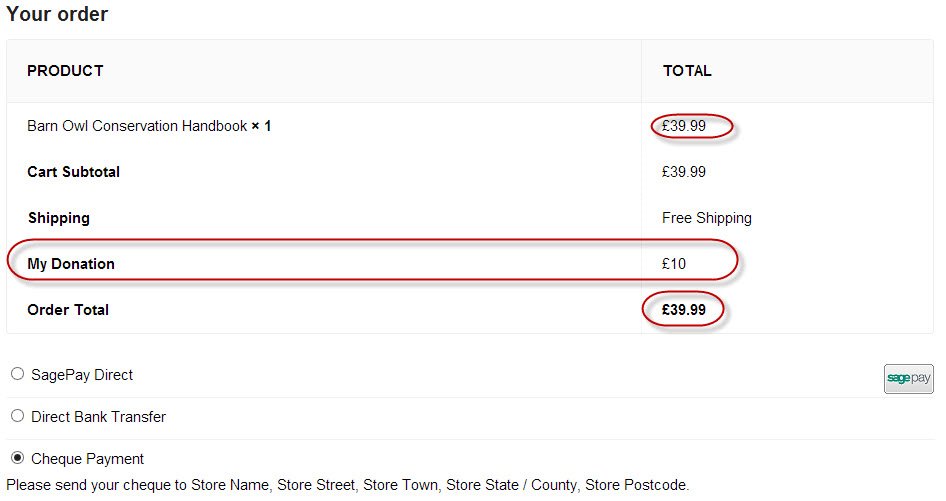
In reply to: [Add Tip WooCommerce] Added amount doesn't reflect in Order TotalI wanted to use this to add a donation to the checkout. It looked like it was exactly what I needed.
This would be a great plugin if it worked properly, but it doesn’t – despite what the author claims, unfortunately.
The added donation does not get included in the total – even when the customer proceeds to payment, the amount is not included in the total to pay. Therefore the plugin does not work as claimed.
Even if it worked, as the author claims, so that the total is added at the payment stage, it is misleading for the customer – who thinks his donation has not been included.
Also, the donation remains in the cart after the cart has been emptied, and having logged out the donation is still showing in the cart (but doesn’t get included in the total).
If logged in as the same user and payment is made (so the cart starts off empty again) the user adds a new product – the donation from the former transaction is still showing.
There is a lot wrong with this plugin!
The plugin author has fixed it and the Right Alignment is working now – turns out that the Canvas theme needs a particular tweak – see this thread
Forum: Plugins
In reply to: [Menu Cart for WooCommerce] New version won't align rightHi there –
Thank you so much – that did the trick!
Forum: Plugins
In reply to: [Menu Cart for WooCommerce] New version won't align rightHi James – sorry I am a bit of a newbie and it probably doesn’t help to post about the same issue to two threads. I just posted this on the other thread
I have Right Alignment set in the MenuCart Settings: Tried everything I can think of
Links to my CSS – using Canvas theme which appears to be overwriting the css
http://zenmoments.org/kusuri/wp-content/themes/canvas/custom.css
http://zenmoments.org/kusuri/wp-content/themes/canvas/style.cssWorks beautifully on http://demo.woothemes.com/canvas/
Hi James – yes I have Right Alignment set in the MenuCart Settings: Tried everything I can think of
Links to my CSS – using Canvas theme which appears to be overwriting the css
http://zenmoments.org/kusuri/wp-content/themes/canvas/custom.css
http://zenmoments.org/kusuri/wp-content/themes/canvas/style.cssWorks beautifully on http://demo.woothemes.com/canvas/
the css tweak to custom.css
.wcmenucart-display-right {
float: right!important;
}
does not work for me, unfortunately
Forum: Plugins
In reply to: [Menu Cart for WooCommerce] New version won't align rightHi there, I was having the same issue with 2.0 – align right not working.
I’ve tried version 2.0.1 (made available by Ewout above) which says “fixed CSS align issue” but it still does not alight right.
I tried adding this
.wcmenucart-display-right {float: right !important;}to custom.css but no joy either.
Look forward to a fix. thanks