Bart

Forum Replies Created
-
Forum: Fixing WordPress
In reply to: Embed for PeerTube contentI’ve added a video to https://haarlem.piratenpartij.nl/2026/07/21/wij-houden-van-muziek-die-speelt/
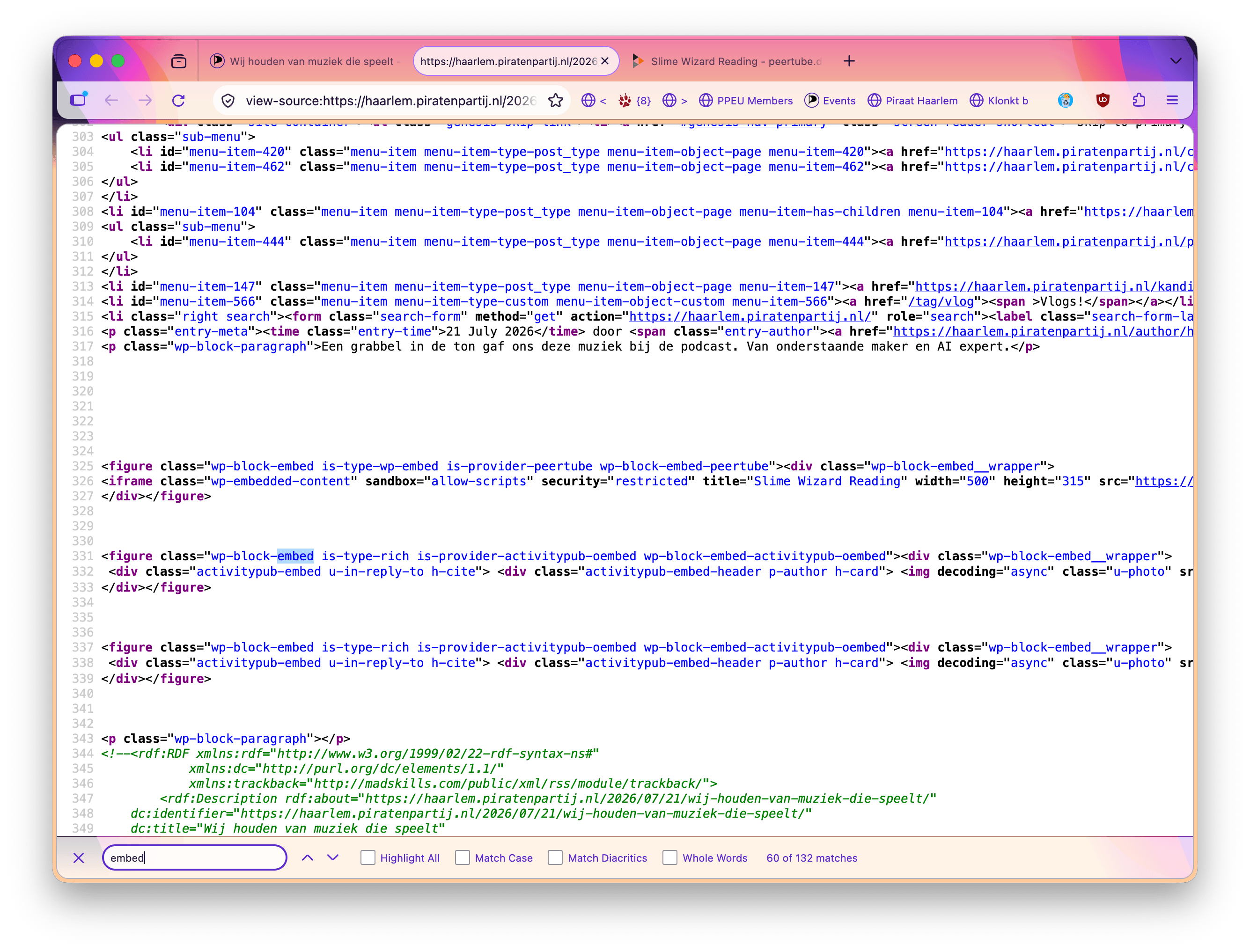
It was a test-post anyway 🤠.What I’ve done is use both the Embed block on the url: https://peertube.debian.social/w/1zkDc4WQthcw6XPyrqwEFC (just a random slime wizard) and the provided embed code in a ‘Custom HTML’ block. The result however is not quite complete.
For a user, the preferred way would be just pasting in the (regular) link and getting the embed block, right? Same as it worked for the posts further in the article.
The source even shows empty lines where the custom HTML should be, but I digress, that is outside of the user-story path..
I say that because the preferred way (embedding) does all the ActivityPub work for us. Like back-linking and notifying the original poster, the option to do a Federated Reply is there as well.
Forum: Fixing WordPress
In reply to: Embed for PeerTube contentThis appears to be WordPress core behaviour rather than something that can be configured through a plugin. If allow-same-origin needs to be preserved for trusted embeds like PeerTube, it would likely require a core change or a custom code solution rather than an additional plugin.
Imran KhanThank you for this statement. It provides a lot of clarity. The way I see it now it is a security measure that needs to be re-thought as something that is preventing participation in the broader Fediverse and all it’s future inventions.
The rationale of
allow-same-originblocking comes from framing same-origin content that is of untrusted provenance, correct? Preventing the shooting of the own foot.The combination
allow-same-originandallow-scriptswould allow for frame-escaping and open the hosting page to the embedded script contents.Thank you for your time!
Forum: Fixing WordPress
In reply to: Embed for PeerTube contentThing was, it wasn’t the iframe but part of the sandbox attribute on the frame that had it’s contents mangled. Is there a plug-in that does this?
Also, regarding extra plugins, this is basic WordPress functionality that should just work for regular users. I know grabbing a plugin might seem like a quick fix, but I’d rather configure the website security properly.
allow-scriptsandallow-same-originon the same iframe is only an issue when you’re framing unsanitized proxied (your own host) contents.Forum: Fixing WordPress
In reply to: Embed for PeerTube contentI’m starting to feel, with another WordPress to test on as well, that it is not a Theme or settings issue but maybe the security considerations surrounding an Embed of the ActivityPub kind?
It is correctly identified as such, the <figure> describing it has the
is-provider-peertubeclass attribute. However the generated iframe is missing the options required for it to work.I mean, if it was embedding something from the same domain that some bad actor was able to place there, then it might be an issue. True.
@pfefferle, Sorry for tagging you. You might know more?
Forum: Plugins
In reply to: [ActivityPub] Alternate names including disallowed charactersThere was not one, but two plugins blocking ‘username enumeration’ via the numbered accounts url.
Thank you so much for your time!
Forum: Plugins
In reply to: [ActivityPub] Alternate names including disallowed charactersThank you! This is part of the issue solved. The issue now is: X-Frame-Options being set to a value that disallows framing. I’ve begun testing from one WordPress site to the other, when that is possible I will further my exploring into why others won’t (yet).
For example: https://browser.pub/pirates%40europeanpirates.eu still fails.
- This reply was modified 4 months, 1 week ago by Bart.
Forum: Plugins
In reply to: [ActivityPub] Alternate names including disallowed charactershttps://ieji.de/search?q=https%3A%2F%2Feuropeanpirates.eu&type=accounts also fails – if that is what you mean?
Forum: Plugins
In reply to: [ActivityPub] Alternate names including disallowed charactersForum: Fixing WordPress
In reply to: Embed for PeerTube contentI’ve started querying the host(s) on that issue. Adding a plugin is also not an option I have.
In the meantime I’m hosting the videos on our own server, which doesn’t do all the fancy things like optimized encoding for internet distribution, automatic subtitles and such luxuries.Thank you for the alternatives, I hope they will be useful for someone else!
Kind regards,
BartForum: Fixing WordPress
In reply to: Embed for PeerTube contentHello Jair,
Thanks for your hints!
I’ve tried both embedding the ‘proper’ embed URL in an embed block, and below it added a custom HTML block. Now that would show nothing if I didn’t wrap it in a <div>! <iframe> is just plainly stripped. No trace of it, not even in the editor when re-opening the post for editing!<div class="embed-iframe-peertube"><iframe title="Camera-toe-zicht" width="560" height="315" src="https://spectra.video/videos/embed/wkjbBoBnT2vzUU3ysKvMVh" allow="fullscreen" sandbox="allow-same-origin allow-scripts allow-popups allow-forms" style="border: 0px;"></iframe></div>Was what I ended up with because I first thought that my eyes deceived me.
<div class="embed-iframe-peertube"></div>Is what remains, in the editor and on the page.
Also, the ‘proper’ embed url does not work for a Federated Reply, but I would believe that to be a PeerTube issue.
Thank you!
- This reply was modified 7 months ago by Bart. Reason: Updated the website, and informing of the Federated Reply