Mohammad Jangda

Forum Replies Created
-
Forum: Plugins
In reply to: [Edit Flow] [Plugin: Edit Flow] Admin – no permission to edit usergroups?!You can use a plugin like Role Scoper or Members instead.
Forum: Plugins
In reply to: [Edit Flow] [Plugin: Edit Flow] Admin – no permission to edit usergroups?!Edit Flow uses custom capabilities for usergroup management and post subscriptions (who should be notified of emails).
To manage usergroups: edit_usergroups
To manage subscriptions: edit_post_subscriptionsJust assign those caps to the the necessary roles/users and that should work.
Thanks for the note, Mike. I’ve committed the fix for this already and will be included in the next version.
With v1.3.1 you can modify the image size and image numbers by adding a bit of code to your theme’s
functions.php(we’ll hopefully add it as an option in a future release).This will change the image size to 500 x 250:
add_filter( 'ioya_image_size', 'my_theme_change_ioya_image_size' );
function my_theme_change_ioya_image_size( $size ) {
    return array( 500, 250 );
}
You can also change the number of images in the same way. This will change the image number to 4:
add_filter( 'ioya_image_count', 'my_theme_change_ioya_image_count' );
function my_theme_change_ioya_image_count( $count ) {
    return 4;
}
Hope that helps!
Glad you like the plugin. The plugin automatically crops images which is why they’re cut off. We’ll try and add a feature so you can specify the size.
Also, to hide months with no posts, you can add the following to your CSS:
div#inoveryourarchives .inoveryouryear ul li span { display: none; }Thanks for the fix Will! We’ll make sure to patch this in the next release.
Forum: Plugins
In reply to: [Edit Flow] [Plugin: Edit Flow] Feature requestsThanks for passing along the email, Erika!
That’s definitely a bug (caused by a fix that we added to 0.6 :P). It should only happen to scheduled posts, though. We’ll have this fixed for the next release.
Forum: Plugins
In reply to: [Edit Flow] [Plugin: Edit Flow] Feature requestsWe’re looking at a number of different ways to improve the calendar and inline editing is definitely one of them. The CSS classes is also a great idea.
As for emails, a link to the post is already included in all the emails. You should see a “View Post” link for published posts and a “Preview Post” link for unpublished ones.
Thanks for the ideas and glad you like the plugin! 🙂
Thanks for the screenshots. The statuses should definitely not be added to the Quick View. We’ll make sure to fix that for the next release.
Forum: Plugins
In reply to: [Edit Flow] [Plugin: Edit Flow] Email notifications, always for adminThanks for the report nicomollet! This will be fixed in the next version.
Forum: Plugins
In reply to: [Plugin: Edit Flow] Support for Editorial Metadata on PagesThanks for the note @dvdwlsh!
We’ve got support for Pages (& other post types) in the works. If you’re feeling daring, you can grab the development version from our github repo which should add metadata support to pages: https://github.com/danielbachhuber/Edit-Flow/commit/2850aa776c1027631efa37a2647f858f2813a7dc
Forum: Plugins
In reply to: [HTML Emails] [Plugin: HTML Emails] question regarding functionalityGlad to hear you’re switching! 🙂
Check out the Plugin Page for info on how to customize the templates.
If you need more info / help, just let me know.
We pushed out v0.6 yesterday and it fixes a lot of comment-related issues. Let us know if the IntenseDebate problem pops up again.
Forum: Plugins
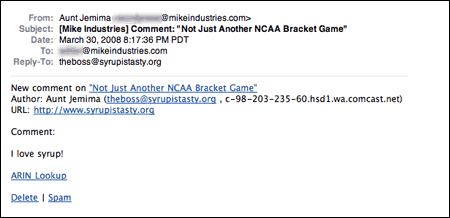
In reply to: [HTML Emails] [Plugin: HTML Emails] question regarding functionalityClean notifications just changes the links so you see links like Spam instead of long stringy URLs like http://example.ca/wp-admin/comment.php?action=spam&c=10055. Screenshot
WIth HTML Emails you get fully designed emails that look far far better than the stock WordPress emails. Screenshot 🙂
Hope that answers your question!
Forum: Hacks
In reply to: Ajax solution similar to WP Categories functioning in Admin areaIf a track can only be on 1 CD at a time, you might be better off registering Tracks as a custom post types and then use the Post2Posts plugin to connect them.
If want to go the “category” route, you can register Tracks as a taxonomy and WordPress will generate the necessary metaboxes for you.