Ashish Rathod

Forum Replies Created
-
Forum: Installing WordPress
In reply to: Error establishing a database connectionPlease find the following lines in your wp-config.php file and edit them according to your database information.
/** The name of the database for WordPress */
define( ‘DB_NAME’, ‘database_name_here’ );/** MySQL database username */
define( ‘DB_USER’, ‘username_here’ );/** MySQL database password */
define( ‘DB_PASSWORD’, ‘password_here’ );/** MySQL hostname */
define( ‘DB_HOST’, ‘localhost’ );You need to make sure that the information for the database name, username, password, and database host is correct.
Forum: Fixing WordPress
In reply to: Elementor@xproprty Enable the safe mode and check again. https://www.youtube.com/watch?v=0mMcjYf5dBQ&t=17s
@eligo02 site worked for me. may be cache issue on your system. please clear the cache and check the private window and other browsers. https://prnt.sc/Eo9O_Nd5jldG
Forum: Fixing WordPress
In reply to: Removing Sidebar on Homepage with Full Width@kimcheng, you can check with the below CSS.
@media screen and (min-width: 1000px)
{
.page-id-4210 .site-main {
width: 100%;
}
}@media screen and (max-width: 999px) and (min-width: 720px)
{
.page-id-4210 .site-main {
width: 100%;
}}
- This reply was modified 2 years, 1 month ago by Ashish Rathod.
- This reply was modified 2 years, 1 month ago by Ashish Rathod.
Forum: Fixing WordPress
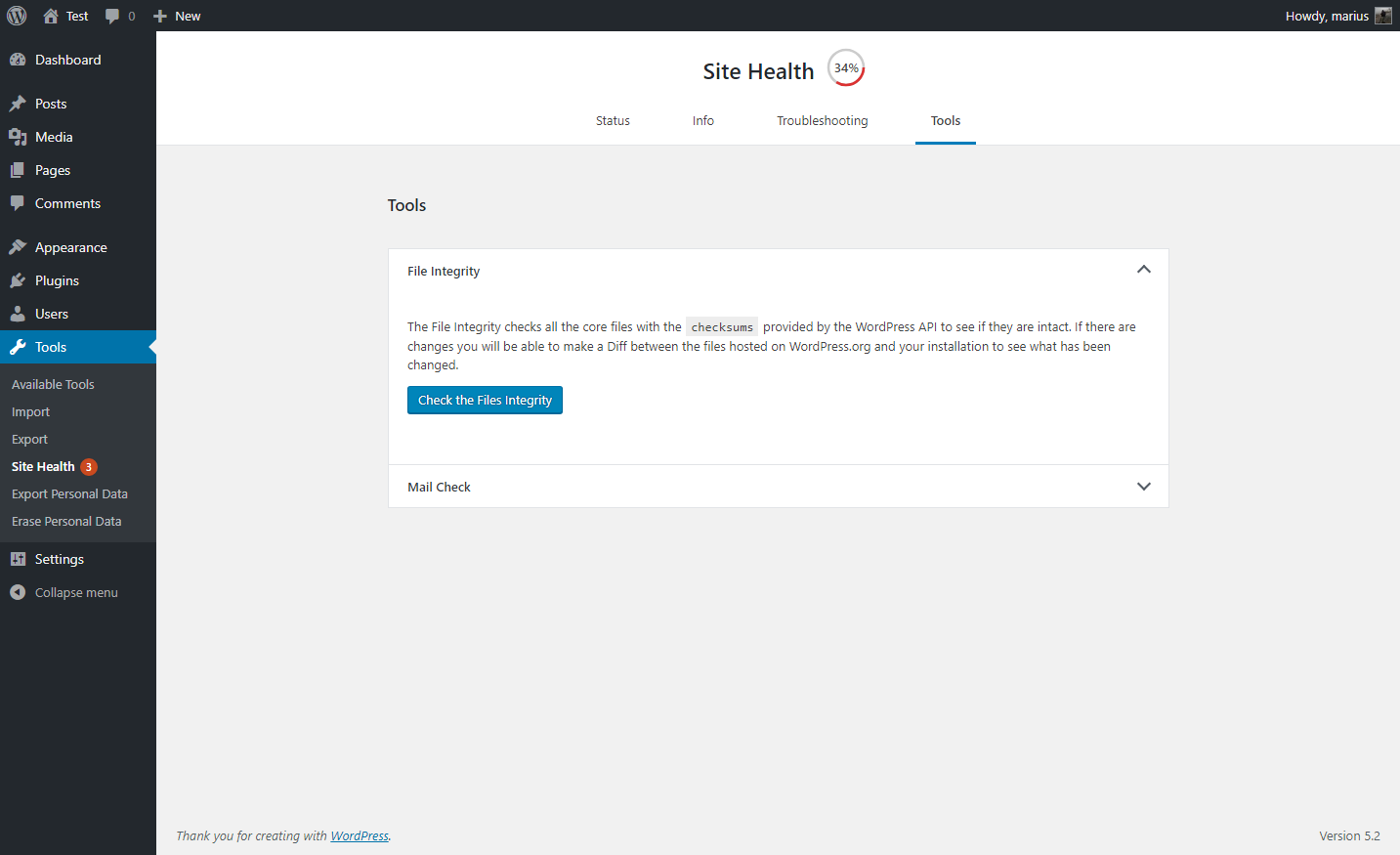
In reply to: Missing WordPress Files@colonue To troubleshoot issues with your WordPress site, download your current WordPress installation. Upload the
wp-login.phpfile via FTP/CPanel to gain access to/wp-admin. Once inside, install the “Health Check & Troubleshooting” plugin and navigate to Tools > Site Health in the Tools Tab. Perform a check on file integrity, and the plugin will provide a list of missing files that you can then upload through FTP/CPanel for resolution.Forum: Fixing WordPress
In reply to: Custom Permalink NightmareHi @unicornbotanicals, Please ensure that you update your
.htaccessfile with the basic WordPress configuration. If the issue persists, I recommend reaching out to your hosting support team to enable the Apachemod_rewritemodule. Alternatively, you can refer to this site for instructions on enabling it yourself: How to enable mod_rewrite for Apache.Forum: Fixing WordPress
In reply to: Can’t set homepage as static pageHi @becky1111,
Please follow the steps below to investigate and select the static page:
1. Ensure that the homepage status is set to ‘Published.’
2. Update your permalink structure by selecting ‘Post Name‘ and then click ‘Update.’
3. Switch to a different theme to investigate if there is a conflict with the current theme.Forum: Fixing WordPress
In reply to: corrupt site, trying to restore, have backup databaseHi @greenpeas, While there are no plugins specifically designed for importing the database, you can explore using the command line as an alternative method.
mysql -u database_username -p database_name < /path/file.sqlMySQL Database name: user_database MySQL Username: user_admin Uploaded database file: database.sqlForum: Fixing WordPress
In reply to: Old link in meny unremovable@vimpan, please add the below filter for unset the menu items in your functions.php file. I hope this solution works for you. 🙂
function wp_unset_menu_items( $menu_objects, $args ) { if ( 'primary_menu' !== $args->theme_location ) { foreach ( $menu_objects as $key => $menu_object ) { if ( $menu_object->title == 'Erbjudanden') { unset( $menu_objects[ $key ] ); break; } } } return $menu_objects; } add_filter( 'wp_nav_menu_objects', 'wp_unset_menu_items', 10, 2 );- This reply was modified 2 years, 1 month ago by Ashish Rathod.
Forum: Fixing WordPress
In reply to: Shouldn’t the URL mysite/wordpress/ redirect to index page?Hello @xyzed,
Kindly review your permalink settings by navigating to the WordPress dashboard and selecting Settings > Permalinks. Opt for “Post Name” and proceed to update the permalink.
If the issue persists, please ensure to update your .htaccess file located in the root directory. In case there isn’t an existing .htaccess file, create one and add the basic rules.
Forum: Fixing WordPress
In reply to: Old link in meny unremovable@vimpan, please review the functions.php file. You can locate it using the following path within your directory: wp-content/themes/>active-theme>/functions.php.
Forum: Fixing WordPress
In reply to: Old link in meny unremovableHi @vimpan,
I think it’s added using the wp_nav_menu_items hook. Please check your functions files and you can comment the hook. Thanks!Forum: Fixing WordPress
In reply to: When a post shared on social media, site icon image uploadedHello, I believe there might be a cache issue on your system because I have tested the social share link for the post, and it displays the featured image correctly on social media. https://i.imgur.com/q8KFKDT.png
Hi @pgdev, You can add below css for remove the next and previous slider text.
a.prev-slide,a.next-slide { font-size: 0 !important; }
Forum: Fixing WordPress
In reply to: product category description editor is missing?Hi! To enable the Description section, you can do so by accessing the screen options at the top of the page within the single product view. Navigate to Screen Options > Product Short Description. https://prnt.sc/-U1OpseVXVUh
Regarding the issue with categories, it appears there may be a conflict between a plugin or your theme. To troubleshoot this, you can try switching to a different theme and deactivating each plugin one by one, then reactivating them to identify the source of the conflict.
- This reply was modified 2 years, 6 months ago by Ashish Rathod.