Andrei

Forum Replies Created
-
Hey there,
Thanks for reaching out to us!
Would you mind sharing with us exactly what is not working for you?
Maybe send some screenshots for a better understanding.
Looking forward to your reply.
Best Regards,
Hey there,
Thanks for reaching out to us!
All the translations made by TranslatePress are saved in your database. They will still be there even if you disable our plugin. You should be able to find your translations in the tables starting with wp_trp_ .
Let me know if you have any further questions.
Regards
Hey there,
Thanks for reaching out to us!
We deeply apologize for the delayed response.
There has been a great load on our support team in the past few days, but such a long reply time is very uncommon.
As far as our knowledge goes, these tools generate different question instantly, so even using an automatic translation engine will not help because these questions are generated after the page load entirely so there is no way for us to translate this.
Let me know if you have any further questions.
Regards
Hello there,
Thanks for reaching out to us!
We deeply apologize for the delayed response.
There has been a great load on our support team in the past few days, but such a long reply time is very uncommon.
TranslatePress works on multisite. You can either network activate the plugin, or do it individually for each sub-site.
You can add languages on individual sub-sites in a network install (and choose the languages in which you translate each sub-site).
However, we do not support having each sub-site as a secondary language.
I’m sorry but we can’t help you in this matter.
Thank you for your patience so far!
Best Regards,
Hey there,
We deeply apologize for the delayed response.
There has been a great load on our support team in the past few days, but such a long reply time is very uncommon.
I’m glad you managed to solve this by yourself.
Let us know if you need help with anything else.
Best Regards,
Hey there,
Thanks for reaching out to us!
We deeply apologize for the delayed response.
There has been a great load on our support team in the past few days, but such a long reply time is very uncommon.
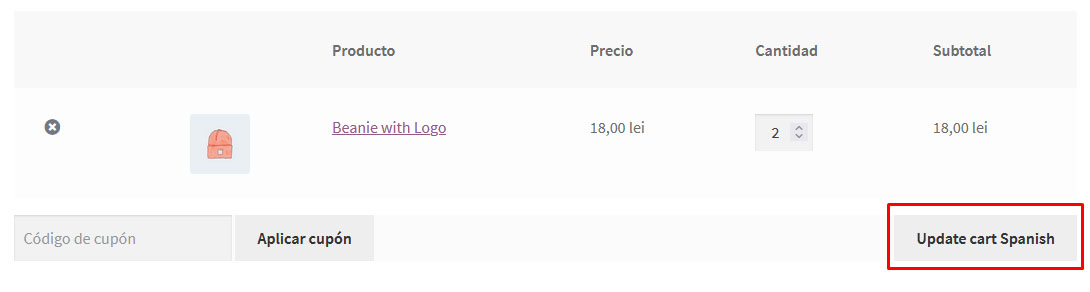
The strings that you can’t translate like First Name, Last Name those are probably not localized or you can change them directly from the plugin. Think of them as actual content, like something that’s inside a post. We’re expecting the content to be written in the original language, thus you can’t select those strings.
My suggestion would be to use Loco Translate: https://wordpress.org/plugins/loco-translate/
If you want to translate a gettext string using Loco Translate, you will first have to exclude that string from being translated by TranslatePress.
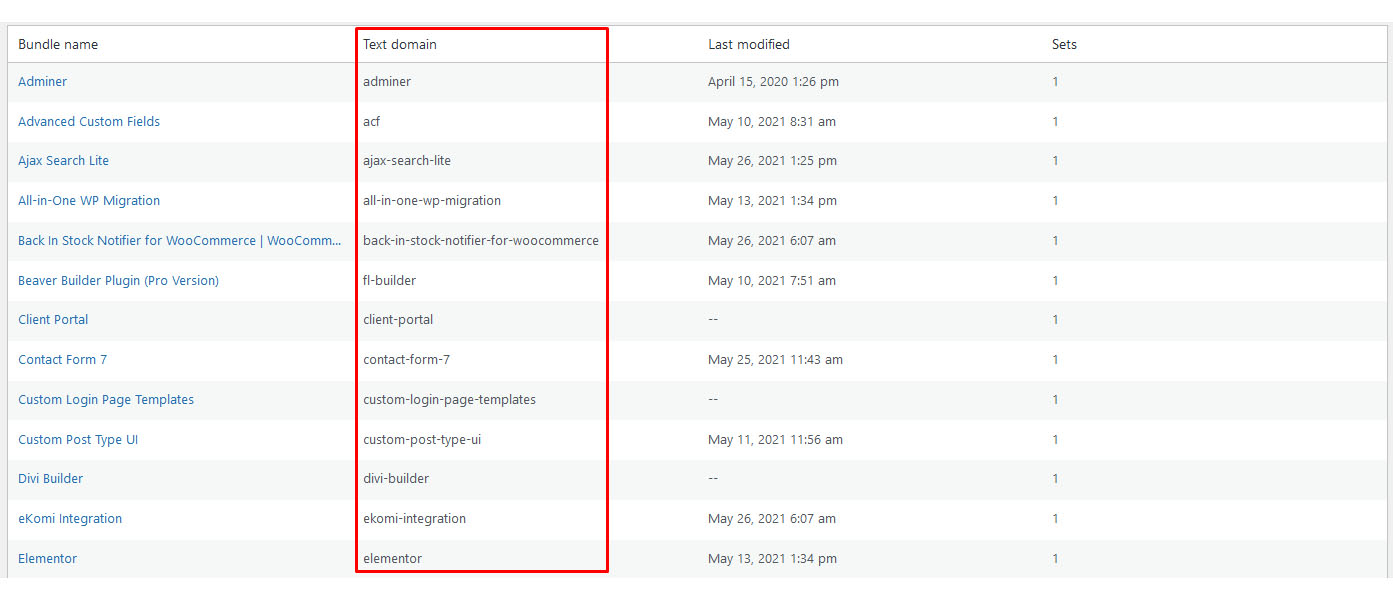
You can find a plugin’s domain by going to: Loco Translate -> Plugins and each plugin’s domain is displayed in the Text domain column.
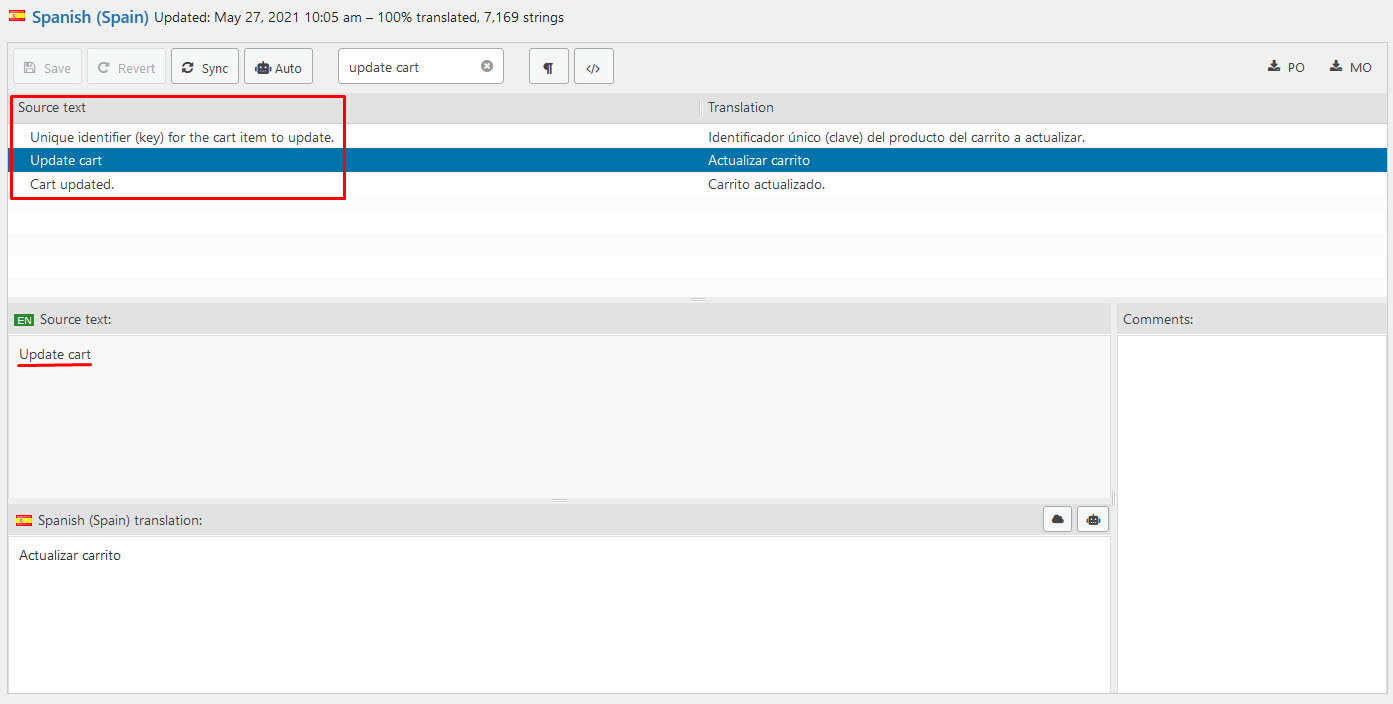
https://www.cozmoslabs.com/wp-content/uploads/2021/06/loco_text_domain.jpgYou can find the original string by accessing the desired plugin in any translated language. The original text is the one found in the Source text column.
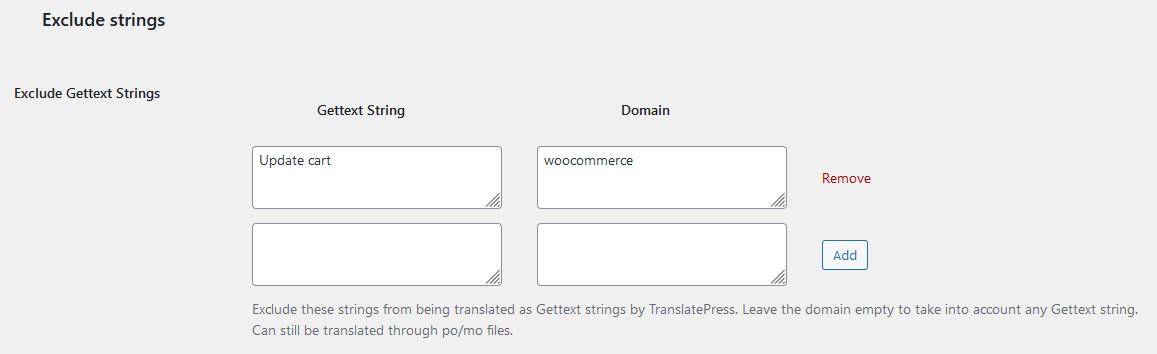
https://www.cozmoslabs.com/wp-content/uploads/2021/06/loco_find_source_text.jpgAfter you have found the desired string, you need to insert it in the Gettext String field (the domain is optional).
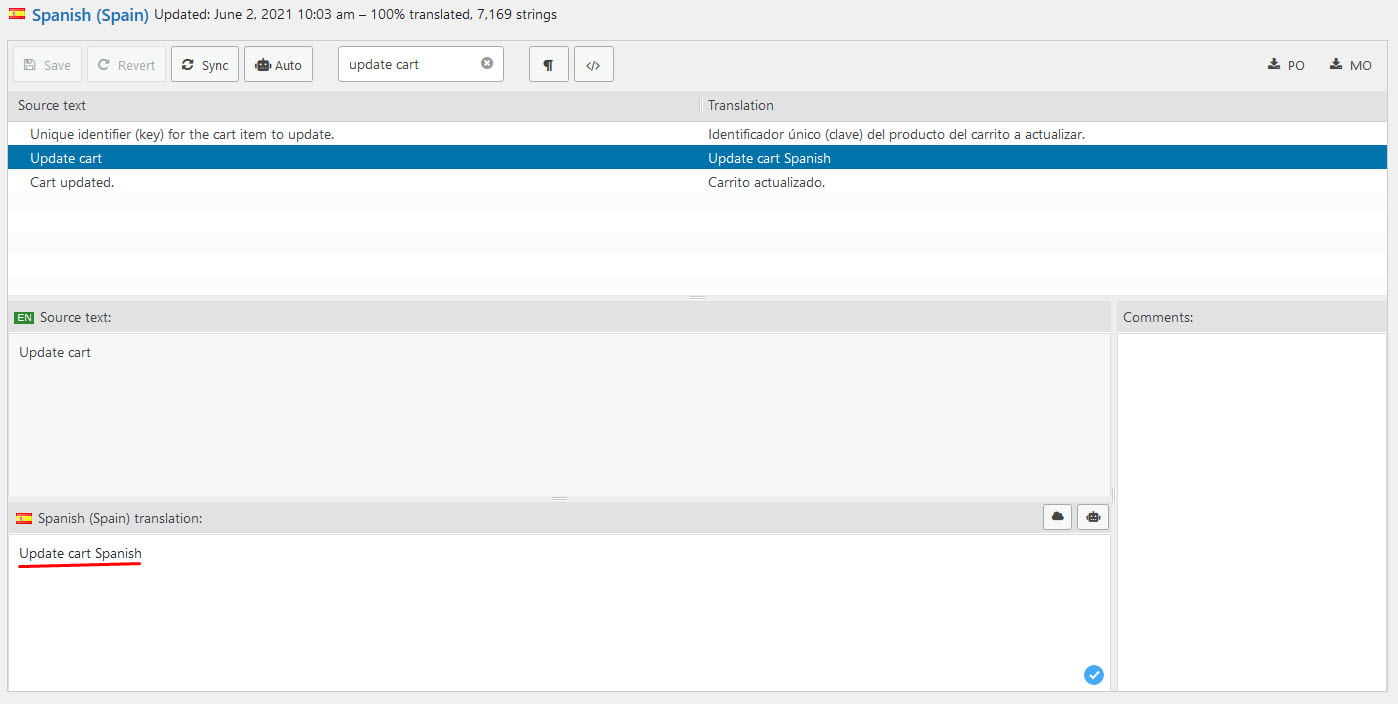
https://www.cozmoslabs.com/wp-content/uploads/2021/06/tp_disable_gettext.jpgNow you can properly change the translation for that string using Loco Translate.
https://www.cozmoslabs.com/wp-content/uploads/2021/06/loco_translate_text.jpgThe translated result can now be seen in the front end of your site.
https://www.cozmoslabs.com/wp-content/uploads/2021/06/update_cart_loco_text.jpgLet me know if this approach works properly in your case.
Best Regards,
Hey there,
Thanks for reaching out to us!
We deeply apologize for the delayed response.
There has been a great load on our support team in the past few days, but such a long reply time is very uncommon.
You can try to add the following CSS code:
@media screen and (max-width: 800px) {

.trp-language-switcher-container:not(#trp-floater-ls){
margin-left: 70% !important;
}

.trp-ls-shortcode-current-language {
width: 100px !important;
font-size: 75% !important;
}

.trp-ls-shortcode-language {
width: 100px !important;
font-size: 75%!important;
}

}
You can change the values to better work with your site.
Let me know if you have any further questions.
Regards
Hey there,
Thanks for reaching out to us!
Please go to TP Advanced settings and turn on “Open language switcher only on click”.
This approach should be more suitable for mobile versions.
Let me know if this helps.
Kind Regards,
Hello there,
Thanks for reaching out to us!
I tried replicating this on my instance with a default twenty-twenty theme, woocommerce and translatepress-multilingual but I was still able to remove products from the cart page without any issue.
Pease try the following test with TP and WooCommerce activated on your instance:
Since this looks a lot like a conflict with some other code, the first/next recommended step is the conflict test (ideally in a staging environment):
*Briefly* disable all other plugins and enable the default Twenty Twenty theme. Please also disable all add-ons. If this fixes the problem, as it probably will, enable everything one by one, checking each time to see when the problem returns.
Please let us know when you find the conflict so that we can take a look and see what we can do about it.
Regards
Hey there,
I’m sorry for the long waiting time you encountered.
There has been a great load on our support team in the past few days, but such a long reply time is very uncommon.
I’m not sure if you are able to use the shortcode on backgrounds, you will have to give it a go and let me know if you encounter any issues along the way.
You should be able to add shortcodes using a code module around the image/video that you want to translate.
Thank you for your patience so far!
Regards
Hello there,
Thanks for reaching out to us!
Changing your theme should not affect your translations in any way because they are saved in your database.
If you do encounter issues along the way please let me know.
Best Regards
The way we prioritize tasks is based on the number of users that request this feature.
At the moment we have other features that have a higher request rate than this specific feature.
We are going to keep tracking this and let you know as soon as there is any improvement on this.
All the best to you!
Hey there,
I’m sorry for the long waiting time you encountered.
Tickets opened on wp.org have a lower priority then those on https://translatepress.com/support/Here is a bit of code sent from our development team that might be of some use to you (if you still need it).
$trp                 = TRP_Translate_Press::get_trp_instance();
    $trp_settings        = $trp->get_component( 'settings' );
	$language_codes_array = $trp_settings->get_settings()['publish-languages'];
And here you have an array of active language codes set by the user.
$language_codes_arrayWe are thrilled that you added support for TranslatePress. We will make sure that you are mentioned here https://translatepress.com/docs/translatepress/
Let us know if you have any further questions.
Best Regards
Hello there,
Thanks for reaching out to us!
I did encounter this problem on your website but I was not able to replicate on my instance. I did have turned on only Woocommerce and TranslatePress Multilingual with a default theme and everything worked just fine.
Since this looks a lot like a conflict with some other code, the first/next recommended step is the conflict test (ideally in a staging environment):
*Briefly* disable all other plugins and enable the default Twenty Twenty theme. Please also disable all add-ons. If this fixes the problem, as it probably will, enable everything one by one, checking each time to see when the problem returns.
Please let us know when you find the conflict so that we can take a look and see what we can do about it.
Best Regards
Hello there,
Thanks for reaching out to us!
One of my colleagues did already answer your question.
This was his answer:
At this time TranslatePress does not support the WPRocket “pre-cache” feature.
Therefore, translated pages will not be affected when this option is enabled.

This is known to the developers and will be fixed when they have time to deal with this task.
However, as we have other features that are requested by many users; we will concentrate on those for now.
If I am mistaken and this is not the question that you asked please provide further detail so I can understand better and address your issue.
Best Regards,