WooCommerce Shipping Tracking plugin activation
-
Hello!
I have bought your plugin on Envato Market, from where you have dissapeared.
I have a license key, but it is not accepted by your plugin (I mean your old plugin).
How can I activate it?

-
Unfortunately, I have converted it to 1-year subscription. While I have bought a full product without subscription!
Hi,
and sorry for the slow reply.The reason the key is rejected: those are two different licensing systems. The plugin you bought on Envato is activated with your Envato purchase code. The licence key you received after converting belongs to the new plugin, so the old one has no idea what to do with it. Nothing is broken; the key is simply in the wrong place.
From here you have two options, and both are fine:
- Stay on the plugin you bought. It is no longer listed for sale, but it is still in your Envato account: you can download it from your Downloads page any time, and it activates with your purchase code exactly as before. Your licence has not been revoked and nothing has been switched off.
- Use the licence you converted. That belongs to Vanquish Shipping Tracking for WooCommerce, the rewritten plugin on WordPress.org. One thing that trips everyone up: Premium there is a separate download, not a key you type into the free version — the free build does not contain the premium features at all, so a key would have nothing to unlock. To get it:
- sign in to users.freemius.com with the email you used when converting
- download the Premium .zip
- in WordPress: Plugins → Add New Plugin → Upload Plugin, upload it and choose to replace the existing version
- activate it and enter your licence key when prompted
Your settings and the tracking on your orders migrate automatically. Since version 1.0.7 these steps are also written inside the plugin itself, under Shipping Tracking → Activate Premium — your question is part of why I added them.
One important difference before you decide: the two are not the same product. The new one is a rewrite, and the shipping timeline in particular works differently. In the plugin you bought, the timeline was produced by embedding a third-party tracking widget. That approach was never covered by any agreement with the data provider: it worked, but it could have stopped working at any moment, without warning and with nothing I could do about it. Building a paid feature on something that fragile is not something I can responsibly keep doing.
So the new plugin does it properly: it talks to a tracking service through its official API, using your own key (AfterShip, TrackingMore or Track123, whichever you prefer). It means an account with one of those services and one extra setup step, but in exchange the timeline is stable, it is under your control, and it cannot disappear because something changed on someone else’s site. Everything else — carriers, tracking numbers, the links, the order emails, your messages — works as before.
On the subscription point: I understand the frustration, and I want to be straight rather than gloss over it. What you bought on Envato stays yours and keeps working. The new plugin’s core — carriers, tracking numbers, tracking links, the details in the order emails and on the order page — is free forever, with no subscription; only the advanced features are paid. I am one developer, and the marketplace model pays once while a WooCommerce plugin needs continuous work every year (HPOS, the block checkout, PHP versions). The year of Premium included with the conversion is meant as a thank-you on top of that free core, not as a replacement for what you already paid.
Hello!
Could you please correct it?
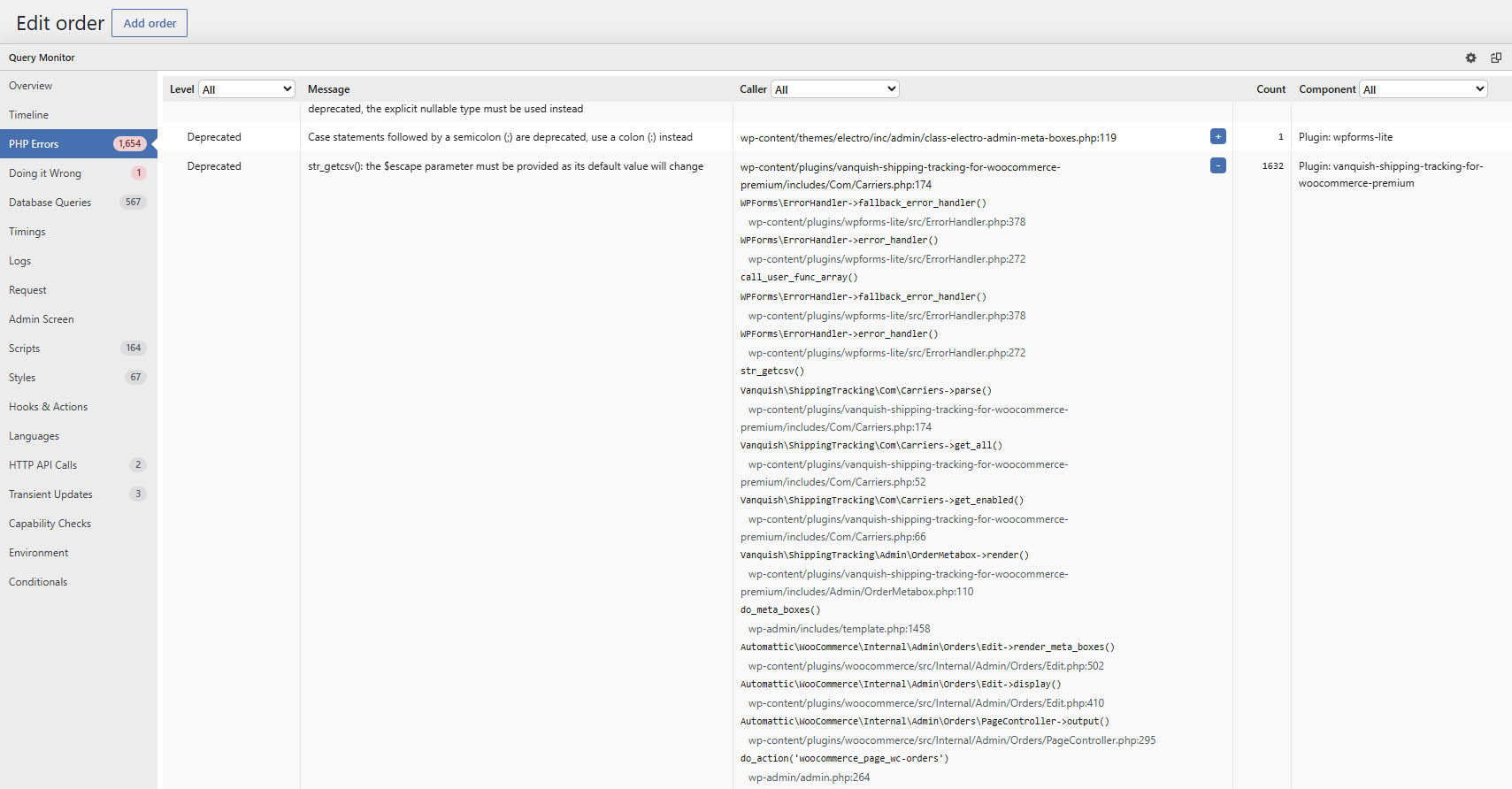
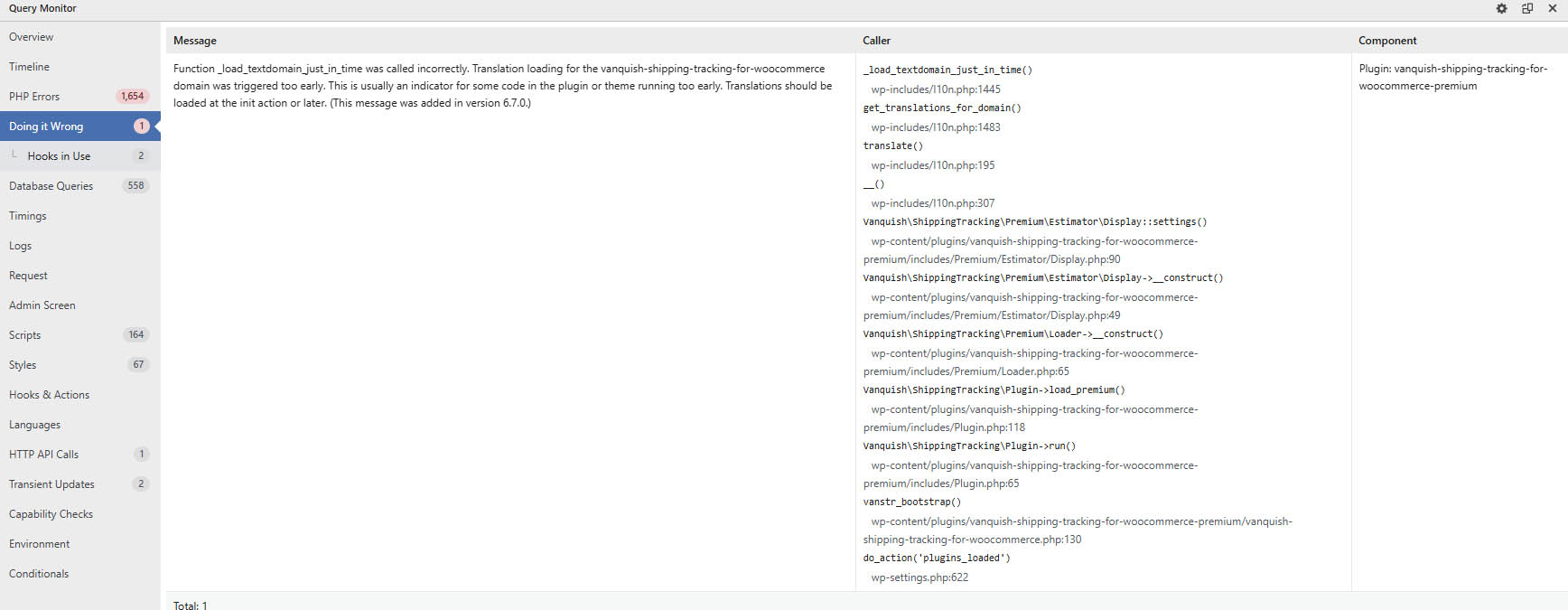
Thanks for the screenshots — both notices were real, and both are fixed in 1.0.9, which is out now.
The first one was the important one: the plugin was reading its carrier file in a way that PHP 8.4 deprecates, and since it parses one line per carrier that produced over 1,600 notices on a single page load. That is now fixed, and I verified the file still parses identically.
The second was the plugin loading its translations slightly earlier than WordPress 6.7 allows. Also fixed.
Neither affected how the plugin works, but they were filling your log and slowing down the order screen for no reason. Thanks for taking the time to send the details — that made them easy to pin down.

You must be logged in to reply to this topic.