@bertomolina98 I’ll address your different enquiries individually, for further clarity.
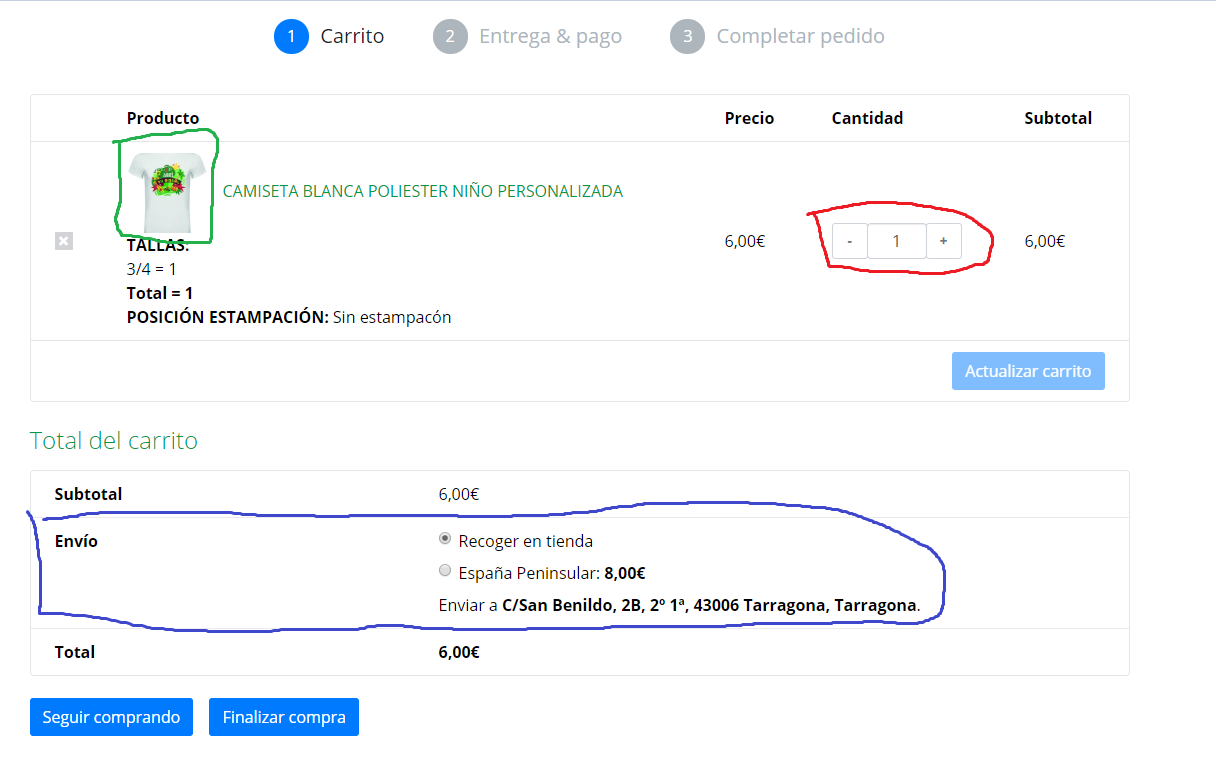
I would like to block in the cart this square. The one that you can choose the quantity. (Red color).
There isn’t a way to do remove this just from the cart, while keeping the quantity selector on the product page.
If you’d like to restrict sales of items to one item per product, that can be done by configuring products to be sold individually. But that would remove quantity selectors across the entire store, so that customers can only purchase 1 of each product per order.
Removing that quantity selector only from the cart page would require custom coding. Perhaps you can share the URL of your cart page, in case someone has any particular suggestions about the coding.
I would like to delete this space “ENVÍO” because this option is in the 2nd step when you are in the check out. (Blue color)
I see that you are using a custom checkout workflow that seems to split the process in several steps. I’m not familiar with the tool you are using to achieve this, so I can’t tell for sure whether this setting will work. But there is an option in the shipping settings (WooComemrce > Settings > Shipping > Shipping options) that allows you to remove the shipping calculator from the cart page.
I’m not sure that will work on your site, since yours is not a traditional cart page – but you can give it a try.
I cannot see the image (Green color) correctly, it looks like cut.
That will be due to how your theme processes and crops images.
From what I can do in your screenshot, the image is being cropped so that it has a square (1:1) thumbnail. However, the image of your product is not a square.
To change that, you’ll want to either upload images that look good when cropped as squares, or change the settings for how thumbnails are cropped.
If your theme does not declare image sizes by default, you can change that setting from the customizer of your site. Head to Appearance > Customize > WooCommerce > Product Images. If available, this is what the options will look like: