Plugin Contributor
 Ewout
Ewout
(@pomegranate)
Hi!
Did you make a custom template for this purpose? If so, you probably didn’t copy it to your child theme (documentation here).
I recommend working with a template action hook instead – simply add a small code snippet to your theme functions or the Code Snippets plugin. Here’s an example (exact meta key for the date field may be different): Print a delivery date on the packing slip.
More information about custom fields in general: Displaying a custom field
Hope that helps!
Ewout
Thread Starter
 yps33
yps33
(@yps33)
I copied the changes that I made over to the new php files, and the the template functions php file, but still the delivery date and time doesn’t show up.
Plugin Contributor
Ewout
(@pomegranate)
I need a bit more information about the order details and the exact code you used. When you write “I copied the changes that I made over to the new php files” – do you mean you edited the plugin files directly? I can’t recommend that, it’s much better and easier to use the tmplate action hooks or copy the template files to your child theme.
Make sure that you’re using the correct meta keys/field names, you can check this with the WooCommerce Store Toolkit. More information here: Finding WooCommerce Custom Fields
Hope that helps!
Ewout
Hello I have a similar question: I use WooCommerce PDF Invoices & Packing Slips Version 1.5.36 with WooCommerce Delivery Time Slots Version 1.0.2.
I put the code you provided at http://docs.wpovernight.com/woocommerce-pdf-invoices-packing-slips/pdf-template-action-hooks/#example-1-print-a-delivery-date-on-the-packing-slip (Example 1) into the functions.php of my child theme (/wp-content/themes/enfold-child).
Unfortunately the delivery time and date are still not showing up.
I also use a copy of the pdf folder: /wp-content/themes/enfold-child/woocommerce/pdf/enfold-child
If I try the Example 2 all is working correctly.
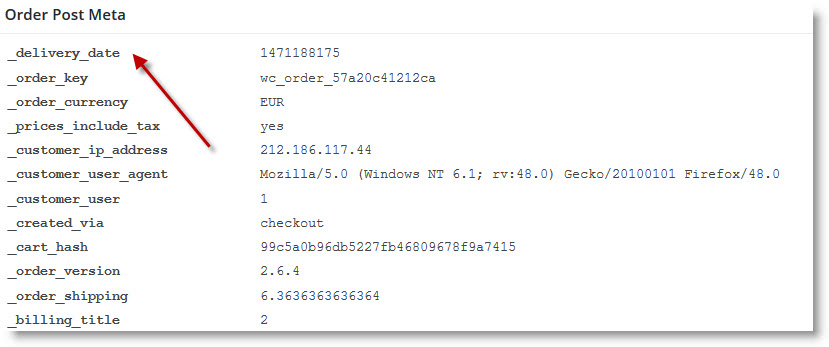
I installed the WooCommerce Store Toolkit und took a look at the hidden custom fields. Screenshot is here: Screenshot
So the key would be: _delivery_date 1471188175
I tried to change the line
<td><?php $wpo_wcpdf->custom_field(‘delivery_date’); ?></td>
to
<td><?php $wpo_wcpdf->custom_field(‘_delivery_date’); ?></td>
but with no success.
Help is very apreciated!
Plugin Contributor
Ewout
(@pomegranate)
Hi! Your could should certainly work. Are you checking the invoice? The example is only for the packing slip.
Also, note that the plugin you’re using uses a unix timestamp rather than a formatted date, so you’d need to convert that to a human readable date first (WordPress has a function date_i18n() for this).
Try this, which should work on both the packing slip and the invoice:
add_action( 'wpo_wcpdf_after_order_data', 'wpo_wcpdf_delivery_date', 10, 2 );
function wpo_wcpdf_delivery_date ($template_type, $order) {
    ?>
    <tr class="delivery-date">
        <th>Delivery Date:</th>
        <td><?php echo date_i18n( get_option( 'date_format' ), $order->delivery_date ); ?></td>
    </tr>
    <?php
}
Let me know if that does work!
Ewout
Many thanks, this works perfectly!
I also added the delivery time:
add_action( 'wpo_wcpdf_after_order_data', 'wpo_wcpdf_delivery_date', 10, 2 );
function wpo_wcpdf_delivery_date ($template_type, $order) {
    ?>
    <tr class="delivery-date">
        <th>Lieferdatum:</th>
        <td><?php echo date_i18n( get_option( 'date_format' ), $order->delivery_date ); ?></td>
    </tr>
    <?php
}

add_action( 'wpo_wcpdf_after_order_data', 'wpo_wcpdf_delivery_time', 10, 2 );
function wpo_wcpdf_delivery_time ($template_type, $order) {
    ?>
    <tr class="delivery_time">
        <th>Lieferzeit:</th>
        <td><?php echo $order->delivery_time; ?> Uhr</td>
    </tr>
    <?php
}
Plugin Contributor
Ewout
(@pomegranate)
Awesome, thanks for sharing! If you can spare a minute, I’d really appreciate a plugin review! https://wordpress.org/support/view/plugin-reviews/woocommerce-pdf-invoices-packing-slips#postform
Ewout