• Resolved mixingmag

    (@mixingmag)


    I’m using Hummingbird’s Asset Optimization in https://myhomepee.com

    It looks fine when I refresh my site with logged out.

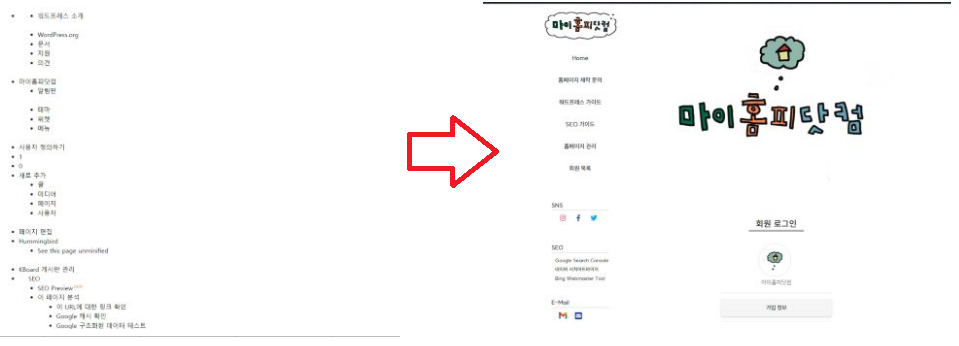
    But when I logged in, I can see html element that CSS styesheet is not applied (about under 1 second. just a blink)

    https://myhomepee.com/wp-content/uploads/2023/01/screenshot.png

    I tried moving/unmoving or preload CSS stylesheet from Asset Optimization section but it won’t work.

    I don’t know why this happend in logged in situation only.

    Any advice would be appreciate.

    Thanks.

    The page I need help with: [log in to see the link]

Viewing 4 replies - 1 through 4 (of 4 total)
  • Hi @mixingmag

    I hope you are doing well today.

    Could you try to exclude your theme css files in first place from list, clear site cache and see if that helps?

    Kind Regards,
    Kris

    Thread Starter mixingmag

    (@mixingmag)

    I tried exclude child-style.css in automatic mode and it works. but is there other way to solve this with manual mode?

    Hi @mixingmag

    I hope you are doing well today.

    In manual mode can you try to not combine this site and see of this helps? I only see in your previous message that you try only “moving/unmoving or preload CSS stylesheet”.

    Kind Regards,
    Kris

    Thread Starter mixingmag

    (@mixingmag)

    I found out that ‘admin-bar’ was moved to footer. I disabled that then it solved. thanks for help 🙂

Viewing 4 replies - 1 through 4 (of 4 total)

The topic ‘When I logged in, CSS load gets slower’ is closed to new replies.