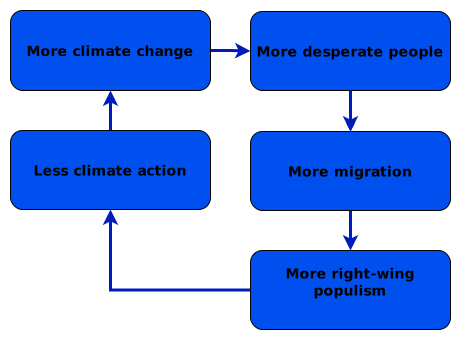
Does the problem also occur in Safari when you access the file directly? /wp-content/uploads/2026/08/Populism-cycle-pic010-4b.svg – if so, then it’s a browser issue and not a problem with WordPress or how WordPress displays the content. In that case, I’d recommend first checking to see if a browser update is available.
Thanks THREADI.

From safari on my mobile, I directly opened

https://feedbackreigns.net/wp-content/uploads/2026/08/Populism-cycle-pic010-4b.svg

and the screen shows the dame erroneous dark blue fill in the rectangles. Others could test this.

This may rule out your suggested browser issue. I got the same erroneous rendition on a friends iPad using safari.

I have now created a separate page to show this diagram by itself.

https://www.feedbackreigns.net/page-for-forum-questions/

This is my first use of SVG files.

I have used in line SVG code so I suspect that anyone can view my diagrams.net SVG code via the above “page for forum questions”.

I did NOT pick a transparent background for my SVG diagram. I thought this would give more predictability for how the diagram appears.

As I am using in line SVG I think that my CSS code should be able to set the colours, and this is not happening now. Here is my CSS additional code.

/* =================================

   Style Draw.io Inline SVGs (via SVG Support plugin)

   ================================== */

/* 1. Force arrows and connector lines to black */

svg.style-svg path {

  stroke: #000000 !important;

  fill: #000000 !important;

}

/* Preserve transparent fill on line paths (so arrows don't become solid shapes) */

svg.style-svg path[fill="none"] {

  fill: none !important;

}

/* 2. Force box backgrounds to soft yellow (excluding the main canvas background) */

svg.style-svg g[data-cell-id] rect:not([width="100%"]) {

  fill: #fff9d6 !important; /* Soft Yellow */

  stroke: #000000 !important; /* Optional: outline color */

}

/* 3. Force all node text to black */

svg.style-svg foreignObject div,

svg.style-svg foreignObject span,

svg.style-svg foreignObject p,

svg.style-svg text,

svg.style-svg tspan {

  color: #000000 !important;

  fill: #000000 !important;

}

If you want any more details please let me know.
Artificial intelligence supplied me with the above CSS code. I have only a little understanding of this code. If you spot hallucinations in the code please let me know.
In your example page, you’ve embedded the graphic differently than on the homepage you linked to at the very top of your thread. On the homepage, the graphic is embedded using an img element, which causes the browser to render the SVG code separately.
On your example page, however, the SVG is embedded (without an img element – simply directly in the HTML code), so that CSS styles loaded on that specific page can also affect the rendering. In exactly this type of embedding, you can influence the CSS rendering as needed using your own custom CSS.
I’m now unsure which of these two scenarios you’re referring to exactly, because I don’t see the homepage you originally mentioned as a problem in this context. If you’re referring to the embedding as shown on your example page and you’re seeing color issues in the graphic there, then – as I said – it’s due to the CSS on that page. That, in turn, is primarily controlled by your theme and, if applicable, plugins. In that case, you have two options to resolve this:
- Avoid embedding SVG graphics; instead, include them using the
img element (as on the homepage).
- Check which CSS properties affect your specific SVG graphic and adjust those settings or (as you’ve already done) override them.
I do not know quite how I have worked it out but it is ok for now. Thanks