Hi Cristina,
Thank you for reaching out .
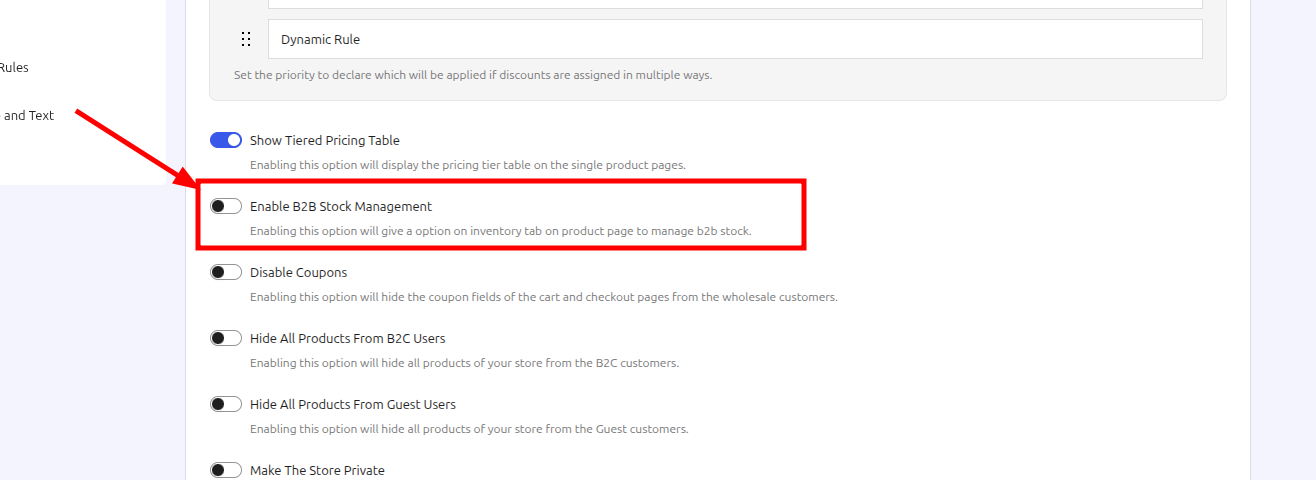
To separate your B2B stock from your B2C stock, you need to enable the dedicated B2B stock management feature from the general settings. Once this option is turned on, the system will allow you to manage and display separate stock values accurately without overriding your standard B2C product pages.
Please follow these quick steps:
- Navigate to the plugin’s General Settings from your WordPress dashboard.
- Look for the B2B Stock Manage option.
- Toggle it to Enable.
You can see exactly where to find and activate this option in the setup screenshot
Please save your changes after enabling it and check your product pages again. Let us know if this resolves the issue or if you need any further assistance!
Hi,
Yes, I had already done that, but the problem persists. Furthermore, I’ve noticed other issues with the plugin. I am unable to delete or modify the roles of users already in the plugin. I also tried adding a “Select role” field to the registration form, but it won’t let me edit the selection options. Could you please help me?
Regards,
Cristina Columpsi
Plugin Support
 Owadud
(@owadud655)
Hi Cristina,
Can you please read this article and follow the 3rd step?
It will help us to identify the cause quickly.
Hi,
i followed the 3rd step and sent my ticket 2 days ago but I haven’t received any reply yet.
Could you please check it?
Regards,
Cristina Columpsi
Plugin Support
Owadud
(@owadud655)
Hi there,
We’ve replied to your ticket. Kindly check.