• Resolved Matthew

    (@revdarkwing)


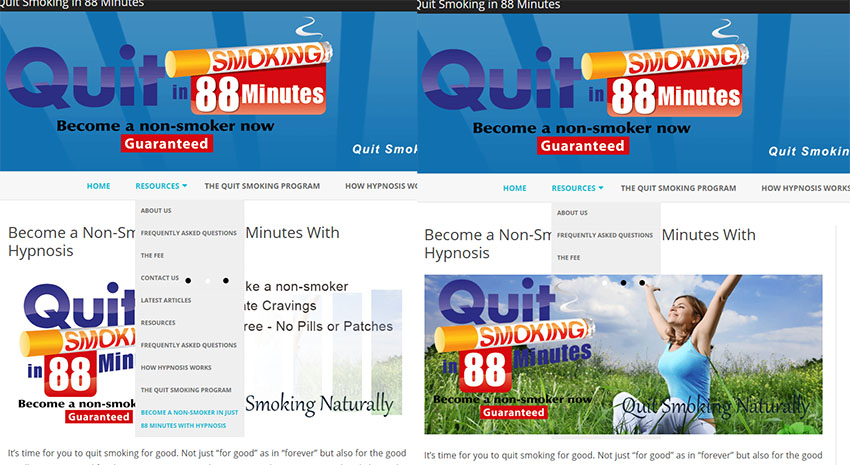
    I have installed your slider on my website and it’s blocking the drop down menu on the navigation bar.
    http://quitsmokingin88minutes.com
    You can actually see the rest of the drop down menu as the slider changes images but then it blocks it out again. Any way to fix this or do I need to use a different plugin?
    I love the plugin except for this bug.
    thanks

Viewing 5 replies - 1 through 5 (of 5 total)
  • Hello
    Thanks for the link. We can see a drop down only on the menu item called “Resources” if you have that only one, then it works fine.

    Please tell me what we should do to see the issue? We tested on Chrome

    Thread Starter Matthew

    (@revdarkwing)

    I am not sure if you didn’t see the problem or if it’s not working on my computer only (using Chrome)
    Here is a screen shot of how it looks for about half a second as the images change over and then how it looks once the image renders side by side. You can see clearly where the drop down menu is visible in one and cut off in the other.
    http://quitsmokingin88minutes.com/uploads/side-by-side.jpg

    PS: I just tried it in Firefox and the exact same thing happened. Are you not getting the same thing?

    Thread Starter Matthew

    (@revdarkwing)

    Hey guys… still waiting for a reply …. this problem persists. Thanks

    Hello
    I am very sorry for the delay .
    Please contact your theme support your issue relates to the theme menu z-index, they should enlarge the z-index up to 999999 and it will correct the issue

    Thread Starter Matthew

    (@revdarkwing)

    That fixed it.. thanks

Viewing 5 replies - 1 through 5 (of 5 total)

The topic ‘Slider blocks drop down menu’ is closed to new replies.