Site error


-
Hello.
I do not see the screenshot in your previous message. But please update your version of Booking Calendar to the latest update 11.4.1, it should resolve the issue that was exists in update 11.4
Kind Regards.
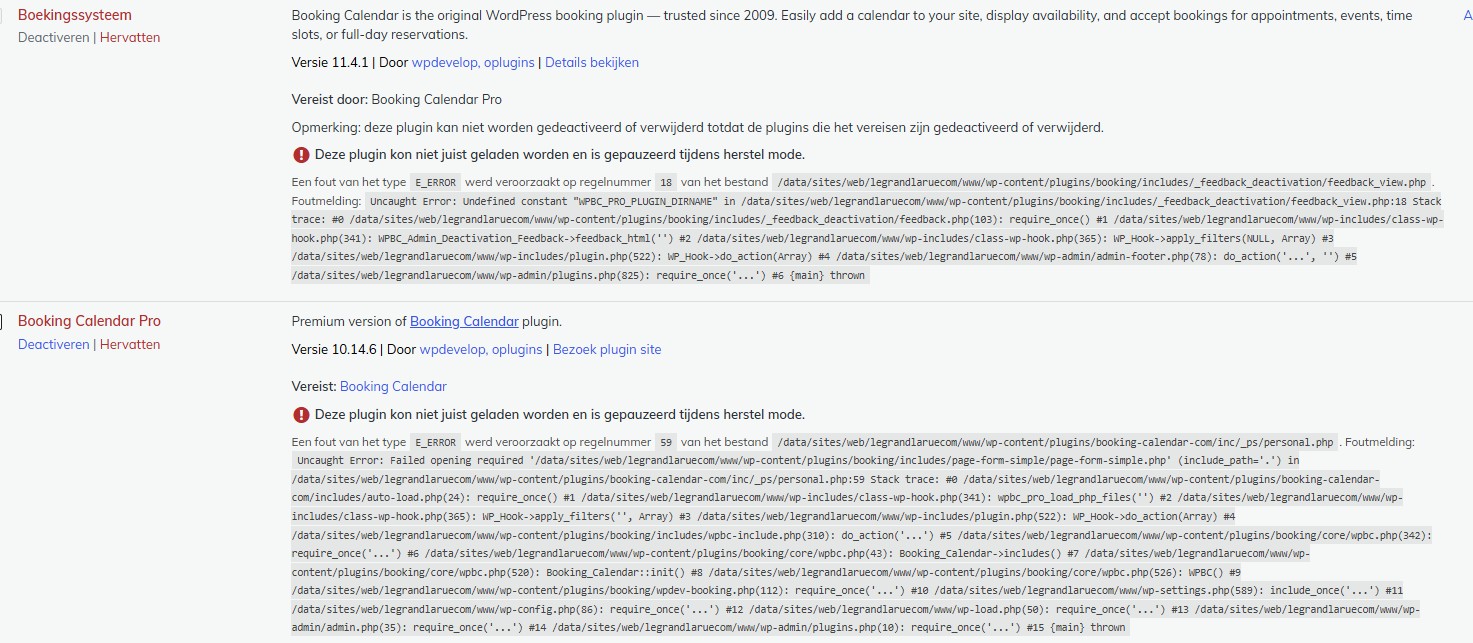
Booking calender is V11.4.1
The pro version is V10.14.6
After enabling the pro version, an error occurs and the site is not loading.
Here are the errors:
Booking calender:
Een fout van het typeE_ERRORwerd veroorzaakt op regelnummer18van het bestand/data/sites/web/legrandlaruecom/www/wp-content/plugins/booking/includes/_feedback_deactivation/feedback_view.php. Foutmelding:Uncaught Error: Undefined constant "WPBC_PRO_PLUGIN_DIRNAME" in /data/sites/web/legrandlaruecom/www/wp-content/plugins/booking/includes/_feedback_deactivation/feedback_view.php:18 Stack trace: #0 /data/sites/web/legrandlaruecom/www/wp-content/plugins/booking/includes/_feedback_deactivation/feedback.php(103): require_once() #1 /data/sites/web/legrandlaruecom/www/wp-includes/class-wp-hook.php(341): WPBC_Admin_Deactivation_Feedback->feedback_html('') #2 /data/sites/web/legrandlaruecom/www/wp-includes/class-wp-hook.php(365): WP_Hook->apply_filters(NULL, Array) #3 /data/sites/web/legrandlaruecom/www/wp-includes/plugin.php(522): WP_Hook->do_action(Array) #4 /data/sites/web/legrandlaruecom/www/wp-admin/admin-footer.php(78): do_action('...', '') #5 /data/sites/web/legrandlaruecom/www/wp-admin/plugins.php(825): require_once('...') #6 {main} thrown
Booking Calender pro:
Een fout van het typeE_ERRORwerd veroorzaakt op regelnummer59van het bestand/data/sites/web/legrandlaruecom/www/wp-content/plugins/booking-calendar-com/inc/_ps/personal.php. Foutmelding:Uncaught Error: Failed opening required '/data/sites/web/legrandlaruecom/www/wp-content/plugins/booking/includes/page-form-simple/page-form-simple.php' (include_path='.') in /data/sites/web/legrandlaruecom/www/wp-content/plugins/booking-calendar-com/inc/_ps/personal.php:59 Stack trace: #0 /data/sites/web/legrandlaruecom/www/wp-content/plugins/booking-calendar-com/includes/auto-load.php(24): require_once() #1 /data/sites/web/legrandlaruecom/www/wp-includes/class-wp-hook.php(341): wpbc_pro_load_php_files('') #2 /data/sites/web/legrandlaruecom/www/wp-includes/class-wp-hook.php(365): WP_Hook->apply_filters('', Array) #3 /data/sites/web/legrandlaruecom/www/wp-includes/plugin.php(522): WP_Hook->do_action(Array) #4 /data/sites/web/legrandlaruecom/www/wp-content/plugins/booking/includes/wpbc-include.php(310): do_action('...') #5 /data/sites/web/legrandlaruecom/www/wp-content/plugins/booking/core/wpbc.php(342): require_once('...') #6 /data/sites/web/legrandlaruecom/www/wp-content/plugins/booking/core/wpbc.php(43): Booking_Calendar->includes() #7 /data/sites/web/legrandlaruecom/www/wp-content/plugins/booking/core/wpbc.php(520): Booking_Calendar::init() #8 /data/sites/web/legrandlaruecom/www/wp-content/plugins/booking/core/wpbc.php(526): WPBC() #9 /data/sites/web/legrandlaruecom/www/wp-content/plugins/booking/wpdev-booking.php(112): require_once('...') #10 /data/sites/web/legrandlaruecom/www/wp-settings.php(589): include_once('...') #11 /data/sites/web/legrandlaruecom/www/wp-config.php(86): require_once('...') #12 /data/sites/web/legrandlaruecom/www/wp-load.php(50): require_once('...') #13 /data/sites/web/legrandlaruecom/www/wp-login.php(12): require('...') #14 {main} thrownHello.
Thank you, for update.Please update your Booking Calendar Pro version to the latest update, 10.14.1. You can do this directly from the plugin website: https://wpbookingcalendar.com/
In the meantime, we will begin working on a compatibility fix to resolve this issue in our next update, which will allow you to use the new Free version alongside older Pro versions without errors.
Kind Regards.
Thank you very much for the support.
I got the new version and it’s working now.
Good luck with the fix.

You must be logged in to reply to this topic.
