• Ben Hutchings

    (@benmeredevelopmentcouk)


    I’ve been trying to get ez-toc to work when it’s placed in a shortcode block in a column in a Page template.

    What works: If I place the shortcode block INSIDE page content, it works, even if I create columns within the content area. When I inspect the page I can see that <spans> with ID’s have been created below each heading.

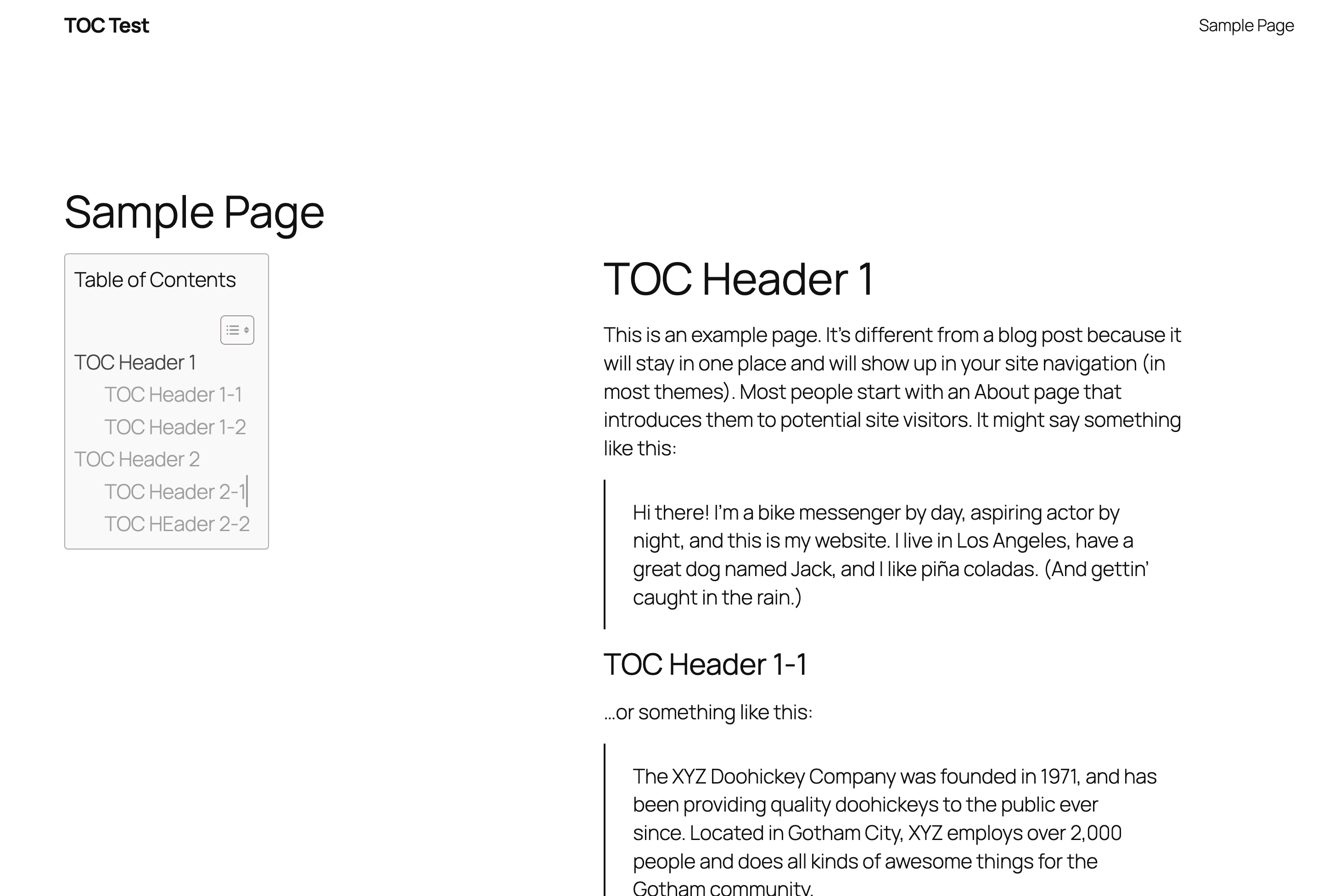
    What doesn’t work: If I edit the page template, add two columns, place a shortcode block containing [ez-toc] in the left column and the content block in the right, this happens:
    The TOC is rendered correctly, with hrefs as expected, but there are no corresponding spans under the headings.

    I’m running:
    WP 7.1.2
    Easy Table of Contents 2.0.88
    Twenty Twenty-Five 1.5

    Please let me know what the issue might be, or if this use-case is even supported. Thanks!

Viewing 2 replies - 1 through 2 (of 2 total)
  • Plugin Support Akshay A

    (@akshaycode1)

    Hi,

    Thank you for reaching out to us.

    We have checked on our end but did not found any such thing. Could you please share a short clip or screen recording, so we can check that way too.

    Thread Starter Ben Hutchings

    (@benmeredevelopmentcouk)

    Hi, I can’t think of a good/quick way to share a screen recording, but here are some steps to reproduce exactly what I’m seeing very quickly, with screenshots:

    1) Spin up fresh WP install, all defaults.

    2) Edit the ‘Sample Page’ and fill it with some headings and paragraphs:

    (https://snipboard.io/S62MKN.jpg)

    3) Edit the ‘Pages’ template and add two columns, with [ez-toc] in a Shortcode block in the left column, and ‘Content’ block in the right.

    (https://snipboard.io/SkFZ93.jpg)

    4. View the page and it’ll look right, but the links won’t work:

    (https://snipboard.io/qhHT2N.jpg)

    Some notes:

    • I’ve tested this both logged-in and logged-out of WordPress.
    • The Install is fresh, and running on local dev. I’ve also tried this on a live site with same result (as reported in first post)
    • Tested in Safari and Chrome (Mac)
    • Here’s the debug info:
      (Screeny here too: https://snipboard.io/BCQ9Kh.jpg)
    debug messages.

    The
    the_content filter applied.
    true
    Post type is.
    page
    Is supported post type?
    true
    Is auto insert for post types?
    false
    Not supported post type or insert TOC is disabled.
    false
    Post eligible.
    false

    I hope that’s enough info to reproduce the problem, thanks!

Viewing 2 replies - 1 through 2 (of 2 total)

You must be logged in to reply to this topic.