• feri6

    (@feri6)


    We have a variable product available in two variations: a red T-shirt and a blue T-shirt.

    The maximum number of each that can be purchased is 2. This is set for each variation, and no maximum value is set for the main variable product and no value is set for “Maximum quantity for all variations”.

    If a customer adds two red T-shirts to their cart, the module won’t let them add two blue T-shirts as well, even though they could buy two of those too.

    Why not? How should this be configured correctly?

    Ver. 5.2.5

Viewing 8 replies - 16 through 23 (of 23 total)
  • Plugin Contributor Pablo Pacheco

    (@karzin)

    Can you please share some screenshots or a video, making sure to show the plugin version, all the plugin’s settings, and the error notice?

    Thread Starter feri6

    (@feri6)

    Here is the video with version 5.2.9: https://drive.google.com/file/d/1pt2GYvmxLK4iaXY-uqfmkM67O67mF48F/view?usp=sharing
    The maximum quantity that can be purchased is displayed directly above the “Add to Cart” button on the product page (“Maximálisan vásárolható: x db”).
    Error message at the end: “You have added 3 items to your cart, but the maximum quantity that can be purchased is 4.” (This doesn’t make any sense, and besides, it’s not even true.)

    Plugin Contributor Pablo Pacheco

    (@karzin)

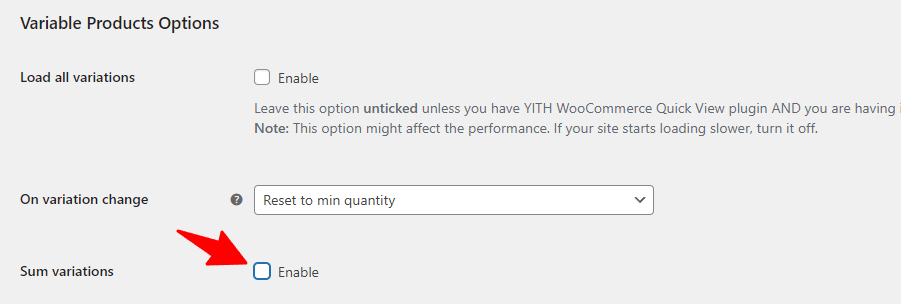
    Thanks for the info. I believe there might be a conflict with the Per Product option and the General > Variable Products Options > Sum Variations.

    Please, disable the Sum variations option and try again.

    Thread Starter feri6

    (@feri6)

    It works, but what’s the solution for variations with a shared inventory? In other words, you can’t buy more than x items in total across all variations.
    For example, we offer both 100-piece and 1,000-piece packages of a product, but we source them from a single inventory. And we don’t want someone to buy all of the two different package sizes by adding them all to their cart.

    Plugin Contributor Pablo Pacheco

    (@karzin)

    Hi @feri6 ,

    You have said previously that you don’t use the All variations option inside the admin product page. Can you please try it? Let me know if it helps.

    Thread Starter feri6

    (@feri6)

    Yes, does not help.

    Plugin Contributor Pablo Pacheco

    (@karzin)

    If I understood correctly what you want, I believe the “All variations” should have worked. The option lets you set a maximum number of variations of that particular variable product in the cart. For example, if you have set the “All variations” to 10, you can only have a total of 10 variations of that product in the cart.

    If that’s not what you had in mind, could you please explain in more detail what you’re trying to achieve?

    Thread Starter feri6

    (@feri6)

    That may have been the original goal, but it doesn’t work. We’ve tested it.

    There is a product that comes in two variations: a 100-unit pack and a 1,000-unit pack. A total of 20,000 units of this product can be purchased (from both pack sizes combined!).
    Even though we set this up, we added 20,000 units of the 1,000-unit pack to our cart, and it allowed us to add 100 units of the 100-unit pack as well, meaning there were 20,100 units in the cart, which is not allowed.

Viewing 8 replies - 16 through 23 (of 23 total)

You must be logged in to reply to this topic.