Ok so you don’t reproduce the whole issue, but what’s the difference between this two codes?
/* MOVE 3BAR MENU DROPDOWN TO ALIGN WITH SEARCH */
div.nav-collapse.tc-hover-menu-wrapper.in.collapse {
position:relative;left: 80px; top:0px;
width:190px;
}
.navbar.resp .nav-collapse.collapse {
width: 190px;
position:relative;
left: 50px;
}
top property, and .. what else, a major specificity of the rule?
They’re targeting different elements?
Nope it’s the same element.
Chappie what if you use just:
.navbar.resp .nav-collapse.collapse {
width: 190px;
left: 50px;
}
(i mean without position: relative)
?
Well, I ran the tests again – just in case the now-deleted slider-centering javascript had somehow been interfering – but got the same results.
My CSS definitely causes the frozen-displaced-menu™ glitch whereas yours doesn’t.
And further testing on this problem…
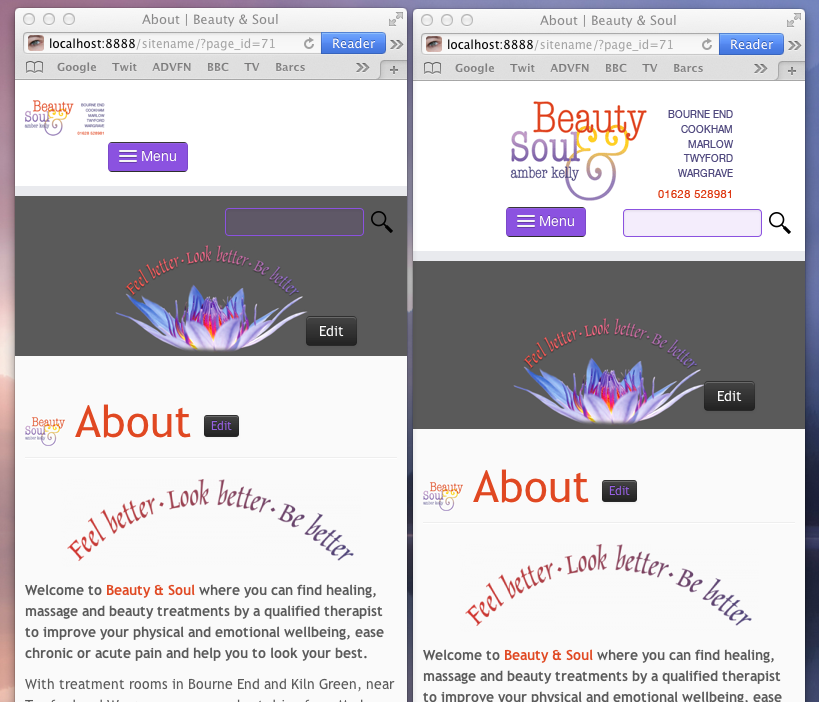
Adding position:relative;left: 50px; brought the whole menu into view – but has also caused the 3bar button to jump to the right as well (although it jumps back to the left on mousedown and then stays on the left unless I refresh the screen in which case it jumps to the right again until I click it.
…reveals that the 3bar menu button doesn’t stay on the left until I reload the page but only until the page redraws.
Chappie what if you use just:
.navbar.resp .nav-collapse.collapse {
width: 190px;
left: 50px;
}
(i mean without position: relative)
?
Well, what happens there is that, er, my problem disappears completely!
I know you’ll be relieved to hear that – but not as relieved as I am. Thank you so much for your help. If it’s possible to determine why that fixes it, I would love to know…
Mmm, really don’t know why the position:relative does this to you. I think you have made a lethal combination 😀
Of ‘course there will be an explanation, but I don’t know it at the moment.
What I did was just take the “working” solution and eliminate the problem with the menu displaced out of the screen.
The thing is that you didn’t need the “position:relative” in that case. You could leave the default “position:absolute” which is in customizr skin css.
Glad you solved.
Goodnight 😉
p.s.
Ah, forgot, the out of screen displacement was due to the fact that by default that menu has the property “right:0” so it were aligned to the right of the container. The container was too small, the menu too big, aligned to the right gave you that problem. Hope I’ve been understandable, sorry for my English chappie, maybe I need to come there to take some lessons 😀
Just to be clear, the following issues have now all been fixed, thanks to you:
1/ My 3bar menu button now loads on the left and stays on the right, whatever abuse I throw at it.
2/ My 3bar dropdown menu now displays at full width and without disappearing off the left of the page.
3/ My doppelganger recoiling dropdown 3bar menu has gone (or is hidden): I now see only one menu drop down and only one recoiling.
4/ My crazy frozen, wrapped and displaced main nav menu has disappeared and I can’t make it reappear.
5/ My displaced and cropped slider is no longer displaced or cropped.
That’s magnificent remote/blind detective work, d4z_c0nf. I’m thrilled – and much happier than I would have been if I had gone out on Saturday night for a meal or a show. I suspect you would have preferred the night out – but at least your Herculean efforts have made a stranger very happy so you are guaranteed a good night’s sleep!
1/ My 3bar menu button now loads on the left and stays on the right, whatever abuse I throw at it.
Doh. Should have read:
1/ My 3bar menu button now loads on the left and stays on the left, whatever abuse I throw at it.
d4z_c0nf, thanks for the explanation. It helps me. Your English is great but I would be glad to help you improve it.
Good night. Sleep well.