Hello @fadipet,
Are you looking to have the product thumbnail displayed in the navigation menu? If that’s the case, generally speaking, the theme controls the navigation menu layout and functionality. Typically you would need to modify the theme’s implementation of wp_nav_menu() in order to add in the product category images.
That said, you could also replace the text in the navigation menu with an IMG tag. WordPress navigation labels can take HTML. You could use that to place an image in the navigation menu. Here’s one way to do that:
- Go to the media library and select the image you want to use first. Click on it and copy the URL to the image file.
- Next go to Appearance > Menus in your dashboard and edit the menu you’re working with.
- Open up Product Categories on the left and add in the first item you’re using.
- Drag and drop it to the correct spot in the navigation structure on the right.
- Then click the arrow on the end of the menu item to open up its options.
- Where it says the name of the category, replace that with this:
<img class="menu-thumbnail" src="https://yoursite.com/image.jpg" /><br />Category Name
- Replace the
https://yoursite.com/image.jpg with the URL to the image file you copied earlier. Also, change Category Name to the name of your category.
- Update your menu.
That should place the image and category name in the navigation menu. Here’s a screenshot of what that looks like with the Storefront theme.
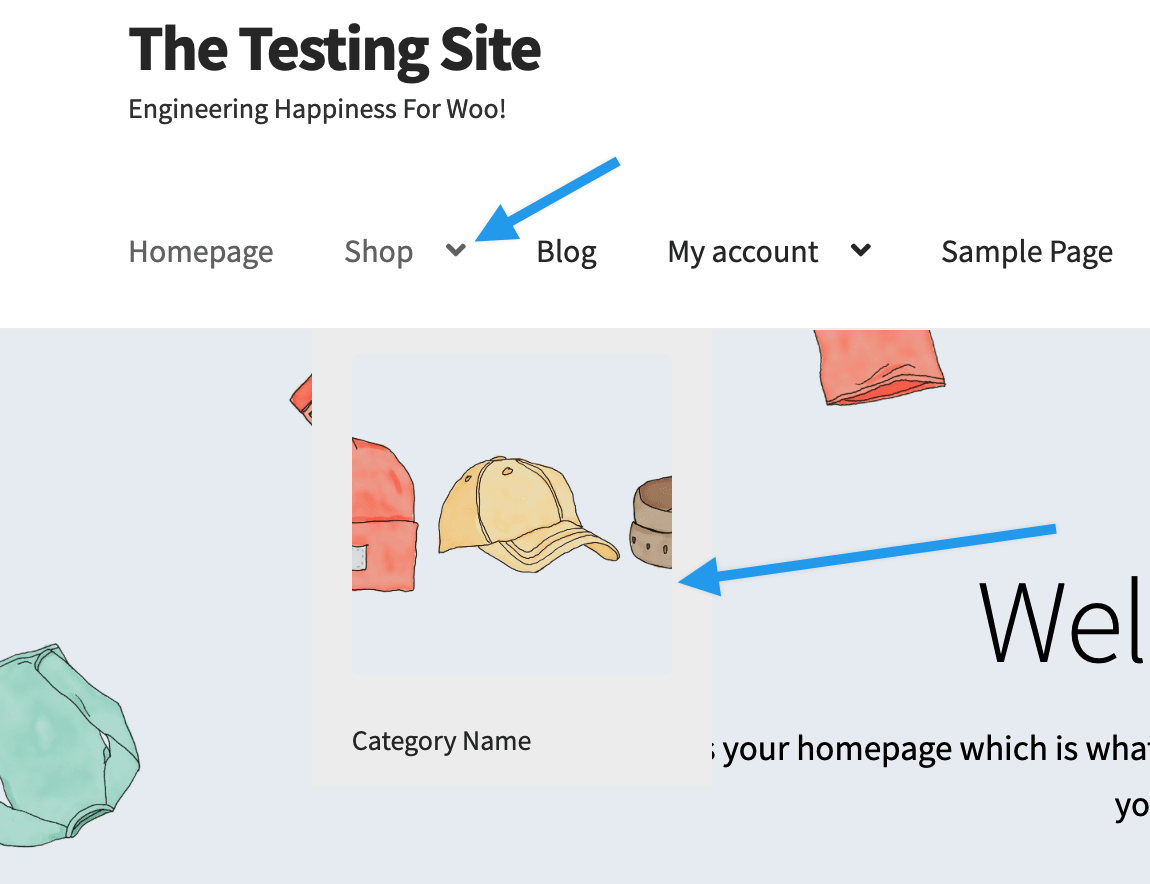
Let me know if you have any questions.
Cheers
Hi @fadipet,
It’s been a while since we heard from you, so I’m marking this thread resolved. Hopefully, you’ve been able to resolve this, but if you haven’t, please let open up a new topic and we’ll be happy to help out.
Take care


