Problem with displaying the admin dashboard
-
After upgrading the WordPress to the latest version (the old one was 3.1) I’ve got a problem with the admin dashboard. The header does not display correctly (as well as the buttons), please see the screenshot.
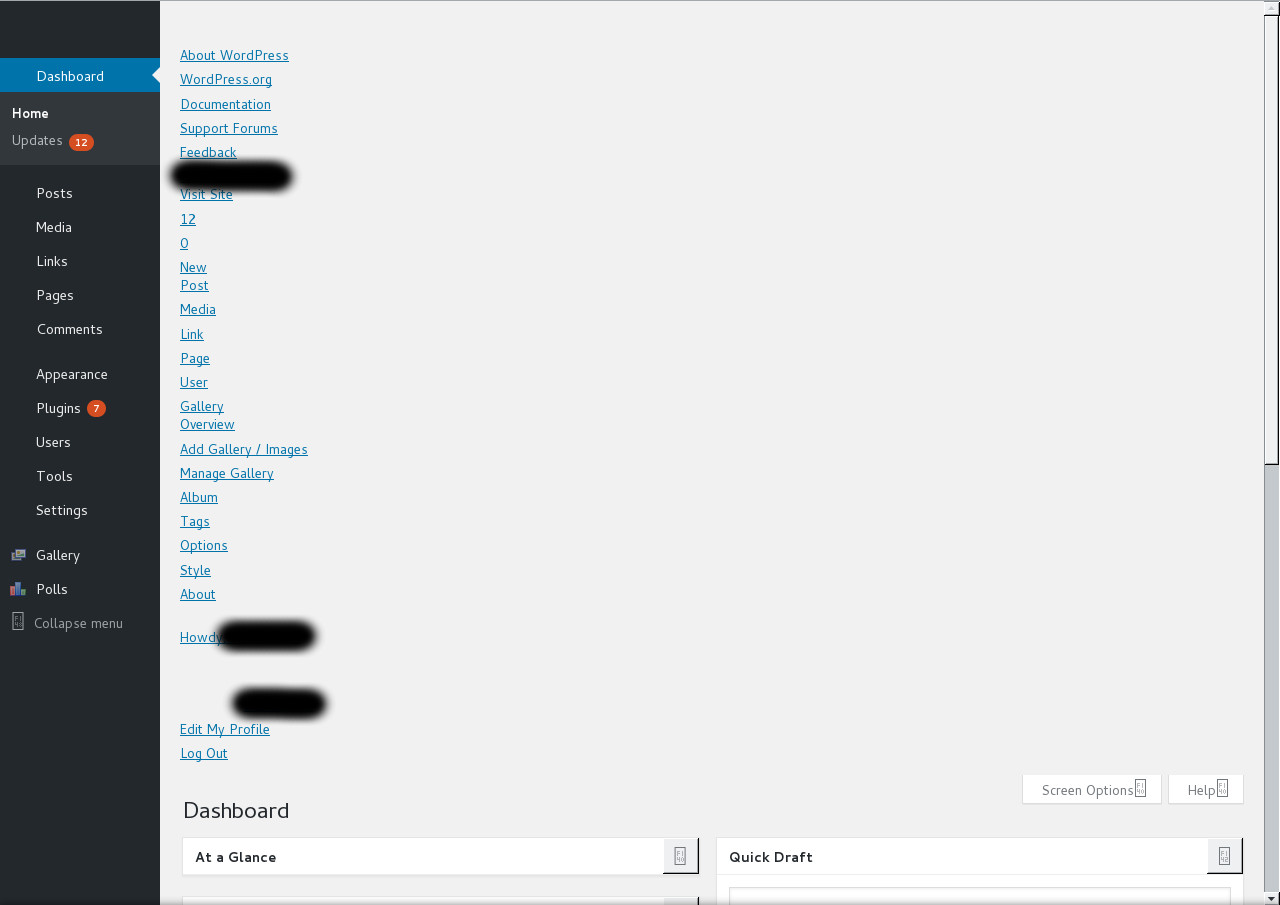

-
Results of debugging:
Notice: register_sidebar_widget is deprecated since version 2.8.0! Use wp_register_sidebar_widget() instead. in /website/wp-includes/functions.php on line 3707
Notice: register_widget_control is deprecated since version 2.8.0! Use wp_register_widget_control() instead. in /website/wp-includes/functions.php on line 3707
Notice: register_sidebar was called incorrectly. No id was set in the arguments array for the “Sidebar Home” sidebar. Defaulting to “sidebar-1”. Manually set the id to “sidebar-1” to silence this notice and keep existing sidebar content. Please see Debugging in WordPress for more information. (This message was added in version 4.2.0.) in /website/wp-includes/functions.php on line 3996
Notice: register_sidebar was called incorrectly. No id was set in the arguments array for the “Sidebar Single” sidebar. Defaulting to “sidebar-2”. Manually set the id to “sidebar-2” to silence this notice and keep existing sidebar content. Please see Debugging in WordPress for more information. (This message was added in version 4.2.0.) in /website/wp-includes/functions.php on line 3996
Notice: register_sidebar was called incorrectly. No id was set in the arguments array for the “Sidebar Archive” sidebar. Defaulting to “sidebar-3”. Manually set the id to “sidebar-3” to silence this notice and keep existing sidebar content. Please see Debugging in WordPress for more information. (This message was added in version 4.2.0.) in /website/wp-includes/functions.php on line 3996
Notice: register_sidebar was called incorrectly. No id was set in the arguments array for the “Sidebar Attachment” sidebar. Defaulting to “sidebar-4”. Manually set the id to “sidebar-4” to silence this notice and keep existing sidebar content. Please see Debugging in WordPress for more information. (This message was added in version 4.2.0.) in /website/wp-includes/functions.php on line 3996
Notice: register_sidebar was called incorrectly. No id was set in the arguments array for the “Sidebar Page” sidebar. Defaulting to “sidebar-5”. Manually set the id to “sidebar-5” to silence this notice and keep existing sidebar content. Please see Debugging in WordPress for more information. (This message was added in version 4.2.0.) in /website/wp-includes/functions.php on line 3996
Notice: register_sidebar was called incorrectly. No id was set in the arguments array for the “Sidebar Category” sidebar. Defaulting to “sidebar-6”. Manually set the id to “sidebar-6” to silence this notice and keep existing sidebar content. Please see Debugging in WordPress for more information. (This message was added in version 4.2.0.) in /website/wp-includes/functions.php on line 3996
Notice: register_sidebar was called incorrectly. No id was set in the arguments array for the “Sidebar Tag” sidebar. Defaulting to “sidebar-7”. Manually set the id to “sidebar-7” to silence this notice and keep existing sidebar content. Please see Debugging in WordPress for more information. (This message was added in version 4.2.0.) in /website/wp-includes/functions.php on line 3996
Notice: register_sidebar_widget is deprecated since version 2.8.0! Use wp_register_sidebar_widget() instead. in /website/wp-includes/functions.php on line 3707
Notice: register_sidebar_widget is deprecated since version 2.8.0! Use wp_register_sidebar_widget() instead. in /website/wp-includes/functions.php on line 3707
Notice: The called constructor method for WP_Widget in mycategoryorder_Widget is deprecated since version 4.3.0! Use
__construct()
instead. in /website/wp-includes/functions.php on line 3767
Notice: The called constructor method for WP_Widget in nggMediaRssWidget is deprecated since version 4.3.0! Use
__construct()
instead. in /website/wp-includes/functions.php on line 3767
Notice: The called constructor method for WP_Widget in nggSlideshowWidget is deprecated since version 4.3.0! Use
__construct()
instead. in /website/wp-includes/functions.php on line 3767
Notice: The called constructor method for WP_Widget in nggWidget is deprecated since version 4.3.0! Use
__construct()
instead. in /website/wp-includes/functions.php on line 3767
Notice: The called constructor method for WP_Widget in WP_Widget_Polls is deprecated since version 4.3.0! Use
__construct()
instead. in /website/wp-includes/functions.php on line 3767
Have you tried:
– Flushing any caching plugins you might be running, as well as server and/or browser caches. Not just your browser, but any op cache or content network cache as well such as Cloudflare. That will solve many weird JavaScript issues.
– deactivating ALL (yes all) plugins temporarily to see if this resolves the problem (plugin functions can interfere). If this works, re-activate them individually (one-by-one) to find the problematic plugin(s).
– If you can’t get into your admin dashboard, try resetting the plugins folder by FTP. Sometimes, an apparently inactive plugin can still cause problems. Also remember to deactivate any plugins in the mu-plugins folder (if you have created such folder). The easiest way is to rename that folder to mu-plugins-old.
– switching to the unedited default Theme (Twenty Sixteen, etc.) for a moment using the WP dashboard to rule out any theme-specific issue (theme functions can interfere like plugins). If you don’t have access to your admin area, use FTP , or your web-host’s cPanel or whatever file management application your host provides (no Dashboard access required). Navigate to /wp-content/themes/ and switch to the default theme by renaming your current theme’s folder by adding “-old” to the end of the folder name. Alternately, you can remove other themes except the default theme. That will force your site to use it.
– If all the above steps do not resolve the issue, then try MANUALLY updating. Download a fresh copy of the WordPress .zip file to your computer, unzip it, and use that to copy up all files and folders EXCEPT the wp-config.php file and the /wp-content/ directory. You may need to delete the old wp-admin and wp-includes folders and files on your server before uploading the new ones. Please read the Manual Update directions first.
– Backup: If you haven’t already done, always backup everything (including your database) before doing any actions, just in case something really goes wrong. You can never have enough backups!Sure, all these steps were performed. However, they have not helped.

The topic ‘Problem with displaying the admin dashboard’ is closed to new replies.