I just started using Post Grid and had a couple technical questions I was hoping you could help with!
1) Is it possible to display a facebook image as the image that Post Grid shows? I use an FB Embed shortcode such as this one: [fb_pe url=”https://www.facebook.com/AcaciaPomskyPuppies/photos/pcb.805061806366707/805061269700094/?type=3″ bottom=””]. Anyway I could get this to show as the image displayed by Post Grid?
2) Is it possible to change the “Read More” text? I like this function, but I’d like it to read “See More Photos”. Is that possible?
3) I’m using Post Grid with the Search & Filter Pro Plugin. I have some custom fields (post meta) that Search & Filter Pro uses to filter the page. Is it possible to show this post meta on the Post Grid Display? For example, one of the custom fields is “State”. So if the state is California, I would like Post Grid to show “California” in a similar way that it displays categories. Is this possible?
4) Is it possible to show more text than the excerpt? It looks like the excerpt is limited to around 100 characters. Is it possible to increase this so I can show a bigger excerpt on the post grid page?
Any advice/insight is appreciated! Thanks!
The page I need help with: [log in to see the link]
Hello, sorry for they delayed reply on this. I have a couple followup questions.
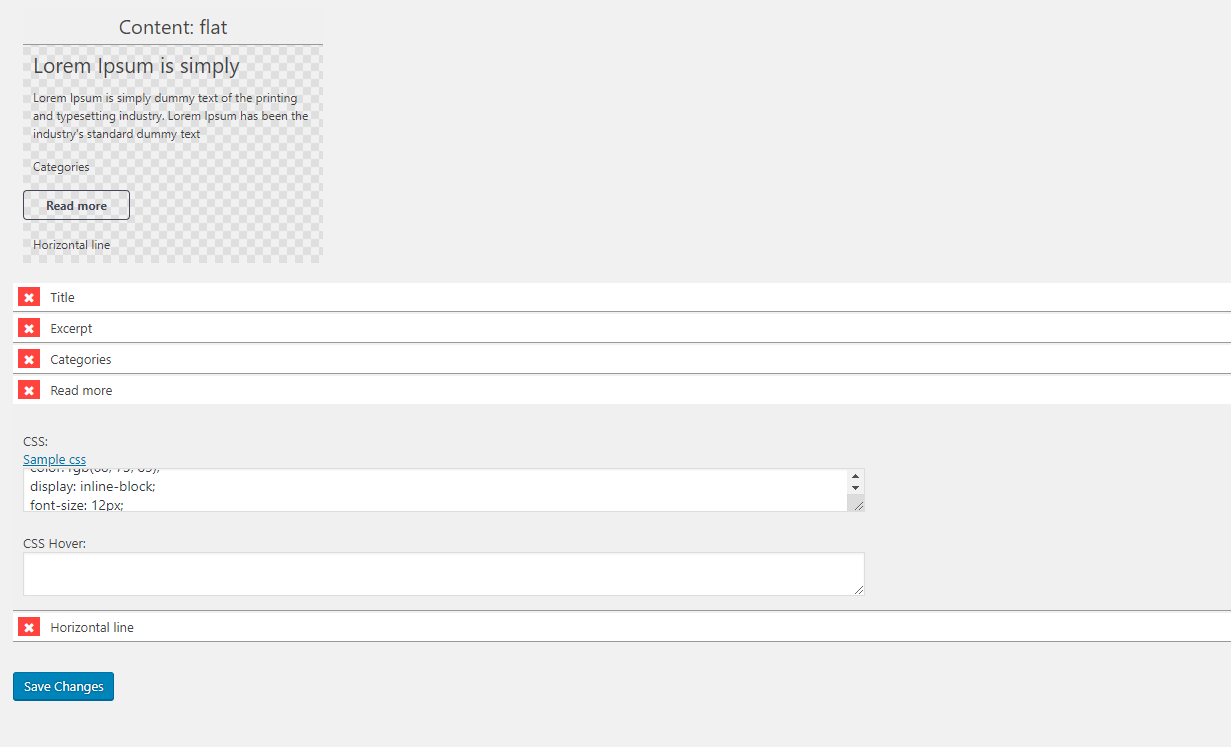
When you say “Yes, its possible to change read more text via layout editor.”. What is the layout editor? Sorry if this is a simple question. Where can I find the layout editor to edit this, is this part of the Post Grid plugin?
Is there an easy way to add hooks? I have limited coding ability so editing my core theme files worries me. Any plugins or something I could use to add these hooks without me risking messing up my core files?
One other question now that I think of it. Post grid displays the “Featured” image of the post. Is there anyway to change this and display a different image? I have a featured image for each post, but I want post grid to display a different image that I select (not the featured image). Is that possible?
Hello again. I’ve looked to edit my “read more” text as you show here https://imgur.com/ZEWb6Yl but this is not an option on my end. See this photo of how read more looks on my end. Why do I not have the “read more text” textbox like you are seeing?
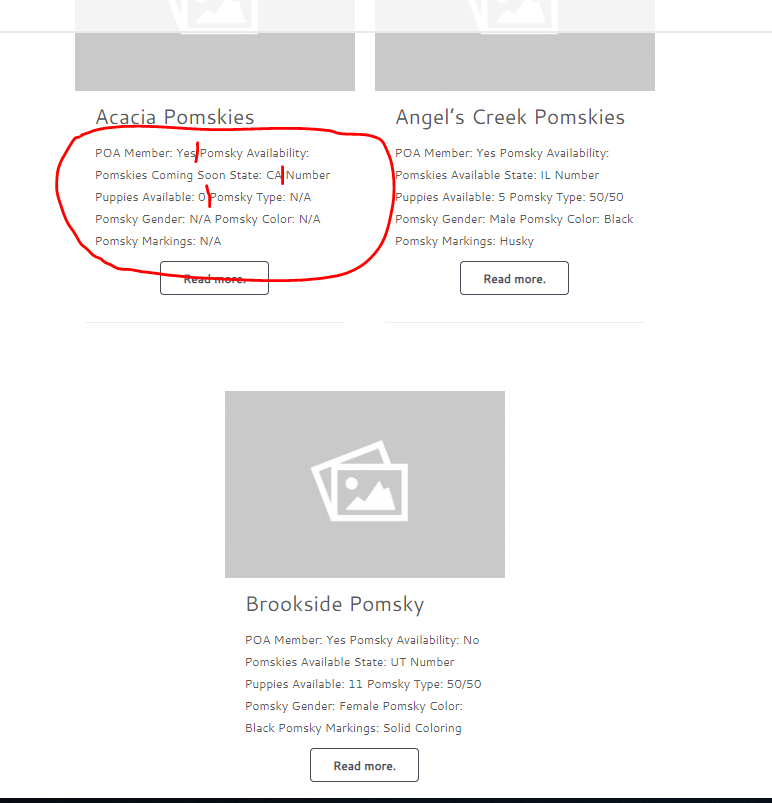
Also, is there anyway to format excerpt text? See how it currently looks, notice there are not page breaks in between sentences (i drew in red where I want page breaks to be) versus how I want it to look with page breaks. Any suggestions on how to format this? Maybe a third party plugin?
Thanks!
1) I have added the hook as described here. What do I do now to achieve this desired formatting? Notice in that image I want each line of text on a separate line. How do I do that with the hook? This is how it looks now, I assume I need to replace the ‘before’ and ‘after’ from the hook with some type of HTML but I don’t know what type of HTML would give me a line break after every sentence? Any suggestions for what to do now? I tried using the </br> break, but with this hook it adds the break ‘before’ and ‘after’ the excerpt. I need it within the excerpt such as after the line “POA Member:” and after the line “New Litter:”.
2) How do I reduce the amount of space between the “read more” button and the excerpt? See this image, notice there is a lot of space between the last line of the excerpt and the “See More Photos” button. How can I reduce this?
Could you describe what this does and what I need to modify in the hook? Could I use this to display an external image URL as thumbnail? Or is this only for internal URLs? Could you give a bit more info on what this does and how I can use it?
Another question! (Sorry to send you so many at once).
I have a shortcode that I custom coded. The shortcode is [cfsval key=”poa_adv_member” post_id=4609]
This shortcode displays, on the front end, the value of the custom meta field “poa_adv_member”.
Is there a way to show this shortcode in my PostGrid Excerpt? Right now, the excerpt does not display anything.It is blank in the excerpt. Probably because I did not add any code the the PostGrid plugin, so it does not recognize the shortcode.
For reference, this is the code I added to my functions.php file of my theme to display the shortcode:
<?php
// [cfsval key=”cfsval-value” post_id=20]
function cfs_values( $atts ) {
$a = shortcode_atts( array(
‘key’ => “”,
‘post_id’ => “”,
), $atts );