Hi,
Thanks for contacting us. 🙂
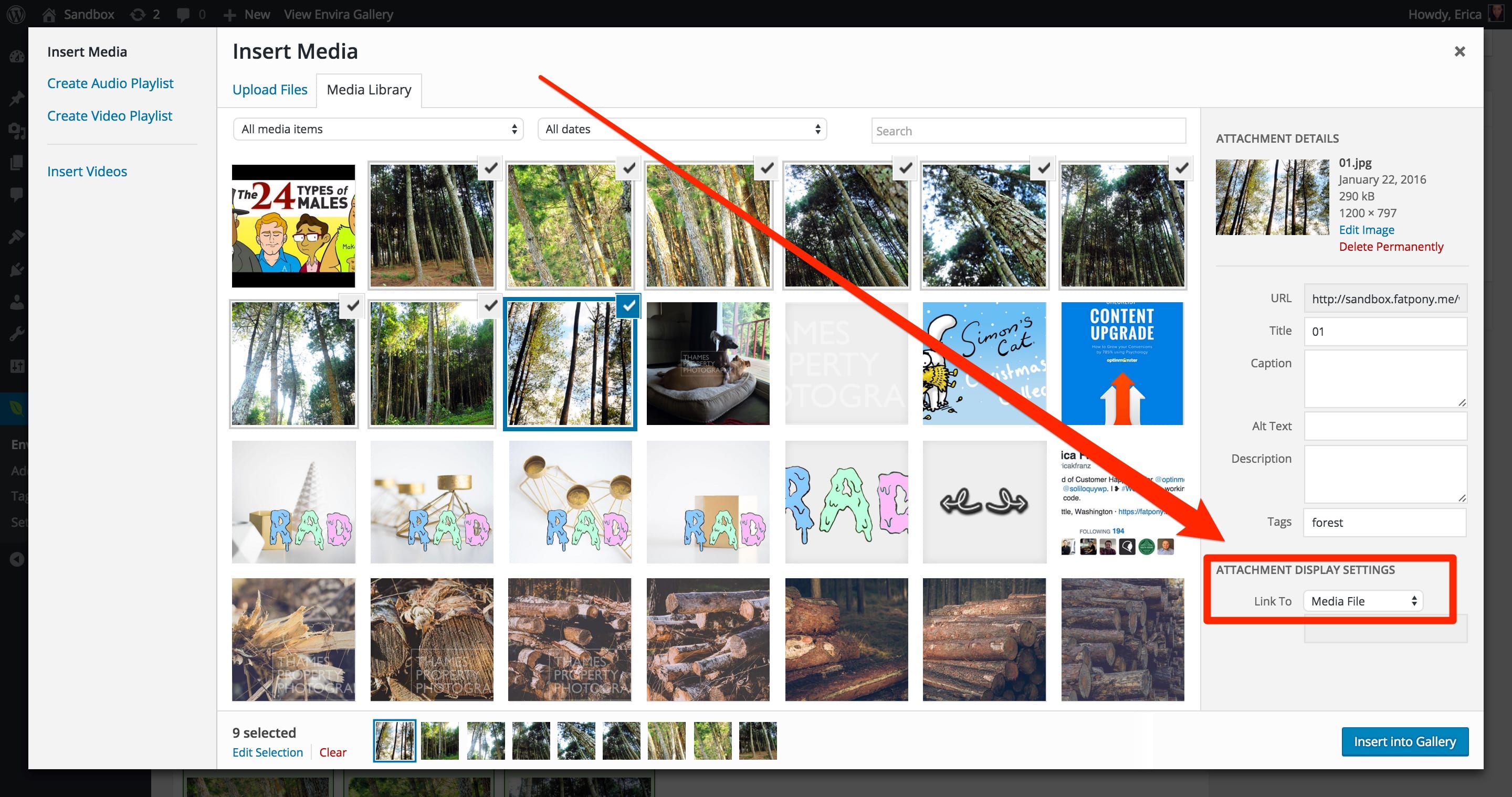
This will happen if the Link To field for the image is set to ‘None’ when adding from the Media Library; it should be set to ‘Media File’ to auto-populate the URL field for these images in the gallery and trigger their appearance in lightbox. See http://enviragallery.com/wp-content/uploads/2016/01/link-to.jpg
To correct the issue for any images already added to galleries where they’re not loading in lightbox view:
- In the gallery edit screen select the blue i button at the top of the image thumbnail
- This will open the ‘Edit Item’ lightbox, where you can see the URL field
- If this field is empty select the ‘Media File’ button to automatically populate the URL field with the URL of the image file
- Select the Save Metadata button at the bottom of the lightbox screen before navigating to the next item or closing the ‘Edit Item’ lightbox
- Update your gallery and check that this resolves the issue.
Let us know if I can help with anything else, thanks!
 Tim
Tim
(@n7studios)
Hi,
If you are referring to the free version of the plugin, the above advice is incorrect.
Please follow https://wordpress.org/support/topic/read-this-before-you-post-12?replies=1 and feel free to update this thread with the necessary details.
We can then advise to a solution.
Thanks.
Updated Envira Lite just before updating my wordpress to current 4.4.2
Problem occurred while still using WP 4.3; updating to Envira Lite version 1.3.5.8
Then updated to latest wordpress 4.4.2. to see if that would help.
No change.
Gallery no longer appears/no longer works.
(has syntax for inserting gallery into a post changed?)
I have found that with the new version of Envira Gallery Lite, I can actually see the gallery on a different computer running Win 7 pro.
But suddenly cannot view gallery on my winXP machine since the update.
Example URL may not necessary because this problem appears to be OS sensitive, but here it is just in case: http://secondtimearoundllc.apps-1and1.com/past-treasures
Steps taken so far have been simply turning-off ALL plugins, updating wp, and viewing site on a different computer with a newer OS.
The error is gallery is not loading after updates on a winXP machine (still a lot of those in use on the internet).
What you expect to see: I expect to see my gallery displayed as it has been for the past year without issue.
I have an old machine, but other updates have had no negative effect on machine or website prior to the latest update. Is it possible to download an older version of Envira Gallery Lite so I can continue to edit my website until I can afford a new computer?
The gallery worked/displayed fine before latest update.
Thanks,
Eric
Also: Thank you for providing a free version of your product. Up until update it worked great for me, and I was very happy with it.