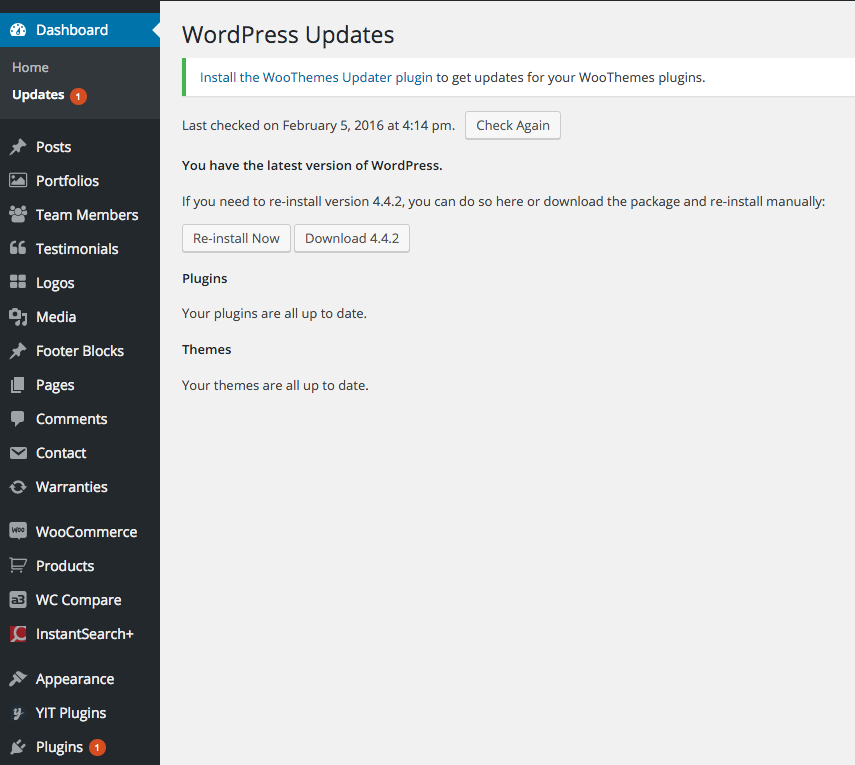
Permanent Update Notification
-
Hi there,
I am unable to rid of WooCommerce update notification despite updating to the latest version 2.5.2.
I know WooCommerce is the plugin causing this because when I deactivate WooCommerce the update notification disappears, when I enable WooCommerce, the update notification appears again. How do I remove this false update notification from WordPress?
### WordPress Environment ###

Home URL: *HIDDEN*
Site URL: *HIDDEN*
WC Version: 2.5.2
Log Directory Writable: ✔  /public_html/wp-content/uploads/wc-logs/
WP Version: 4.4.2
WP Multisite: –
WP Memory Limit: 256 MB
WP Debug Mode: ✔
Language: en_US

### Server Environment ###

Server Info: Apache/2.2.24 (Unix) mod_hive/5.0 mod_ssl/2.2.24 OpenSSL/1.0.0-fips mod_auth_passthrough/2.1 mod_bwlimited/1.4 mod_fastcgi/2.4.6 mod_fcgid/2.3.6
PHP Version: 5.4.45
PHP Post Max Size: 32 MB
PHP Time Limit: 45
PHP Max Input Vars: 2000
SUHOSIN Installed: –
MySQL Version: 5.5.31
Max Upload Size: 24 MB
Default Timezone is UTC: ✔
fsockopen/cURL: ✔
SoapClient: ✔
DOMDocument: ✔
GZip: ✔
Multibyte String: ✔
Remote Post: ✔
Remote Get: ✔

### Database ###

WC Database Version: 2.5.2
:
woocommerce_sessions: ✔
woocommerce_api_keys: ✔
woocommerce_attribute_taxonomies: ✔
woocommerce_termmeta: ✔
woocommerce_downloadable_product_permissions: ✔
woocommerce_order_items: ✔
woocommerce_order_itemmeta: ✔
woocommerce_tax_rates: ✔
woocommerce_tax_rate_locations: ✔

### Active Plugins (21) ###

BackupBuddy: by iThemes – 6.5.0.13
Coming Soon Page & Maintenance Mode by SeedProd: by SeedProd – 4.2.2
Contact Form 7: by Takayuki Miyoshi – 4.3.1
Gon Importer: by ThemeSky Team – 1.0.1
Instant Search + for WooCommerce Search: by Fast Simon Inc – 1.4.5
WPBakery Visual Composer: by Michael M - WPBakery.com – 4.9.2
Ultimate WooCommerce Brands PRO: by MagniumThemes – 1.5
Optimus: by KeyCDN – 1.4.5
WooCommerce Product Filter: by Mihajlovic Nenad – 5.1.0
Slider Revolution: by ThemePunch – 5.1.6
SKU for WooCommerce: by Algoritmika Ltd – 1.0.0
Tawk.to Live Chat: by Tawkto – 0.1.1
ThemeSky: by ThemeSky Team – 1.0.6
WC Vendors Pro: by WC Vendors – 1.2.2
WC Vendors: by WC Vendors – 1.8.6
Woocommerce Color or Image Variation Swatches: by phppoet – 1.7.0
WooCommerce Compare Products PRO: by A3 Revolution – 2.6.1
WooCommerce Warranty Requests: by 75nineteen Media LLC – 1.7.1 – 1.7.2 is available
WooCommerce: by WooThemes – 2.5.2
WP Media folder: by Joomunited – 3.3.4
YITH WooCommerce Wishlist: by Yithemes – 2.0.13

### Settings ###

Force SSL: –
Currency: BDT (৳ )
Currency Position: left
Thousand Separator: ,
Decimal Separator: .
Number of Decimals: 2

### API ###

API Enabled: ✔
API Version: 3.1.0

### WC Pages ###

Shop Base: #9 - /shop/
Cart: #10 - /cart/
Checkout: #11 - /checkout/
My Account: #12 - /my-account/

### Taxonomies ###

Product Types: external (external)
grouped (grouped)
simple (simple)
variable (variable)

### Theme ###

Name: Gon Child
Version: 1.0.0
Author URL: http://theme-sky.com/
Child Theme: ✔
Parent Theme Name: Gon
Parent Theme Version: 1.0.9
Parent Theme Author URL: http://theme-sky.com/
WooCommerce Support: ✔

### Templates ###

Overrides: gon/woocommerce/archive-product.php
gon/woocommerce/cart/cart.php
gon/woocommerce/cart/mini-cart.php
gon/woocommerce/checkout/form-checkout.php
gon/woocommerce/content-product.php
gon/woocommerce/content-product_cat.php version 2.5.0 is out of date. The core version is 2.5.2
gon/woocommerce/content-widget-product.php
gon/woocommerce/loop/add-to-cart.php
gon/woocommerce/loop/loop-end.php
gon/woocommerce/loop/loop-start.php
gon/woocommerce/loop/orderby.php
gon/woocommerce/loop/pagination.php
gon/woocommerce/myaccount/my-address.php
gon/woocommerce/single-product/add-to-cart/variable.php
gon/woocommerce/single-product/product-image.php
gon/woocommerce/single-product/product-thumbnails.php
gon/woocommerce/single-product/rating.php
gon/woocommerce/single-product/review.php
gon/woocommerce/single-product/tabs/tabs.php
gon/woocommerce/single-product.php

: Learn how to update outdated templates

### WC Vendors Pro ###

Pro Dashboard Page: ✔
			 - #233
Feedback form page: ✔  - #234
Vendor Shop Permalink: ✔  - vendors/

### Templates ###

Overrides: –
Many Thanks,
Jawad

Viewing 12 replies - 1 through 12 (of 12 total)


Viewing 12 replies - 1 through 12 (of 12 total)
The topic ‘Permanent Update Notification’ is closed to new replies.