Hello @doortoriver,
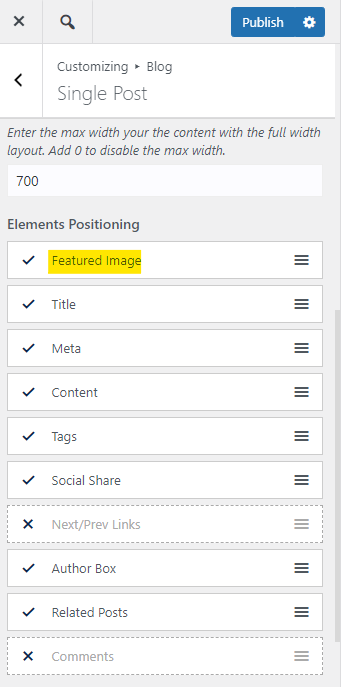
It seems the featured image is disabled for all single posts. To enable the featured image for single posts please navigate to Customizer > Blog > Single Post; Find the “Elements Positioning” section and ensure the featured image is enabled for posts.
Please check this screenshot: https://i.postimg.cc/4xMq1xbb/image.png.
I hope that helps.
Please recheck it and keep us posted.
Best Regards
Thanks for your reply! Unfortunately. that’s not the case, which is why featured images show up in blog posts.
I haven’t changed this:
View post on imgur.com
That’s how it’s been, which – again – is why they show up in blog posts.
Could this be some kind of caching issue?
Hello @doortoriver,
Yes, it could be a cache issue, but for troubleshooting, please do the steps in the following and let me know the results:
1. Head over to WP Dashboard > Plugin.
2. Deactivate all plugins.
3. Then, first activate the Ocean Extra plugin.
4. Check your issue.
5. Then, activate your plugins one by one
6. After activation of any plugins, check your issue
Note 1: You can try troubleshooting on the staging website/or on a fresh installation.
Note 2: if you have any cache plugin or server cache(CDN / Browser Cache and Cookies and …), you need to clear its cache contents or disable them to see your changes. Also, remember to click on the regenerate all assets file and data in Elementor > Tools(if you have Elementor).
* Update: if you have a child theme, temporarily, please deactivate it by activating the primary theme(OceanWP). If the issue is solved, then for troubleshooting in the child theme:
1- Remove all customization on the child theme.
2- add your customization one by one to the child theme.
3- After adding each customization code, check your issue.
Please keep us posted.
Best Regards
-
This reply was modified 3 years, 5 months ago by
 Shahin.