Optional displayed on Required checkboxes
-
Hello,
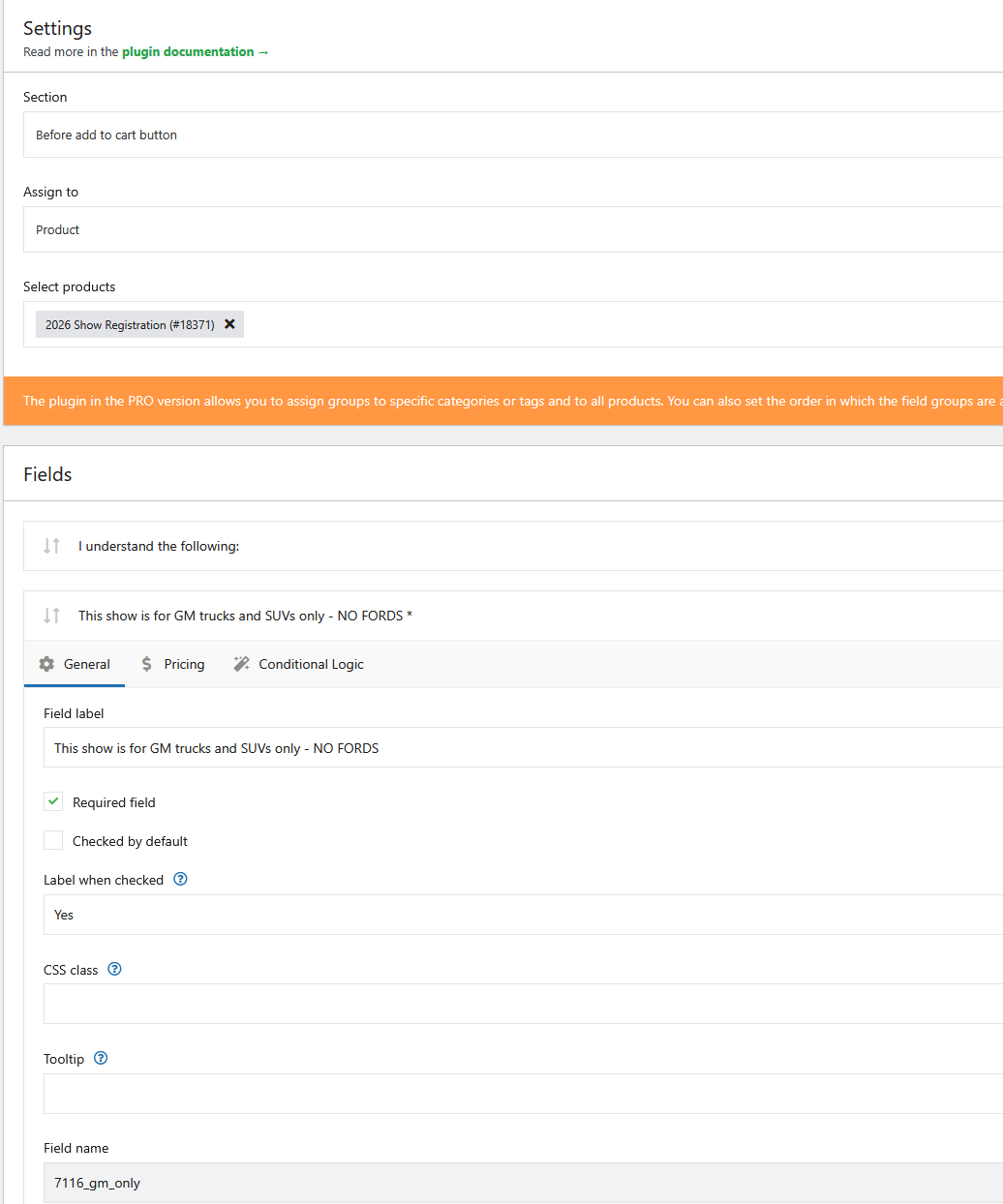
I have a product that has three required check boxes. Those check boxes are marked as required on the plugin page and function as required, but they display (optional), which is confusing to say the least.
To see the problem visit https://gmtruckshow.com/show-registration/ and scroll down to Outdoor spot registration.
Thanks in advance for your help.
The page I need help with: [log in to see the link]

-
Hello,
Thank you for reaching out to us.
Just to make sure I fully understand your expectations: could you please confirm how the checkboxes added via the plugin should behave?
Specifically, I see the section titled “I understand the following:” with the following checkboxes:
- This show is for GM trucks and SUVs only – NO FORDS (optional)
- My registration packet will be mailed several weeks before the show to the shipping address on the checkout page (optional)
- There are no refunds on show registrations (optional)
Am I correct in understanding that all of these should be required — meaning the customer must check all of them in order to proceed?
Once confirmed, I’ll be happy to take a closer look and guide you on the best way to fix the label display.
Kind regards,
Thanks for the reply.
Your response is correct. The idea is that my client wants everyone who buys a registration to be required to acknowledge those three statements. Everything is working correctly except the text that says (optional) for the required check boxes.
Thanks again
Hello,
Thank you for confirming
I’ve tried to reproduce the issue in my testing environment, but I wasn’t able to replicate it. Could you please let me know which version of the Flexible Product Fields plugin you’re currently using?
If it’s not the latest version (2.12.0), I recommend updating to 2.12.0 and checking whether the issue with the “(optional)” label still appears.
If you are already using version 2.12.0 and the problem persists, please try temporarily switching your theme to the default Storefront theme. This will help us determine whether the current theme is possibly overriding the Flexible Product Fields settings.
If that doesn’t help either, just let me know — I’ll be happy to provide a CSS snippet to hide the “(optional)” label as a workaround.
Kind regards,
Thanks for trying to reproduce the error. The first thing I tried was updating the plugin version. I forget what it was before, but it’s 2.12.0 now (see attached screencap).
I’ll try switching the theme and I’ll reporting my findings. I’ve had this theme and your plugin working correctly for a few years with no problem until just recently.
Thanks again for the effort

Actually, would you mind sending over that CSS code snippet? I’m going to redo this site’s theme after this show season anyway.
Thanks
Hello,
Thank you for your message.
As a workaround, you can safely hide the “(optional)” label for those three required checkboxes using a small CSS snippet. This does not affect validation or functionality — the fields will remain required and must still be checked to proceed.
Please add the following CSS:
#7116_gm_only_field .optional,#7116_shipping_field .optional,#7116_refunny_field .optional {display: none;}You can add this code in one of the following ways:
- Go to Appearance → Customize → Additional CSS, paste the snippet, and publish the changes.
- Alternatively, add it to your child theme’s
style.cssfile (if you are using a child theme).
This will hide the “(optional)” text only for those three checkboxes on the product page and will not impact other fields or checkout behavior.
Please let me know if you have any further questions.
Kind regards,
Thanks for the reply. I have good news and bad news:
Good news is that after I added the above lines to the style.css in the theme editor and the “Optional” text no longer appears on the product page in the store.
Bad news is that the “Optional” text still appears on the product on the page https://gmtruckshow.com/show-registration/
On that page the CSS doesn’t seem to have fixed the issue. I’m attaching a screencap of the source on that page.

If you have a way to get around that one also, I’d really appreciate it
Hello,
Thank you for your message.
No worries — here’s a CSS snippet that should hide it there as well:
Option 1: Hide(optional)site-wide for all Flexible Product Fields checkboxes:.fpf-input-field + span .optional {
display: none !important;
}Option 2: Hide
(optional)only on the Show Registration page:
If you prefer to apply this change only to that specific page, you can use thepage-idin the body tag.body.page-id-14280 .fpf-input-field + span .optional {
display: none !important;
}You can add either version of the CSS via Appearance → Customize → Additional CSS or directly in your theme’s
style.cssfile.Please let me know if you have any additional questions.
Kind regards,
Thanks again for looking into this.
I’ve tried entering both of those snippets separately into the style.css file and the AdditionalCSS and it’s still not working on the https://gmtruckshow.com/show-registration/ page.
Any more ideas on how to override that (optional) text on that one particular page?
Once again, thanks for your help
Hello,
Thank you for your message. This is indeed weird.
This can sometimes happen if the checkbox fields were originally set to optional and later changed to required — in some cases, the plugin output retains both labels due to how it’s rendered in the HTML.
Please try to use this custom CSS as a fallback:
You can add this to Appearance → Customize → Additional CSS or your theme’sstyle.cssfile. This snippet should hide the “(optional)” label specifically on this page:body.page-id-14280 span.optional {
display: none !important;
}If the issue persists after adding this snippet, please try the following steps:
- Delete the affected checkbox fields (the three checkboxes under “I understand the following”) from the Flexible Product Fields section.
- Recreate them from scratch, this time setting them as required right away.
- Save and refresh the page to confirm if the
(optional)label disappears.
We’ve seen this fix the issue in similar cases, as it forces the plugin to regenerate the field markup cleanly.
Please let me know how it goes.
Kind regards,
Thanks again for the extended help with this.
The snippet you attached worked! The (optional) field no longer shows on the Registration page, and the previous snippet is still keeping it from showing up on the product page in the Store.
Client is extremely happy to have this resolved
Thanks again
Hello,
You’re very welcome — I’m glad to hear the CSS snippet did the trick and that everything is now displaying correctly on both the Registration page and the Store product page.
If you have a moment — and only if you’re genuinely happy with the plugin and/or the support you received — we’d really appreciate it if you could leave a review here:
https://wordpress.org/support/plugin/flexible-product-fields/reviews/#new-post
Of course, it’s completely optional, so please don’t feel obligated.I’ll mark this thread as Resolved now. If anything else comes up, feel free to reach out to us anytime.
Kind regards,
Of course – I’d be happy to. Thanks for the help

You must be logged in to reply to this topic.
