Thread Starter
 sneed
sneed
(@sneed)
Also the page that pops up with all my products shows all the woocommerce product filter info at the top of the page AND on the sidebar.
Hello. Set please permalinks and try again …
Thread Starter
sneed
(@sneed)
Which permalinks am I changing and what am I changing them to?
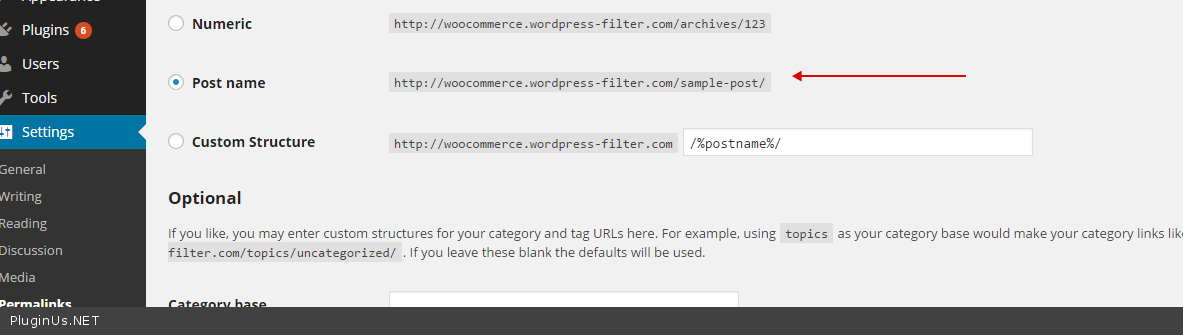
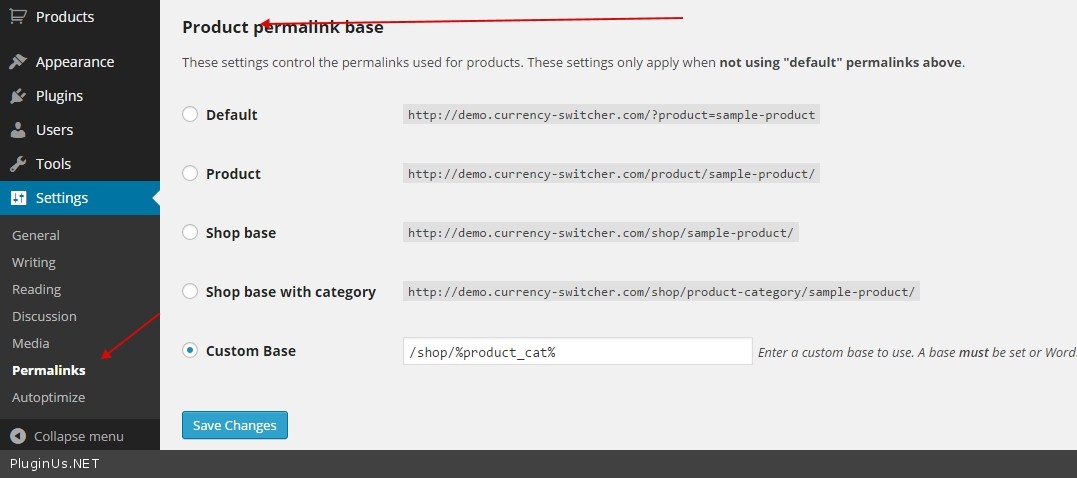
wp-admin/options-permalink.php
http://c2n.me/3fUdQe7.png
+
Product permalink base: /shop/%product_cat%
Thread Starter
sneed
(@sneed)
My current Post Name is NOT ticked and looks like this:
http://www.moonlightmattress.com/sample-post/
Should I tick it?
And what should I change it to?
And then do I untick it?
Sorry, I have no idea what permalinks are or do.
http://www.moonlightmattress.com/shop – 404
Product permalink base: /shop/%product_cat%
We are talking about products
http://www.demo.woocommerce-filter.com/product-category/clothing/ – let your links willbe like this one
Thread Starter
sneed
(@sneed)
It is very easy question: http://c2n.me/3g1Ek5p.jpg
Read please more tutorials how to use wordpress
Thread Starter
sneed
(@sneed)
Hmm. I now tested new version of the plugin and can suggest you a deal: you write me PM with your wp-admin access and ftp <realmag777@gmail.com> – I install to your site new version, premium but beta 2.0.0 – and will make it works. You will get the filter – I will get some fixed bugs =)
Hello sneed, I had the same problem. I set the permalinks to Posts=Postname, Products=Shop base with category. Now the filter works