Hi @suygenneris
Good news — no workaround needed. INSERT_ELEMENTOR is still a fully native shortcode in the current plugin, wired to the exact same code as dynific_template. They’re interchangeable; INSERT_ELEMENTOR was never deprecated or removed. Your thousands of existing pages will keep working exactly as-is.
Thread Starter
 Suyta
Suyta
(@suygenneris)
Hi @tejwanihemant
Many thanks for your reply.
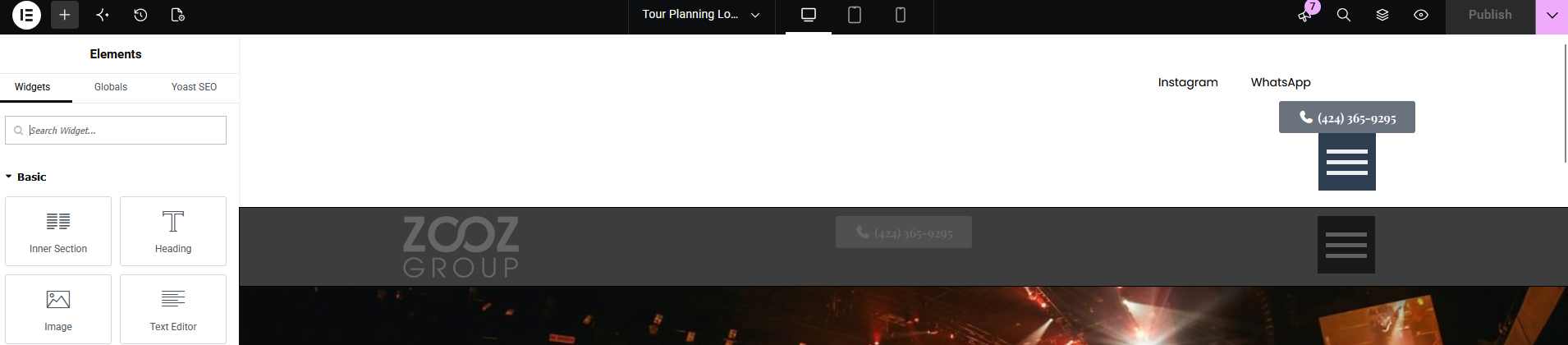
Yes, it works, but it works on the frontend only. In the backend, when editing the page with Elementor, the content generated by the shortcode is not displayed correctly in the Elementor editor, which makes it confusing when editing the page.
Is there any way to make the shortcode content display correctly in the Elementor editor as well?
Thanks again!
Hi @suygenneris
We have tried on our end and its working. Can you please provide some screenshots and elementor’s system info. You can download Elementor’s system info from the Admin > Editor > System > System Info.
Thread Starter
Suyta
(@suygenneris)
Hi @tejwanihemant
I use Elementor Pro genuine license, all updated to latest version (WordPress, plugins, theme).
This is the screenshot from editor:
Issue
Thanks!
For Elementor PRO – contact Elementor Support, paid products are not supported on wordpress.org
Thread Starter
Suyta
(@suygenneris)
@moderator
I’m explaining the environment according the question, I’m not requesting support for those products.
Thanks.
Hi @suygenneris
I believe I’ve got the blank in the document; something’s missing. Here is the link of the screenshot.
Thread Starter
Suyta
(@suygenneris)
Yea, I will try to show you shortly. Thanks.
Thread Starter
Suyta
(@suygenneris)
Screenshot
That what you see white on top is the Dynific shortcode.
Thanks!
Please provide system info. You can download Elementor’s system info from Admin > Editor > System > System Info.
Thread Starter
Suyta
(@suygenneris)
Here is the System Info. Sensitive information has been redacted.
Thanks.