Hello
You can create two text widgets with shortcodes – [woof] AND [woof taxonomies=product_cat:1,2
For show or hide widgets on different pages – http://www.woocommerce-filter.com/how-to-show-or-hide-widget-only-on-selected-site-pages/
In your case use is_user_logged_in()
Hello,
This is not working if I use [woof taxonomies=product_cat:1,2] it still shows all product categories – https://share.getcloudapp.com/OAuJJJOq
Hello
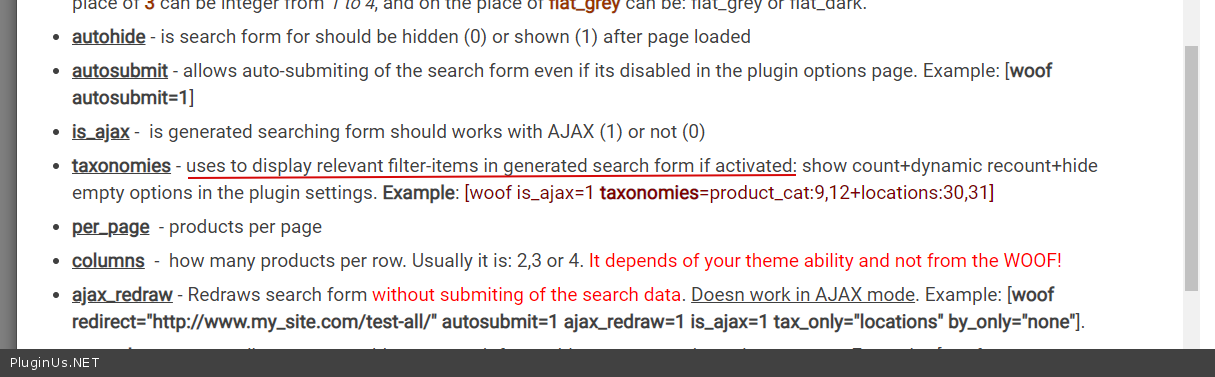
taxonomies=product_cat:1,2 – this is not an exception category! Please read docs( https://c2n.me/49qWx39.png ) – https://products-filter.com/shortcode/woof/
in other words it is prefiltration
I have read docs – it appears you cant have 2 different [woof] shortcodes – so for example going back to my original post, if i have 3 prod cats, 1,2,3 displaying the shortcodes below
[woof]
[woof taxonomies=product_cat:1,2]
Will result in all filter labels of prod_cats 1,2 and 3 being displayed.
In this thread the user posts the same question – https://wordpress.org/support/topic/hide-show-specific-categories-in-filter-using-shortcodes/ so it appears not possible.
Hello
Then you can find a solution –
$terms = apply_filters('woof_sort_terms_before_out', $terms, 'checkbox');
Can you give example using filter please?
Hello
add_filter('woof_sort_terms_before_out', function($terms,$type){
foreach($terms as $term){
//check  terms  and  delete
}
return $terms;
},99,2);
-
This reply was modified 5 years, 7 months ago by
 mediawebster.
Ok – just a little more help would be appreciated – how would it work for a taxonomy being product_cat and the terms either as names Retail,Travelor IDs 40,41 to be only shown.
-
This reply was modified 5 years, 7 months ago by
 neilgee.
Hello
In this case, you should ask a programmer friend for help.
I cannot provide you with a ready-made code, you need to test it and fix it
$new_terms=array();
foreach($terms as $term){
if($term->taxonomy=="product_cat" AND in_array($term->term_id,array(40,41))){
$new_terms[]=$term;
}
}
if($new_terms){
return $new_terms;
}
I tried it like this..
add_filter('woof_sort_terms_before_out', function($terms,$type){

	$new_terms=array();

	foreach($terms as $term){
		if($term->taxonomy=="product_cat" AND in_array($term->term_id,array(40,41))){
			$new_terms[]=$term;
		}
	}

	if($new_terms) {
		return $new_terms;
	}

},99,2);
But output is blank, it would be good if you can illustrate an example how the filter works – then you can reference it in future support requests.
PHP warning from wp-debug is…
PHP Notice: Trying to get property 'taxonomy' of non-object in /Users/neilg/Sites/bdr/wp-content/themes/bdr/functions.php on line 375
Hello
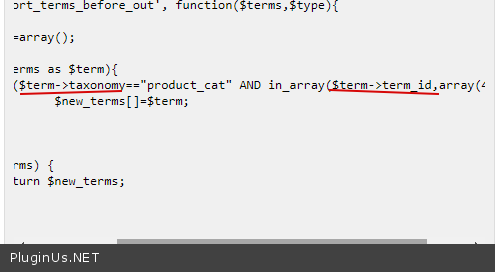
Ok try to change code https://c2n.me/49DAxVD.png – to
$term[‘taxonomy’] and $term[‘term_id’]
if($term['taxonomy']=="product_cat" AND in_array($term['term_id'],array(40,41))){
Ok that’s great, got it working…..
add_filter('woof_sort_terms_before_out', 'prefix_filter_woof', 99, 2);
/**
 *  Use specific taxonomy terms for WOOF filtering
 *  @link https://wordpress.org/support/topic/multiple-woof-shortcodes-diff-categories/
 *
 */
function prefix_filter_woof($terms,$type) {

	$new_terms=array();

	foreach($terms as $term){
		if($term['taxonomy']=='product_cat' AND in_array($term['term_id'],array(40,41))){
			$new_terms[]=$term;
		} // Uses a taxonomy with certain terms

		if (in_array($term['taxonomy'],array('type_category','size_category')) ) {
			$new_terms[]=$term;
		} // Uses an array of taxonomies with all terms
	}

	if($new_terms) {
		return $new_terms;
	}
}
You can use multiple if blocks depending on needs – in example first if block uses WooCommerce default taxonomy product_cat with specific term ids – second if block uses all terms that belong to 2 custom taxonomies; type_category and size_category
Also my intent is to use the filter based on certain conditions not for the entire site so for example you may want to use the filter based on user login status…
if (! is_user_logged_in() ) {
add_filter('woof_sort_terms_before_out', 'prefix_filter_woof', 99, 2);
}
-
This reply was modified 5 years, 6 months ago by neilgee.