• Hello,
    I have now made several websites with the OceanWP theme. It is a very flexible and adaptable.
    Unfortunately, I recently noticed that on an iPad in landscape, the desktop menu is displayed instead of mobile. Since there is usually not enough space, the main menu is broken into two lines, which looks very ugly.
    Here an other example:
    juwelier-happe.de

    The media query break point is set to 959px by default, but if I change the setting there no longer shows the mobile menu at all. No matter what other plugins are installed, it will not work in tablet landscape.

    • This topic was modified 3 years, 5 months ago by asyx.

    The page I need help with: [log in to see the link]

Viewing 1 replies (of 1 total)
  • Hello @asyx,

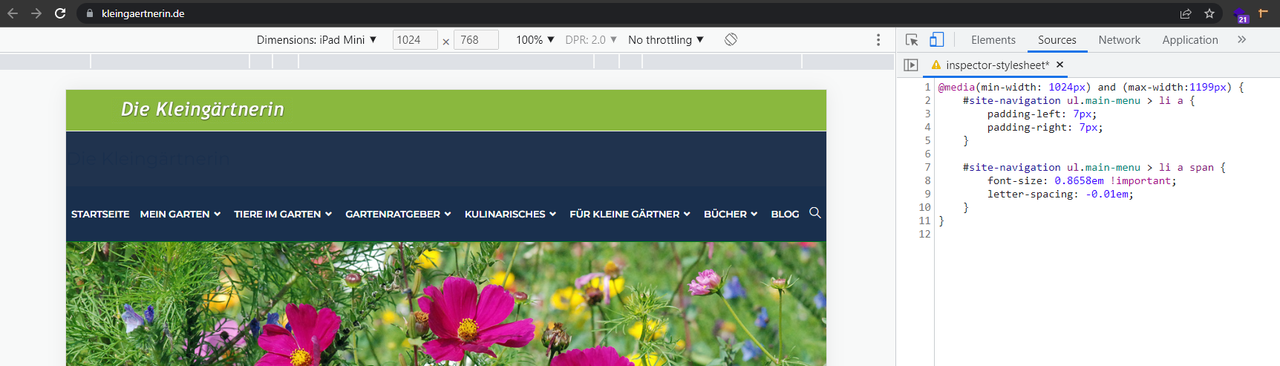
    The solution to solve the issue is changing the breakpoint or setting a smaller font-size and padding for each menu item. With the current settings on your website(), you can use the CSS below in Customizing > Custom CSS/JS > CSS Code:

    @media(min-width: 1024px) and (max-width:1199px) {
        #site-navigation ul.main-menu > li a {
            padding-left: 7px;
            padding-right: 7px;
        }
    
        #site-navigation ul.main-menu > li a span {
            font-size: 0.8658em !important;
            letter-spacing: -0.01em;
        }
    }

    Result: https://i.postimg.cc/XJVGggpL/image.png.

    Please read this link for more information about the CSS/JS code on the customizer: https://docs.oceanwp.org/article/354-add-custom-css-and-js-to-your-website.

    Note: if you have any cache plugin or server cache(CDN / Browser Cache and Cookies and …), you need to clear its cache contents or disable them to see your changes. Also, don’t forget to click on the regenerate all assets file and data in Elementor > Tools(if you have Elementor).

    Regarding this part: “The media query break point is set to 959px by default, but if I change the setting there no longer shows the mobile menu at all. No matter what other plugins are installed, it will not work in tablet landscape.“.
    Please explain your issue, including screenshots, URLs, and any other document, so we can understand and check it better.
    You can upload your files to one of the following online services:
    https://postimages.org
    https://loom.com
    https://drive.google.com
    https://wetransfer.com
    https://dropbox.com

    Best Regards

    • This reply was modified 3 years, 5 months ago by Shahin.
Viewing 1 replies (of 1 total)

The topic ‘mobile menu doesn´t work on iPad landscape’ is closed to new replies.