Hello @newbielearner,
Thank you for reaching out,
And thank you for using OceanWP
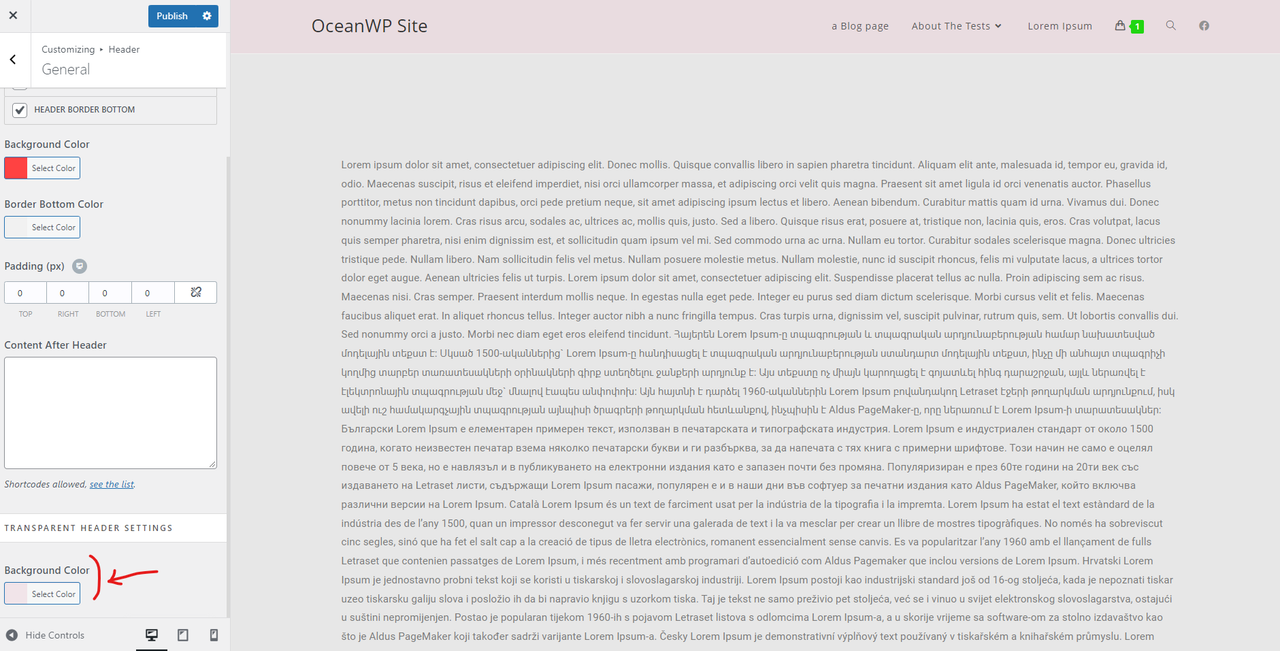
Since the transparent header just shows on the mobile, perhaps you’ve set a background color for the header. To check it, please navigate to Customizer > Header > General > Transparent Header Settings, find and check the background color opacity.
Please check this screenshot: https://i.postimg.cc/8cb25bMK/image.png.
I hope that helps.
Best Regards
Hi @skalanter,
Apologies for the delay in response, I have had a look at what you recommended and there is no colour specified (It is just a blank field). The weird thing is it is transparent in computer view just not in mobile view. Do you have any other suggestions?
Hello @newbielearner,
I fully examined the issue you have raised on this topic and could not see it on my end.
Please share a live URL. I’ll check it online.
Best Regards
-
This reply was modified 3 years, 4 months ago by
 Shahin.
Hi @skalanter ,
The url is http://www.clevertech.net.au
Thanks for taking a deeper look into it for us 🙂
Hello @newbielearner,
Thank you for sharing a live URL.
There is a custom CSS that affects it.
Please find it and remove it to solve your issue: https://postimg.cc/gallery/0JSkzTV
Note: if you have any cache plugin or server cache(CDN / Browser Cache and Cookies and …), you need to clear its cache contents or disable them to see your changes. Also, remember to click on the regenerate all assets file and data in Elementor > Tools(if you have Elementor).
After removing the custom CSS; the result should be like this: https://postimg.cc/HVrxMV9B.
Best Regards
Thanks @skalanter ,
How would I go about finding and removing this?
Not sure what information you require but I use Elementor and Pagelayer in WordPress. Currently the website is hosted via infinityfree (whilst the business is being established and monitoring traffic flow, although this does come with the downside of being incredibly slow at the moment!)
TIA 🙂