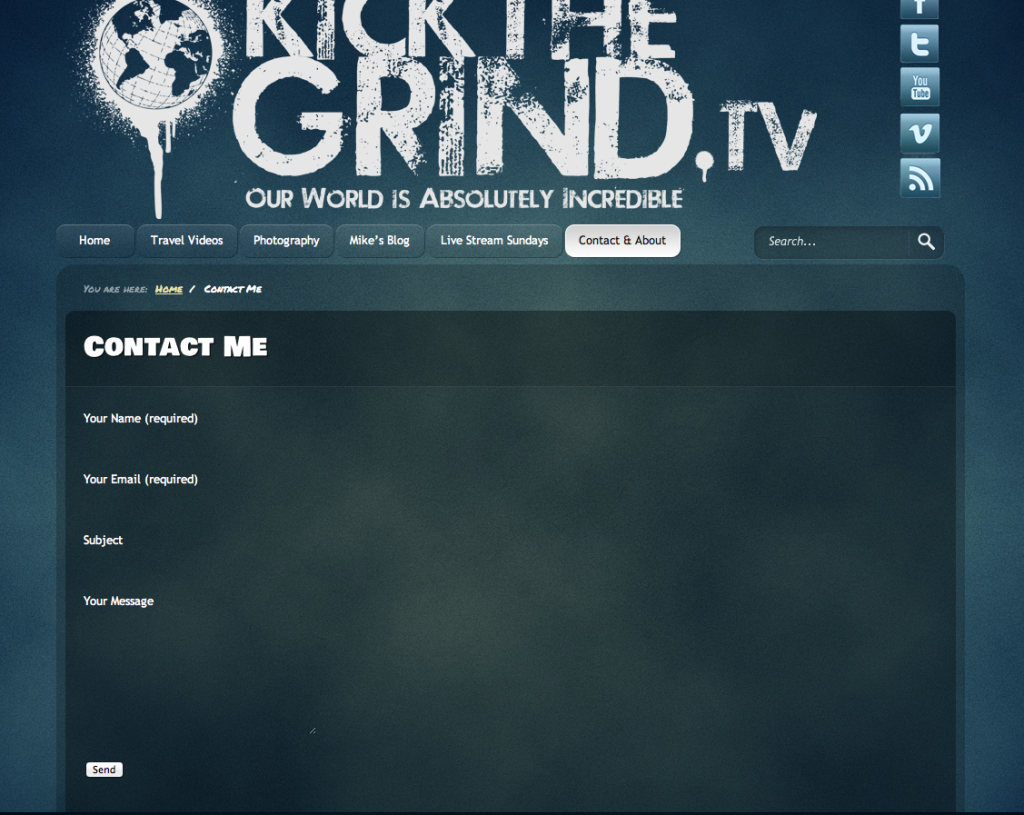
Probably a CSS issue. Can you share the URL of the page?
Here’s the URL. Thanks for the help!
http://kickthegrind.tv/contact-me-2/
http://kickthegrind.tv/wp-content/themes/clockstone/style.css
Line #128
input[type=”text”] {
border:0;
font:1em “Trebuchet MS”, Helvetica, Garuda, sans-serif;
line-height:1em;
padding:4px;
background:none;
color:#fefefe;
outline:none;
}
This ‘border:0;’ makes the fields invisible. Just delete it or set appropriate border.
Perfect. You’re a life saver. Thanks!
I, too, am having the issue that Mike was having. Unfortunately, I don’t know how to get the URL – only the short code. I am missing the field in which the inquirer should type Your Name. It shows up in the text,as you can see below, but when I publish it, the white-ish area where the should actually type their name is missing. ???
<p>Your Name (required)
[text* your-name] </p>
<p>Your Email (required)
[email* your-email] </p>
<p>Subject
[text your-subject] </p>
<p>Your Message
[textarea your-message] </p>
<p>[submit “Send”]</p>
Oh, I guess you can take a look at the actual site – please remember it’s under construction so don’t laugh too hard at me!! 😉
http://www.joyceauteri.com
And of course if I go to my website and try to contact me, it won’t send. Boo-hoo!! My contact form is broken! How do I fix it? Please help, someone!