Lost Look
-
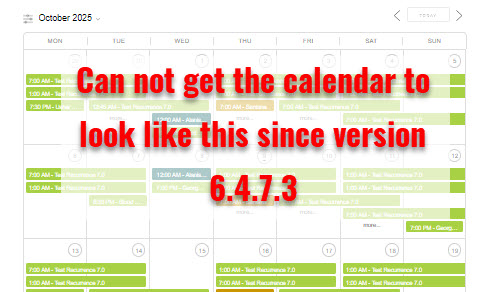
I have tried and tried and tried to get the calendar to look like the example on the page where the events are bars on the page and not colored circles.
https://greaterorlandoballoonrides.com/image/Events-Manager-Calendar-look.jpg
I keep having to go all the way back to version 6.4.7.3 to get it to look like this.Every update after 6.4.7.3 has the silly colored circles on the dates. I do not want that.
The page I need help with: [log in to see the link]

-
Hello @thompsonaire,
I had this very unpleasant issue too, but it was long ago, so I’m not sure exactly what I did. Here’s my suggestion to try:
Events > Settings > Formatting > check Enable Code Editor for Formats > Save
and
Events > Settings > Formatting > Advanced Mode > enable Super Advanced Mode > Save
Thank you Tree Trail
Unfortunately that did not work.
No matter what I try I can not get the calendar to show Bars on the event dates. Not matter what I do I get the silly circles (That I do not want). So again I have had to roll back to 6.4.7.3.It is too bad because the app has great potential but, I will just leave it as it is and not update it.
thompsonaire, your name sounded familiar & I see that you’ve been suffering this issue for a very long time! But not updating over a long period has some very serious risks.
ChatGPT has some good looking suggestions. I have not tried them, because I’m no longer having this issue. You could go to: https://chatgpt.com. And type something like this:
How to fix WP FullCalendar displaying events with circles instead of bars. I’m using “WP FullCalendar” with “Events Manager”. Shortcode = [fullcalendar]. (If you include the FullCalendar version number even better.)
I would absolutely make a website backup before implementing anything.
Hello, what are you using to output the calendar, shortcode? If so, use this in your shortcode:
calendar_size=”full”
Thank you Marcus, but this is working great for me. It’s @thompsonaire, that I was trying to help.
@aprilschmitt27 yup the question was directed at @thompsonaire 🙂
Big thanks for helping!By the way, we’re adding so many things I forgot we already address this… I was thinking we should add the feature we already have 🙂
To force the calendar to show a certain size, and not responsive to the size of the calendar depending on screen or layout, go to:
Events (or archetype name) > Settings > Formatting > Calendar > Default calendar sizeAnd set that to whatever size you want, rather than ‘responsive’. Let us know if that doesn’t work for you!
@msykes Tried to go to the page as you have described above. I scrolled down the entire list of options in Events (or archetype name) > Settings > Formatting > Calendar > Default calendar size Did not find a setting for “Default calendar size”
I am currently making a video that I will post a link to here in a little bit showing me adding the short code as suggested above and how it changes my calendar to circles and not bars.
More soon.Thank you all for trying to help.
Jeff AKA TAGo to Events > Settings and then select the Formatting tab then click on the Calendar section and you will then see the “Default calendar size” option.

Here is the video of what I find (or do not find) when I go to “Events (or archetype name) > Settings > Formatting > Calendar > Default calendar size” I do not find a setting for “Default calendar size”
[video src="https://greaterorlandoballoonrides.com/video/Cal-settingsRAW.mp4" /]I do not see it.
I have posted a video of what I see and it is still awaiting moderation.
[video src="https://greaterorlandoballoonrides.com/video/Cal-settingsRAW.mp4" /]LOL, I can not make videos fast enough.
So,, I updated to the latest version. 7.2.2.1
Now I have found the setting, “Events (or archetype name) > Settings > Formatting > Calendar > Default calendar size”
I set it to LARGE, saved, Went back to my calendar and the Circles are back! I do not want circles. So I changed the short code from “Responsive’ to Large.
So I changed it to calendar_size=”full” and I still have circles.
Then I went back to the calendar page and changed the short code from calendar_size=”full” back to calendar_size=”large” and I still have the circles.So the only way for me to get the “Bars” back is to roll back to version 6.4.7.3
Thank you all for the help but I can not get the circles to go away no matter what I do. The reason I could not see the setting for Default Calendar size is because it is not available in version 6.4.7.3
All my best.
Jeff (AKA TA)There is no “full” options for the calendar size. Only “Responsive”, “Large”, “Medium”, and “Small”.

Update to 7.2.2.1 and set the “Default calendar size” to Large and then click on the Save Changes button. Then provide a link to your calendar page.
If you’re using a shortcode to display the calendar the use [events_calendar calendar_size=large]
-
This reply was modified 7 months ago by
joneiseman.
[video src="https://greaterorlandoballoonrides.com/video/Bars-vs-circles.mp4" /]
I have tried everything suggested. Thank you all.
I am over this.
Hello Marcus. I think that this request may have gotten confused with others, who were currently asking about fullcalendar SIZE. Jeff Thompsonaire’s issue is about fullcalendar FORMAT. He doesn’t want circles around the numbers. He wants category colored bars with the names of the events in them, similar to this: https://wilmingtontrailclub.org/.
WP Fullcallendar, Events Manager, and Events Manager Pro are totally fantastic …thank you!
-
This reply was modified 7 months ago by


The topic ‘Lost Look’ is closed to new replies.