list upcoming events wp query
-
Hello,
i’m trying to order the next events displayed on my site by start date.
but i’m not arriving to do it.
i tryed different way, but events never shows up in the good order.
this is my query args :
‘post_type’=> ‘mec-events’,
‘orderby’ => ‘start_date’,
‘order’ => ‘ASC’,any help will be apreciate.
thanks in advance for your help-
This topic was modified 7 years ago by
Gregory Janssens.
-
This topic was modified 7 years ago by
-
This topic was modified 7 years ago by

-
Hello @himself,
As you may know, according to Support rules, customization is not a part of the support job, but we try to give Custom CSS to our users to facilitate their projects. But what you need to do, can’t be done by a quick CSS code and it requires code writing.
Our new services are now available. Please submit your request for your preferred service via the following URL.
Our team will get in touch with you via email in the shortest time.
Customization Services Link: https://webnus.net/services/
Warm Regards
Hello,
excuse me but this is not CSS or customisation…
this is PHP/MYSQL. I don’t need you to code in my place. Just to share info that will help me develop my tool.
i just need to know ( i have found nothing in documentation ) how i can list upcoming events in a mysql/wp_query.
i tryed with meta_key start_date
but events are not showing by upcoming.
-
This reply was modified 7 years ago by
there is no hook or filters info in docs…
Hi @himself,
There’s no documentation for MEC development at the moment.
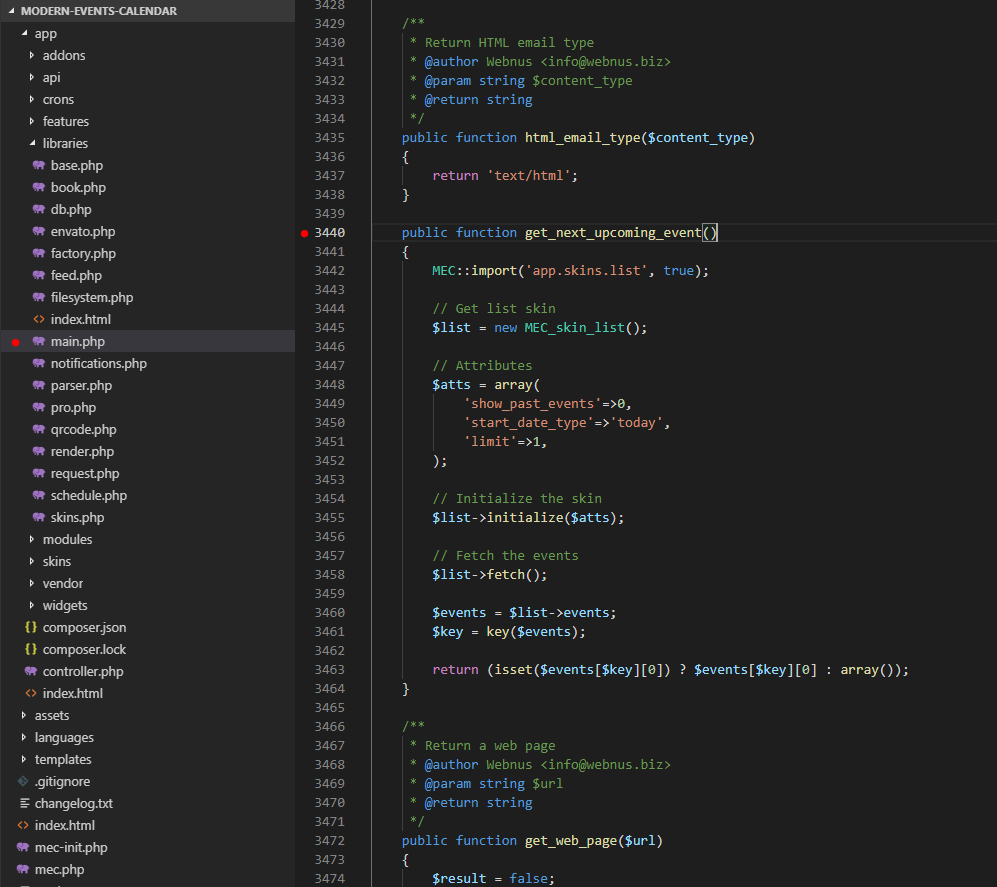
We will surely have one soon, and we are working on it.However, for the time being, we can tell you that you need to place your codes in the following directory below in the main.php – line:3440
wp-content\plugins\modern-events-calendar\app\libraries\main.php
You can develop this function and put your own code and everything you need.
https://ticksy_attachments.s3.amazonaws.com/3672505050.pngBest Regards
Please stop set my thread as resolved anytime you add an answear…
I don’t need to add code to your plugin… and it will be stupid, because anytime you update the plugin, my code will be scratch…. o_O !
also, you don’t seem to understand my question…
i just need to know what is the meta key used to DISPLAY NEXT UPCOMING EVENTS…
i just want a list of next events on my homepage, without any widget.
i already got all info, just need to order them!
my code
<?php $args = array( 'post_type'=> 'mec-events', 'orderby' => 'start_date', 'order' => 'ASC', ); $the_query = new WP_Query( $args ); if($the_query->have_posts() ) { while ( $the_query->have_posts() ) { $the_query->the_post(); ?> <li> <?php $image_url = get_the_post_thumbnail_url('','liste-etablissements'); $event_cities = get_field('contact_city',$post->ID); ?> <div class="presta-img-home-events"> <?php if($image_url[0]) { ?> <img src="<?php echo esc_url( $image_url ); ?>" alt="<?php the_title_attribute(); ?>"> <?php } else { ?> <img src="<?php echo get_template_directory_uri() . '/images/placeholder-blog.jpg'; ?>" alt="<?php the_title_attribute(); ?>"> <?php } ?> <div class="presta-img-home-events-overlay"><?php echo $event_date; ?> - <?php if($event_cities) { $cities = 0; $max_cities = 1; foreach($event_cities as $event_city) { $cities++; if($cities > $max_cities) { break; } echo ''. get_the_title( $event_city->ID ) .''; } } ?></div> </div> <div class="featured-content-wrapper"> <h3 class="featured-title"> <a title="<?php the_title_attribute(); ?>" href="<?php the_permalink(); ?>"><?php the_title(); ?></a></h3> <!--<a href="<?php the_permalink(); ?>" class="single_add_to_wishlist" ><?php esc_html_e('Découvrir','BeProvence'); ?><i class="fa fa-heart"></i></a>--> </div><!-- featured content wrapper --> </li> <?php } } ?>-
This reply was modified 7 years ago by
Hi @himself,
As we have already mentioned, we do not have any developer documentation for MEC.
Regarding your changes which have been missed, I should add that you need to keep your customized codes safe using the link here (in a child theme):
https://webnus.net/dox/modern-events-calendar/mec-theme-integration-guide/Regarding how the codes work, we know what you have in mind. As I mentioned before, we have the same function which does this and unfortunately, we can’t test the code you have written here.
We did not define anything for “next upcoming event” so that you can use it to distinguish what you are looking for.
It is a complicated procedure and so you cannot load it that simple.Anyway, If you need filter or action, then we can do them for you. You only need to tell us where you need them so that we can place them in MEC, in order for you to use them.
Warm Regards
Hello, i ran a local guide, so i need to be able to run my own query, because i use a custom relation field ( based on acf plugin ) to link pages/posts to CITY.
so i don’t use the location option of MEC, i use this custom field.
like this i can do query like : display all upcoming events in CITY
i want to display this info in sidebar as hyperlink text.
-> 09/06 – Event name 1
-> 10/06 – Event name 2and on front page, i want to show ALL upcoming events, but with my own design.
Ok finded !
i give the code for other users ( it use WPML, so if you don’t, juste take of the “AND wp_icl_translations.language_code=’$lang’ ” from the query.
    $startday = date("Y-m-d");
    if ( defined( 'ICL_LANGUAGE_CODE' ) ) {
      $lang = ICL_LANGUAGE_CODE;
    }
    $results = $wpdb->get_results( "SELECT * FROM wp_posts, <code>wp_mec_dates</code> AS mecd, wp_icl_translations WHERE wp_posts.ID = mecd.post_id and post_status='publish' AND wp_icl_translations.language_code='$lang' AND dstart>'$startday' and  wp_posts.ID = wp_icl_translations.element_id ORDER BY dstart" );
    foreach ($results as $event) {
        echo $event->post_title .'<br />';
    }
and you can display all the infos you need.
Hello @himself,
Thank you for providing the code and thanks for resolved.
Anyway, I will forward your ticket to the developer team and they will process that. If it is possible they will add this feature in next plugin updates.Warm Regards
-
This reply was modified 7 years ago by

The topic ‘list upcoming events wp query’ is closed to new replies.