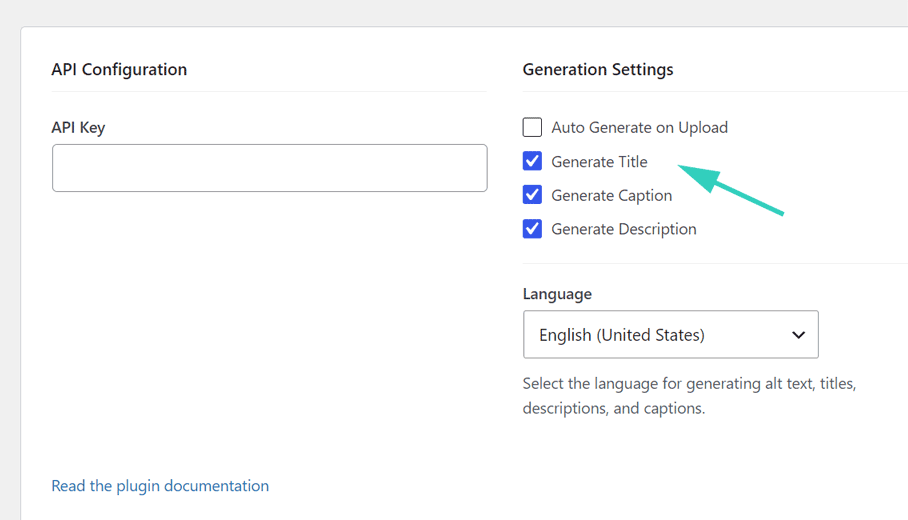
One: Some of my images have fairly meaningful titles. Some have titles that are “technical”, as in convey information about where the image came from or how it was generated. Is there a way to control what titles get overwritten if I do either a bulk generate or even an image at a time? The meaningful ones have some specific information, like people’s names, that the AI shouldn’t be able to provide, even if it creates a better title. The technical ones have informatIon I’d like to preserve somewhere – is there a way to do that?
Two: The WP media library may include files like .csv. How will the plugin handle them?
The page I need help with: [log in to see the link]
I just realized that there is also the file name visible in the media library for a selected image. That name seems to not be changed by Imagerr.ai and matches the Title before any manipulation.
1) By default, in the bulk process, only images without alt text are processed. If those images that have technical titles also already have alt text, they won’t be overwritten. However, if you want, you can have them overwritten. You will just need to enable the option “Include images that already have alt text” in the Bulk Generator settings.
Also, the plugin doesn’t take into account existing image titles (if you enable the option to overwrite them). It generates new ones from the images. What you can do, if you want to, e.g., include people’s names, is to use the SEO keywords feature in the plugin’s settings. You would enter the people’s names into the SEO Keywords field (please remember to click on the Save Settings button at the bottom). Then you would go to your Media Library, would select the particular images, and would bulk generate the alt texts (and titles, captions, and descriptions too if needed) for these images (or generate just for one particular image). Thereafter, you would go back to the plugin’s settings and remove the SEO keywords or enter new ones (and click on the Save Settings button at the bottom).
2) CSV files are ignored. Only image file types are processed on the bulk process.
3) The plugin doesn’t change file names. It doesn’t have such a feature.
If anything else is still not clear to you, feel free to ask.
Thanks for the full explanation. I have gone ahead and implemented it on our website. I did not take the time to individually work with those images that had titles with, for example, people’s names on them, so they got overwritten. Generally a good job, though!
I thought I understood from the instructional video that selecting “posts” would update the instances of images in posts and also in pages. I don’t see that that happened, for example, on https://www.vcjewishcenter.org/holiday-sales-page/. The challah cover, which the AI identified as a tablecloth and I edited in the media library later, does not seem to have any alt text.
alt="Elegant handmade embroidered challah cover with intricate golden floral design" title="Golden Embroidered Challah Cover"
So it looks like you have already figured it out.
And as for the plugin not recognizing your image as a challah cover, the plugin uses the OpenAI API, and it is not perfect. It works really well on most images, but some images still need manual adjustments.
If you still need to clarify anything else, I’m happy to help.