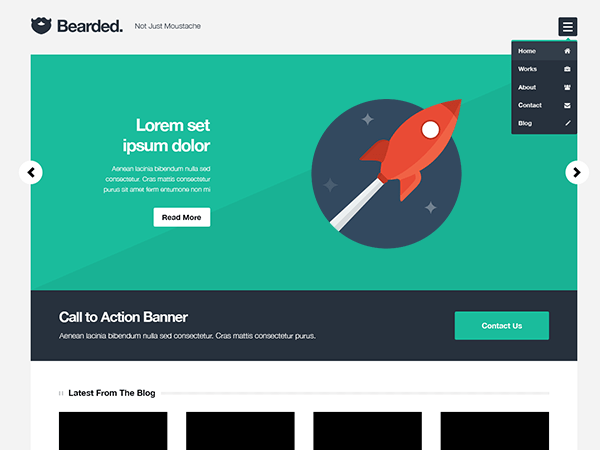
How to make one color background?
-
i just wanna hide or maybe remove gray #CCCCCC background at the right-bottom of theme, how do that ? this theme has so many file realy need a good documentation. or sampel.xml .. btw this is best free wordpress theme i ever seen… thanks

-
Let’s see your website
i made it localy , i want do some change before i use it to my client websites monysaga.com i change background color but still has gray shape in the right and bottom. i can’t find where is that thing come from? no option and clue wheres file located. thanks
That website shows “maintenance mode” page.
I’ve got one of the theme’s demo websites up, do you mean this bit that I’ve outlined in red: http://snag.gy/BmMGM.jpg ?
yes the footer html is another problem but this what i mean Screenshot changing the background color doesn’t effect in that area.
Hey Himar,
I spent 5 hours trying to find the code to remove that stupid grey bar on the right and bottom….Finally found it!
CSS:Look for
.main-wrapper {below it you will see:
/*! just for fun */
box-shadow: 0px 0px 0 #e2e5e5,1px 1px 0 #e2e5e5,2px 2px 0 #e2e5e5,3px 3px 0 #e2e5e5,4px 4px 0 #e2e5e5,5px 5px 0 #e2e5e5,6px 6px 0 #e2e5e5,7px 7px 0 #e2e5e5,8px 8px 0 #e2e5e5,9px 9px 0 #e2e5e5,10px 10px 0 #e2e5e5,11px 11px 0 #e2e5e5,12px 12px 0 #e2e5e5,13px 13px 0 #e2e5e5,14px 14px 0 #e2e5e5,15px 15px 0 #e2e5e5,16px 16px 0 #e2e5e5,17px 17px 0 #e2e5e5,18px 18px 0 #e2e5e5,19px 19px 0 #e2e5e5,20px 20px 0 #e2e5e5,21px 21px 0 #e2e5e5,22px 22px 0 #e2e5e5,23px 23px 0 #e2e5e5,24px 24px 0 #e2e5e5,25px 25px 0 #e2e5e5,26px 26px 0 #e2e5e5,27px 27px 0 #e2e5e5,28px 28px 0 #e2e5e5,29px 29px 0 #e2e5e5,30px 30px 0 #e2e5e5,31px 31px 0 #e2e5e5,32px 32px 0 #e2e5e5,33px 33px 0 #e2e5e5,34px 34px 0 #e2e5e5,35px 35px 0 #e2e5e5,36px 36px 0 #e2e5e5,37px 37px 0 #e2e5e5,38px 38px 0 #e2e5e5,39px 39px 0 #e2e5e5,40px 40px 0 #e2e5e5,41px 41px 0 #e2e5e5,42px 42px 0 #e2e5e5,43px 43px 0 #e2e5e5,44px 44px 0 #e2e5e5,45px 45px 0 #e2e5e5,46px 46px 0 #e2e5e5,47px 47px 0 #e2e5e5,48px 48px 0 #e2e5e5,49px 49px 0 #e2e5e5,50px 50px 0 #e2e5e5,51px 51px 0 #e2e5e5,52px 52px 0 #e2e5e5,53px 53px 0 #e2e5e5,54px 54px 0 #e2e5e5,55px 55px 0 #e2e5e5,56px 56px 0 #e2e5e5,57px 57px 0 #e2e5e5,58px 58px 0 #e2e5e5,59px 59px 0 #e2e5e5,60px 60px 0 #e2e5e5,61px 61px 0 #e2e5e5,62px 62px 0 #e2e5e5,63px 63px 0 #e2e5e5,64px 64px 0 #e2e5e5,65px 65px 0 #e2e5e5,66px 66px 0 #e2e5e5,67px 67px 0 #e2e5e5,68px 68px 0 #e2e5e5,69px 69px 0 #e2e5e5,70px 70px 0 #e2e5e5,71px 71px 0 #e2e5e5,72px 72px 0 #e2e5e5,73px 73px 0 #e2e5e5,74px 74px 0 #e2e5e5,75px 75px 0 #e2e5e5,76px 76px 0 #e2e5e5,77px 77px 0 #e2e5e5,78px 78px 0 #e2e5e5,79px 79px 0 #e2e5e5,80px 80px 0 #e2e5e5,81px 81px 0 #e2e5e5,82px 82px 0 #e2e5e5,83px 83px 0 #e2e5e5,84px 84px 0 #e2e5e5,85px 85px 0 #e2e5e5,86px 86px 0 #e2e5e5,87px 87px 0 #e2e5e5,88px 88px 0 #e2e5e5,89px 89px 0 #e2e5e5,90px 90px 0 #e2e5e5,91px 91px 0 #e2e5e5,92px 92px 0 #e2e5e5,93px 93px 0 #e2e5e5,94px 94px 0 #e2e5e5,95px 95px 0 #e2e5e5,96px 96px 0 #e2e5e5,97px 97px 0 #e2e5e5,98px 98px 0 #e2e5e5,99px 99px 0 #e2e5e5,100px 100px 0 #e2e5e5,101px 101px 0 #e2e5e5,102px 102px 0 #e2e5e5,103px 103px 0 #e2e5e5,104px 104px 0 #e2e5e5,105px 105px 0 #e2e5e5,106px 106px 0 #e2e5e5,107px 107px 0 #e2e5e5,108px 108px 0 #e2e5e5,109px 109px 0 #e2e5e5,110px 110px 0 #e2e5e5,111px 111px 0 #e2e5e5,112px 112px 0 #e2e5e5,113px 113px 0 #e2e5e5,114px 114px 0 #e2e5e5,115px 115px 0 #e2e5e5,116px 116px 0 #e2e5e5,117px 117px 0 #e2e5e5,118px 118px 0 #e2e5e5,119px 119px 0 #e2e5e5,120px 120px 0 #e2e5e5,121px 121px 0 #e2e5e5,122px 122px 0 #e2e5e5,123px 123px 0 #e2e5e5,124px 124px 0 #e2e5e5,125px 125px 0 #e2e5e5,126px 126px 0 #e2e5e5,127px 127px 0 #e2e5e5,128px 128px 0 #e2e5e5,129px 129px 0 #e2e5e5,130px 130px 0 #e2e5e5,131px 131px 0 #e2e5e5,132px 132px 0 #e2e5e5,133px 133px 0 #e2e5e5,134px 134px 0 #e2e5e5,135px 135px 0 #e2e5e5,136px 136px 0 #e2e5e5,137px 137px 0 #e2e5e5,138px 138px 0 #e2e5e5,139px 139px 0 #e2e5e5,140px 140px 0 #e2e5e5,141px 141px 0 #e2e5e5,142px 142px 0 #e2e5e5,143px 143px 0 #e2e5e5,144px 144px 0 #e2e5e5,145px 145px 0 #e2e5e5,146px 146px 0 #e2e5e5,147px 147px 0 #e2e5e5,148px 148px 0 #e2e5e5,150px 150px 0 rgba(0, 0, 0, 0);I removed this from my CSS and it fixed the problem.
Good luckCud Eastbound
what the hack is that? -___- that is very long code to make gray shape.
btw thanks for your time and your help.. i realy appreciate it.remove it and its works for me. [Advertisement redacted]
Another method – if you don’t want to get into the actual CSS of the theme, you can use a CSS editor/plugin and add the following code:
.main-wrapper {
	box-shadow: none;
}


The topic ‘How to make one color background?’ is closed to new replies.