The rules should be added to the .htaccess anyways but if they are not you can add them to the file.
Here is a page that should help.
https://gtmetrix.com/add-expires-headers.html
If you have them in the file and its still not working then it sounds like a problem with mod_expires
Hello. I have the same problem — trying to fix this at wheresmynotes.com which is a fresh WP install.
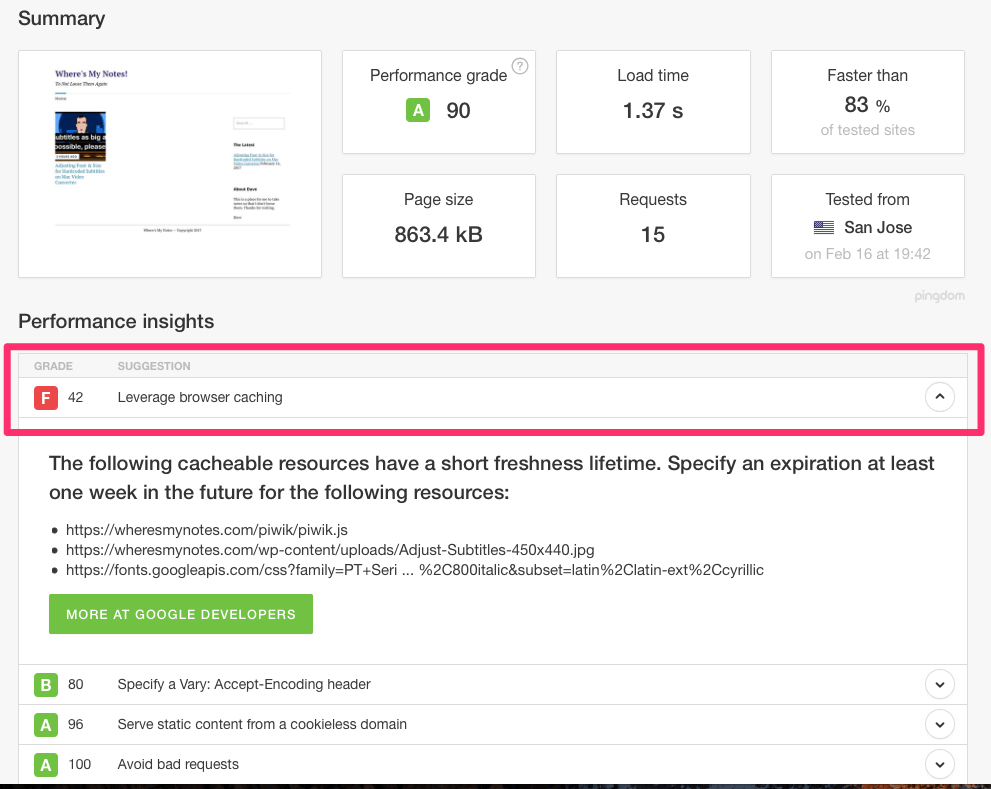
All I have in my .htaccess is the following. Is there a way to get the plugin to correct the file by itself? What could be the problem?
# BEGIN WordPress
<IfModule mod_rewrite.c>
RewriteEngine On
RewriteBase /
RewriteRule ^index\.php$ – [L]
RewriteCond %{REQUEST_FILENAME} !-f
RewriteCond %{REQUEST_FILENAME} !-d
RewriteRule . /index.php [L]
</IfModule>
# END WordPress
Thank you!
Setting a browser cache expire directive for images (and everything else…) has nothing to do with Caching Plugin(s)
ExpiresActive On
ExpiresDefault A0 (don’t cache)
ExpiresByType image/webp A2592000 (1 month)
ExpiresByType image/gif A2592000
ExpiresByType image/png A2592000
Tons of articles about setting browser cache (demos), pros and cons etc.
Now server side caching for an image ??? Is there such a thing? Optimization yes. Caching?


